In a significant move to redefine the landscape of artificial intelligence in the workplace, Microsoft has announced a comprehensive reimagining of its Copilot platform. The technology giant is introducing what it calls the "new Copilot," a centralized AI experience designed to bridge the gap between traditional productivity tools and a new generation of autonomous agentic capabilities. The update represents a strategic shift from AI as a reactive chat interface to AI as a proactive, persistent collaborator capable of building custom solutions and managing complex workflows independently.
According to Microsoft, this evolution is aimed at helping both individuals and organizations scale their accomplishments within the natural "flow of human ambition." By connecting the tools that millions of workers rely on daily with advanced automation, Microsoft seeks to position Copilot not just as an assistant, but as a foundational layer for modern enterprise operations.
A Unified Experience for Every Mode of Work
At the heart of this redesign is the introduction of "Home," a new starting point within the Copilot app that serves as a command center for professional activity. Home is designed to solve the fragmentation often felt by modern workers who must constantly oscillate between meetings, email threads, documents, and various business applications. By consolidating these disparate streams, Home provides users with a way to get their bearings, review recent activity, and receive intelligent suggestions on where their attention is most needed.
Within this new interface, work is categorized into three primary modes: Chat, Cowork, and Code. While "Chat" remains the destination for instant, conversational needs—such as quick lookups or drafting short messages—the "Cowork" feature is designed for tasks that require delegation. In the Cowork mode, a user defines a complex objective, such as generating a Request for Proposal (RFP) response or a financial close package. Copilot then manages the task from end-to-end, iterating on the result until it is complete.
Microsoft is also deepening the integration between its flagship productivity suite and the AI platform through "Office in Copilot." This feature embeds the full functionality of Word, Excel, and PowerPoint directly into the Copilot experience. The company notes that this integration is intended to eliminate the friction of broken formatting or lost context that often occurs when moving data between different applications. From the Home screen, users can prompt Copilot to build a budget model in Excel or a presentation deck in PowerPoint. These files are created as live, editable documents that support real-time collaboration, allowing team members to @mention colleagues and see edits as they happen, ensuring that progress remains synchronized across all Microsoft 365 apps.

The company also highlighted specific enhancements within the Office suite. PowerPoint can now automatically ensure that decks remain on-brand while allowing for fine-tuned slide adjustments. In Excel, a new transparency feature allows users to see exactly what changes Copilot or other collaborators have made and why, while the AI provides recommendations for the most effective data visualizations. Furthermore, the introduction of specialized "Skills" allows organizations to bring role-specific expertise—such as legal or financial workflows—directly into these applications.
Democratizing Solution Building with ‘Code’
One of the most ambitious elements of the new Copilot is "Code," a feature intended to move solution-building beyond the exclusive domain of software developers. Historically, the primary unit of knowledge work has been the file—a document, a spreadsheet, or a slide deck. Microsoft is now introducing a fourth unit: the purpose-built solution.
The Code feature allows users to describe an application, an automation workflow, or an interactive dashboard using natural language. Copilot then selects the best technical approach and builds the solution, which can range from a persistent desktop widget for quick data reference to a cloud-hosted internal app shared across a team. This capability is powered by the same underlying technology as GitHub Copilot, but it is tailored for the general workforce.
To support this shift toward user-generated solutions, Microsoft is introducing the "Copilot Managed Runtime." This hosting infrastructure allows the code generated by Copilot to run safely and securely within a company’s existing Microsoft 365 environment. It provides a sandboxed space governed by corporate IT departments, ensuring that while employees have the freedom to build tools, the organization maintains control over data security and compliance. This runtime environment will also be opened to third-party and professional developers, creating a unified foundation for apps built in Cowork, Code, and Copilot Studio.
Autopilot: The Persistent Digital Teammate
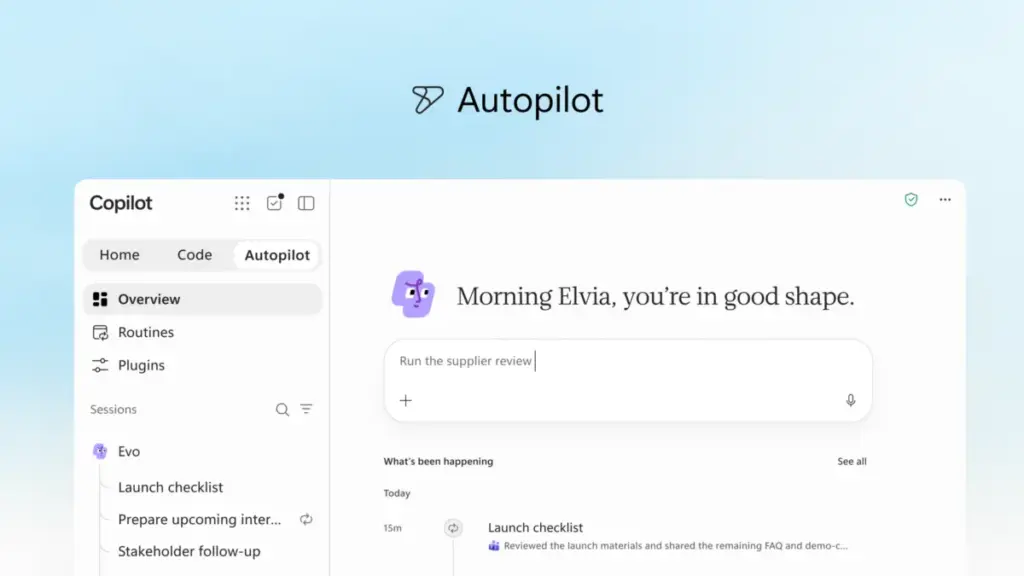
Perhaps the most significant leap toward autonomous AI is the introduction of "Autopilot." Formerly known during its development phase as "Scout," Autopilot is described as a digital teammate that can be assigned a specific name, role, and goal. Unlike traditional AI assistants that wait for a prompt, Autopilot is proactive and persistent. It works in the background, monitoring communication channels, following up on email threads, and managing recurring business processes.
Microsoft provided the example of a supplier review process to illustrate Autopilot’s potential. A user can task the agent with managing the entire cycle: building a schedule, handling pre-meeting preparations, conducting follow-ups, and even reaching out to stakeholders for updates. Because Autopilot is cloud-hosted, it continues to work even when the user is offline.

Autopilot is built on "Microsoft IQ," the company’s unified intelligence platform. It possesses its own identity, memory, and workspace within an organization’s tenant, allowing it to understand the specific nuances of how a particular business operates. It is designed to show up where people already work, such as in Microsoft Teams or Outlook, where it can be @mentioned like any other colleague. Microsoft emphasized that while the agent handles the heavy lifting, the human user remains in control, setting the boundaries and objectives while being kept informed of the agent’s progress.
Expanding Business Context and Data Grounding
For AI to be effective in an enterprise setting, it must be grounded in the specific data and context of that business. To this end, Microsoft is expanding the reach of Microsoft IQ. The platform now integrates "Fabric IQ," which brings more than 20 million semantic models from Power BI into the Copilot environment. This ensures that when a user asks a question or delegates a task, the AI is drawing from trusted, real-time organizational data.
Furthermore, Copilot is now grounded in workflows and data from Dynamics 365 and the Power Platform. This means a salesperson drafting a proposal can have Copilot automatically incorporate deal histories or customer support tickets directly into the document without having to switch apps or perform manual lookups.
To facilitate easier integration of third-party tools, Microsoft is launching a new "plugin registry." This unified catalog allows IT departments to centrally approve and manage plugins from Microsoft, its partners, and custom internal builds. Developers can publish a plugin once and have it extend Copilot’s capabilities across all supported Microsoft 365 experiences, providing a streamlined way to introduce new functionalities at scale.
Managing the Economics of AI
As AI usage grows within organizations, managing the associated costs has become a primary concern for business leaders. Microsoft addressed this by outlining a dual-track pricing and spending model.
For "everyday AI" tasks—such as drafting summaries, analysis, and quick answers—Microsoft utilizes a User Subscription License (USL). This provides a fixed-cost model for standard Copilot features in Word, Excel, Teams, and other apps. At the center of this is "Auto," a routing system that weighs accuracy, speed, and cost for each request to select the most efficient model for the job.

For more complex "agentic" work, such as the long-running tasks performed by Cowork, Code, and Autopilot, Microsoft is moving toward Usage-Based Billing (UBB). This model allows organizations to match their spending to the value generated by advanced frontier models.
To help organizations navigate these costs, Microsoft is introducing "FinOps for AI." This suite of capabilities within Agent 365 and Microsoft Copilot provides administrators with tools to manage spending policies at scale. Admins can route credit requests through automated approval workflows and set which model families are available to different user groups. Business leaders can also access analytics to understand which AI-driven tasks are generating the strongest returns on investment. On the individual level, users will be able to view their own credit usage and history directly within the Copilot app, helping them stay within organizational guardrails.
The Roadmap Ahead: ‘Today’ and Teams Integration
The announcements also included a preview of upcoming features intended to make Copilot even more personalized. Scheduled for private preview in October is "Today," a proactive command center that aggregates information from mail, calendars, Teams threads, and tasks. Rather than just listing what a user has missed, Today is designed to prepare the work in advance—drafting replies, proposing schedule changes, and providing the necessary context for forgotten follow-ups.
Additionally, Microsoft is enhancing collective intelligence through "@Copilot in Teams." When invoked within a channel or group chat, Copilot gains the shared context and permissions of that specific group. It can explain the history of a product decision by pulling from past conversations or prepare cross-functional reviews that identify dependencies and open questions across different departments.
The "new Copilot" experience is currently rolling out through Microsoft’s Frontier program, with continuous updates expected in the coming weeks. The company invited users to explore these innovations further at the upcoming Microsoft Ignite conference, which will take place from November 17–20 in San Francisco and online.
Jared Spataro, who leads Microsoft’s AI at Work efforts, emphasized that these developments are part of a broader commitment to helping organizations leverage AI and agents to solve unique business problems and drive new value creation. As the role of AI evolves from a simple tool to a proactive participant, Microsoft’s latest updates signal a future where the boundary between human effort and machine assistance becomes increasingly seamless.
 Productivity Software & Office Suites
Microsoft Reports 30 Million Paid Copilot Seats as Enterprise AI Shifts from Assistance to Autonomy
In a recent earnings call that signaled a pivotal moment for the...
 Productivity Software & Office Suites
Microsoft Expands Copilot Ecosystem with Natural Language App Building to Democratize Enterprise Software Development
The landscape of software development is undergoing a fundamental transformation, driven by...
 Productivity Software & Office Suites
Microsoft Announces New AI-Integrated Office Suites to Streamline Small Business Operations
In the demanding ecosystem of small business management, success is often measured...