At its annual Ignite conference this week, Microsoft signaled a significant evolution in its artificial intelligence strategy, moving away from the "single-player" chatbot experience toward a vision of AI as a central, collaborative hub for the modern enterprise. The tech giant unveiled a suite of updates for its Copilot ecosystem, headlined by the introduction of Copilot Workspaces—a new environment designed to facilitate seamless interaction between human employees and autonomous AI agents.
The announcements represent Microsoft’s latest attempt to fortify its dominance in the productivity software market. As emerging AI-native competitors like OpenAI and Anthropic begin to challenge the traditional office suite with their own document and collaboration tools, Microsoft is leaning heavily into its deep integration with the Office stack to maintain its competitive edge.
The Shift to "Multiplayer" AI Collaboration
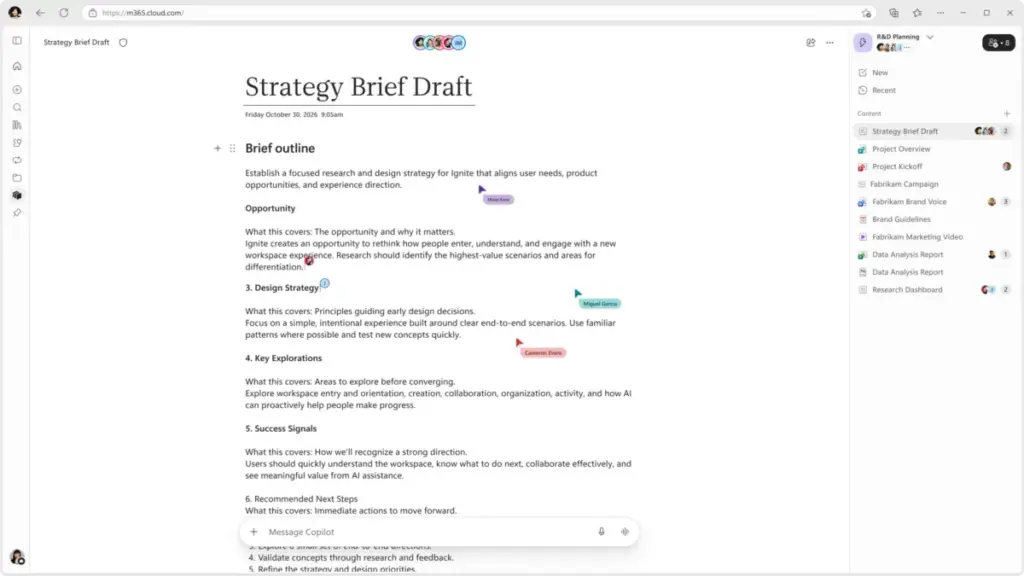
The centerpiece of the Ignite announcements, Copilot Workspaces, marks a fundamental change in how users are expected to interact with generative AI. Workspaces essentially replaces Copilot Notebooks, a feature introduced last year that allowed individuals to gather reference materials and prompt the AI to draft documents or summarize content in isolation.
In contrast, Workspaces is built as a "team-first" shared environment. It allows groups of colleagues to collaborate on shared projects in real time, featuring live cursors that indicate where each person is working—a staple of modern cloud collaboration now augmented by AI. Within this space, Copilot acts as a persistent participant rather than a passive tool. Microsoft also teased the upcoming arrival of "Autopilot" agents, which will operate continuously in the background of these workspaces to complete tasks without requiring constant human intervention.
Jared Spataro, Microsoft’s chief marketing officer for Copilot, framed this as a milestone in the evolution of the technology. “Until now, AI interactions have mostly been single player,” Spataro noted in a post-keynote briefing. “Workspaces makes it a truly multiplayer experience, where people and agents drive towards a common goal, with shared context.”
The ambition is to turn Copilot into what analysts call the "front door for work"—a single interface where employees can access people, applications, organizational data, and AI agents simultaneously. However, the transition to such a highly integrated environment is not without its hurdles. Jack Gold, principal analyst at J. Gold Associates, suggested that while cooperative AI is a logical step, it will require a high degree of trust that the industry has yet to fully earn.
“For most organizations, this will be a slow uptake until it’s proven to help productivity,” Gold said. He pointed out that agents must be robust enough to operate without causing security or interference issues. “There is significant risk that something could go wrong relying too heavily on AI capabilities.”
Challenging the AI-Native Disruptors
Microsoft’s aggressive expansion of Copilot comes as the competitive landscape for office productivity tools undergoes its most radical transformation in decades. For years, Microsoft Word, Excel, and PowerPoint have faced little meaningful competition. However, the rise of large language models (LLMs) has allowed AI labs to build productivity features from the ground up.
In recent months, Anthropic has introduced Claude Docs, Slides, and Sheets, while OpenAI has launched ChatGPT "Canvas" and "Pages." These tools allow users to generate and edit content within the same window as the AI, bypassing the need to copy-paste text between a browser and a word processor.
Microsoft addressed this competition directly at Ignite. Jacob Andreou, Microsoft’s executive vice president for Copilot, argued that while the offerings from Anthropic and OpenAI are functional, they lack the depth required for professional-grade work.
“We’ve all seen Anthropic and OpenAI embrace documents, slides, and spreadsheets,” Andreou said during a keynote presentation. “But their simplified viewers and editors force compromise on power and collaboration, and real work needs both. Knowledge work already lives in Word, Excel, and PowerPoint—it’s where your team is collaborating.”
To counter these "AI-native" challengers, Microsoft announced the general availability of Office in Copilot. This feature brings the full, editable versions of Microsoft’s legacy applications directly into the AI assistant’s interface. By doing so, Microsoft hopes to eliminate the friction of switching apps while retaining the advanced formatting and data-processing capabilities that professional users rely on.
Chris Gardner, VP and research director at Forrester, noted that Microsoft’s massive installed base provides a powerful defensive moat. “There are billions of Office documents floating around from the past few decades, and the default for many people is to collaborate through Microsoft 365,” Gardner said. “Inertia is a powerful thing.”
Governance, Lock-in, and the Multivendor Reality
While Microsoft’s "all-in-one" approach offers convenience, it also raises concerns about vendor lock-in and data governance. Max Goss, a senior director analyst at Gartner, warned that the more an organization embeds its workflows into a single AI ecosystem, the harder it becomes to pivot if costs rise or performance plateaus.
The move toward multiplayer environments with autonomous agents also introduces a new layer of complexity for IT administrators. If an employee shares sensitive information with an "autopilot" agent within a Workspace, ensuring that the agent does not inadvertently leak that data to unauthorized users becomes a paramount concern.
“If an employee shares something with an autopilot agent, how do you ensure that this agent doesn’t share with another user who shouldn’t have access?” Goss asked. He noted that while the collaborative vision is compelling, the underlying data governance frameworks must be equally sophisticated to handle these dynamic interactions.
Furthermore, Gartner statistics suggest that Microsoft may be facing a more fragmented enterprise market than it is used to. According to Goss, roughly 66% of organizations using Copilot have also deployed at least two other enterprise AI assistants. This suggests a clear preference among businesses for a multivendor approach, rather than relying solely on one provider.
“Microsoft can no longer assume its Microsoft 365 installed base will automatically translate into Copilot adoption,” Goss said. “Microsoft’s challenge is therefore to demonstrate that deep integration with Office produces materially better outcomes. If it doesn’t, then some may question whether they need the underlying productivity stack.”
Managing the Economics of Agentic AI
As Microsoft moves toward "agentic" workflows—where AI performs multi-step tasks autonomously—the cost of computing power becomes a critical factor for enterprise customers. To address this, the company introduced Copilot Auto, a tool designed to manage the background complexity and costs of AI operations.
Copilot Auto functions as a routing layer. When a user assigns a complex task, the tool splits it into smaller components and assigns each part to the specific AI model best suited for it—balancing factors like reasoning power, latency, and cost. For example, a simple text summary might be routed to a faster, cheaper model, while a complex financial analysis might be sent to a high-reasoning model.
This routing capability is increasingly important as Microsoft introduces usage-based billing. While standard Copilot chat queries are included in the flat $30-per-user monthly enterprise fee, more complex "agentic" tasks often draw from a pool of paid "Copilot Credits."
However, analysts note that the system is still maturing. Goss pointed out a current limitation in the "Auto" tool: while it can recommend that a user switch from a free Chat task to a paid "Cowork" task for more complexity, it does not yet effectively route users back the other way. This leads to situations where organizations might overspend on high-tier "Cowork" credits for simple tasks that could have been handled for free.
“People are using Cowork for simple things they can actually achieve in Copilot for free,” Goss said. “Microsoft hasn’t solved this yet.”
Looking Ahead: The "Today" Feature and Seamless Integration
Beyond the structural changes to Workspaces and Office, Microsoft also previewed "Today," a personalized morning briefing feature. Available in private preview, "Today" aims to act as a digital chief of staff, providing users with a summary of their daily agenda, flagging important tasks, and even preparing drafts of emails or schedule changes for the user to review and approve.
This proactive approach is part of Microsoft’s broader goal to move AI from a tool that waits for a prompt to a system that anticipates needs. By integrating these features into the OneNote app and other parts of the Microsoft 365 ecosystem over time, the company hopes to make Copilot an indispensable part of the workday.
For now, Workspaces and the new "Today" feature remain in early access through Microsoft’s Frontier program. As these tools roll out more broadly, the ultimate test will be whether the "power" of the 30-year-old Office stack can outweigh the agility of the AI-native labs. As Goss observed, the labs are starting from the question of what a human using AI actually needs, while Microsoft is working to retrofit a legacy stack for a new era. The outcome of that clash will likely define the next decade of office productivity.
 Small Business IT & Cloud Computing
Microsoft Issues Emergency Fixes Following Disruptive September Patch Tuesday Updates
The long-standing mantra for information technology professionals and cybersecurity experts has always...
 Small Business IT & Cloud Computing
Seagate and Toshiba Locked in Bidding War for TDK Magnetic Head Business as AI Demand Surges
The global hard disk drive industry, once a crowded field of dozens...
 Small Business IT & Cloud Computing
Tech Manufacturing Faces Triple Threat of Surging Component Costs, Logistics Strain, and Global Sovereignty Shifts
The consumer electronics landscape is currently navigating a period of unprecedented volatility,...