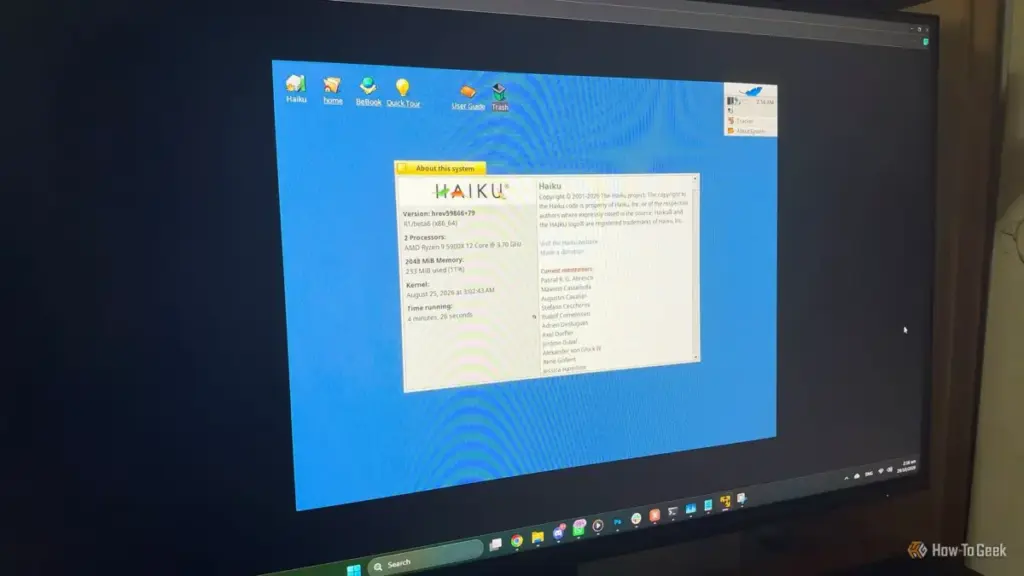
Hardware compatibility remains the primary hurdle. One of the most significant limitations is the lack of hardware-accelerated 3D graphics. Haiku currently renders its entire interface using the CPU (software rendering). While this is perfectly adequate for traditional desktop tasks, office work, and web browsing, it makes the system unsuitable for modern gaming or any application that relies heavily on GPU acceleration.

Networking is another area where users may encounter challenges. While wired Ethernet support is generally excellent, Wi-Fi support relies on drivers ported from the FreeBSD project. While many common chipsets work seamlessly, others may require specific configuration or may not work at all. For those planning to use Haiku on a laptop, verifying Wi-Fi compatibility via the system’s "live mode" is a crucial first step. Similarly, while Bluetooth support is present, it is not as mature as the implementations found in Linux or Windows.
It is also important to manage expectations regarding modern web browsing. While Haiku can boot on 128 MB of RAM, the modern web cannot. Attempting to load a script-heavy website like YouTube or a complex web application on a machine with less than 1 GB of RAM will be a frustrating experience regardless of the operating system. For a smooth experience that includes modern web tasks, a machine with at least 1 GB or 2 GB of RAM is recommended.
For users with hardware that supports 64-bit processing, the 64-bit version of Haiku is the clear choice, offering better performance and access to a wider range of modern software ports. The 32-bit version should be reserved specifically for older CPUs that lack 64-bit instructions or for those who have a specific need to run legacy BeOS binaries.
A Distinctive Second Life for Forgotten PCs
Haiku R1/beta6 represents a significant milestone in the project’s long history. It provides a unique alternative for those who find modern operating systems too bloated or those who feel alienated by the direction of contemporary Linux distributions. It is an operating system that prioritizes the user’s time and the machine’s resources, offering a level of "snappiness" that is increasingly rare in the modern computing landscape.
While it may not be ready to serve as a primary workstation for everyone, Haiku is an excellent choice for revival projects. It can turn a dusty old laptop into a distraction-free writing environment, a dedicated terminal for retro-coding, or a lightweight machine for basic productivity. By focusing on a cohesive design and maintaining support for aging architectures, Haiku ensures that "old" hardware doesn’t have to mean "useless" hardware. As the project moves closer to its eventual R1 gold release, Beta 6 stands as the most polished and compelling version of the system to date, offering a glimpse into a faster, more focused way of computing.
 Tech Tutorials & How-To Guides
The Linux Mint Paradox: Why the ‘Windows Alternative’ May Not Be the Gateway It’s Marketed to Be
For years, the tech community has championed Linux Mint as the definitive...
 Tech Tutorials & How-To Guides
The Profanity Protocol: How One Engineer Used AI and Smart Home Tech to Break a Sedentary Habit
For many remote workers, the transition from a traditional office to a...
 Tech Tutorials & How-To Guides
The Hidden Masterpieces of Netflix: Why Critical Success and Mainstream Popularity Don’t Always Align
In the modern era of the "streaming wars," Netflix has established itself...