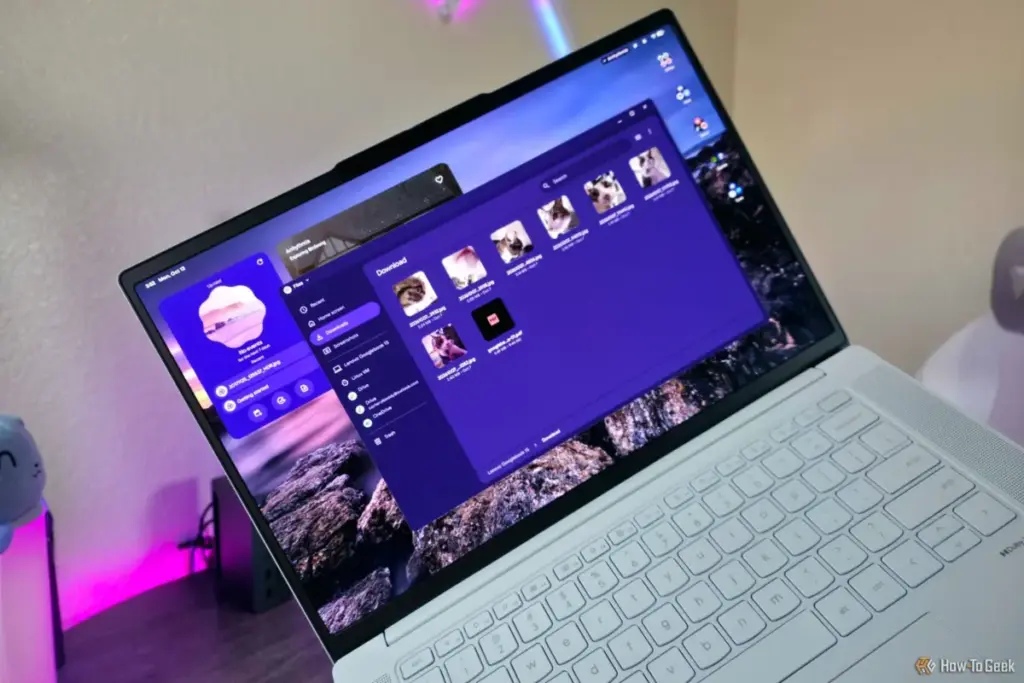
Power users who are accustomed to the granular control of Windows File Explorer may find the Googlebook OS somewhat limiting. Currently, the Files app lacks the ability to open multiple tabs within a single window, a feature that has become a staple for multitasking on other platforms. Furthermore, the lack of advanced selection boxes, in-depth view customization, and complex search filters means that for heavy-duty data management, the Googlebook still feels more like a mobile-first device than a traditional workstation.
Google’s design philosophy here appears to be a conscious choice. By avoiding the complexity of a "mature" desktop operating system, they maintain a level of speed and simplicity that has always been the hallmark of their hardware. The Googlebook OS is positioned as a "desktop-grade" successor, but it carries the DNA of a phone application. It is clean, it is fast, and it is designed for a generation of users who grew up with touchscreens and simplified app interfaces rather than the directory-heavy structures of the 1990s and 2000s.
A New Direction for Google’s Hardware Strategy
The arrival of Googlebooks and the accompanying OS suggests a long-term strategy to move away from the "budget" reputation of the Chromebook. By focusing on a more powerful local file system and deep AI integration, Google is signaling that it wants to compete in the premium laptop space currently dominated by the MacBook Air and high-end Windows Ultrabooks.
The emphasis on local storage is a clear response to a changing market where users want to do more than just browse the web. They want to edit video, manage large libraries of high-resolution photos, and run complex applications locally without worrying about cloud latency or data caps. The Googlebook OS provides the software foundation for this shift, even if the file management tools still have room to grow in terms of professional-grade features.
Ultimately, the Googlebook OS represents a middle ground. It offers more power and local control than the ChromeOS of old, yet it remains tethered to the simplicity and ease of use that defines the Google ecosystem. For the average user, the ability to find all their files in a single, intuitive "Download" folder—backed by the intelligence of Gemini and the versatility of Android—will likely be a welcome upgrade. For the power user, it remains a platform to watch as it continues to evolve toward a more robust desktop experience.
As Googlebooks begin to filter into the hands of consumers, the true test will be how this new local file system holds up under the weight of "desktop-grade" workloads. For now, the message from Google is clear: the era of the "web-only" laptop is over, and the era of the AI-integrated, locally-powered Googlebook has begun.
 Tech Tutorials & How-To Guides
Amazon Unveils Comprehensive 2026 Kindle Overhaul Featuring First Color Scribe and Thinner Designs
Amazon has officially announced a sweeping transformation of its entire Kindle ecosystem,...
 Tech Tutorials & How-To Guides
Asustor Lockerstor 2 Gen2+ NAS Review: A High-Security Storage Solution for Power Users and Small Businesses
In the rapidly evolving landscape of network-attached storage (NAS), the market is...
 Tech Tutorials & How-To Guides
Smart Solutions for Rising Utility Bills: How Specialized Tech Identifies and Reduces Residential Energy Waste
As global energy markets remain volatile and utility costs continue a steady...