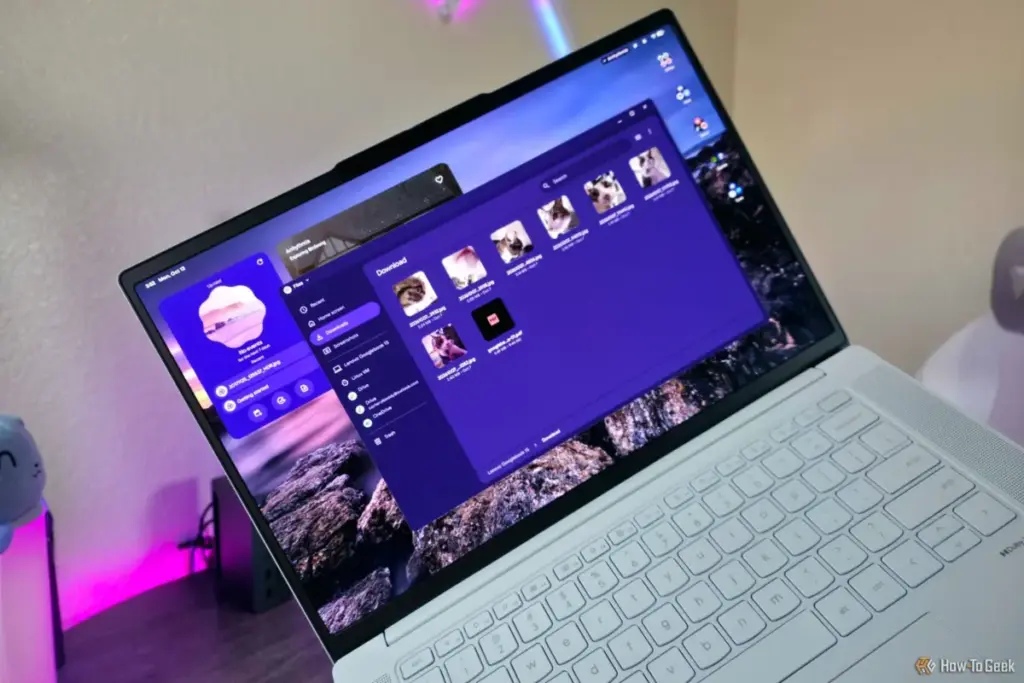
In this new ecosystem, Android applications operate with a level of system-level access that allows them to interact directly with the local file system. When a user edits a photo in a professional-grade Android editing suite or manages a database through a mobile-first productivity tool, the resulting files are instantly accessible within the main Files app. This level of synergy is intended to make the Googlebook feel less like a laptop running a mobile emulator and more like a cohesive, multi-purpose platform.
This integration also extends to how the OS handles system resources. By moving toward a "native" feel, Google has optimized how these apps utilize the supposedly more powerful local file system. The result is a smoother performance profile that benefits from the increased hardware specifications typically found in the Googlebook category, which often features higher-capacity solid-state drives and more efficient processors than the entry-level Chromebooks of the past.
The Role of Gemini and AI-Driven Management
Perhaps the most "next-generation" aspect of the Googlebook OS is the "deep Gemini integration." As artificial intelligence becomes an inextricable part of the computing experience, Google has embedded its proprietary AI, Gemini, into the very fabric of the operating system. While the original news highlights the presence of these features, the implications for file management are profound.
Gemini is not just a chatbot sitting in a sidebar; it is designed to assist in the organization and retrieval of data across the new local file system. In a traditional operating system, finding a specific document often requires a manual search through nested folders or a reliance on brittle keyword-matching search bars. With Gemini integration, Googlebook OS aims to provide a more semantic approach to file discovery. The AI can theoretically understand the context of a user’s request, helping to surface relevant downloads, recently edited documents from Android apps, or images shared via Quick Share with minimal friction.
This AI layer also acts as a bridge for the "easy to use" philosophy that Google maintains. By utilizing AI to handle the heavy lifting of organization, Google can keep the Files app interface clean and uncluttered—a design choice that keeps the OS feeling approachable for those moving over from mobile platforms like Android or iPadOS.
Comparing the Googlebook Experience to Legacy Desktops

Despite the advancements in the Googlebook Files app, it is important to contextualize its capabilities against established giants like Windows File Explorer or macOS Finder. As Zachary Boddy notes, the Googlebook Files app, while improved, is not yet a direct competitor to the depth of functionality found in Windows.
 Tech Tutorials & How-To Guides
Five Highly Rated Comedy Series on Netflix for Quick and Easy Viewing
In the modern landscape of streaming, where "prestige television" often demands dozens...
 Tech Tutorials & How-To Guides
Bridging the Security Gap: Replicating the YubiKey Experience with a $6 ESP32 Microcontroller
In an era where digital identity is under constant siege from sophisticated...
 Tech Tutorials & How-To Guides
The Ghost in the Machine: Investigating the Root Causes of Unexpected Windows Wake Events
For many Windows users, the experience is unnervingly familiar: a desktop or...