
The landscape of portable computing has undergone a seismic shift with the official introduction of Googlebooks, the long-anticipated successor to the Chromebook lineup. As Google seeks to redefine its presence in the desktop and laptop market, the transition from the web-centric ChromeOS to the more robust, AI-driven Googlebook OS marks a pivotal moment for the tech giant. This evolution is not merely a branding exercise; it represents a fundamental change in how Google envisions the relationship between local hardware, mobile ecosystems, and cloud-based intelligence.
At the heart of this transition is a revamped approach to file management and local storage, a move designed to address long-standing criticisms of the Chromebook’s reliance on an active internet connection. For years, users of ChromeOS navigated a system that felt like a bridge between a browser and an operating system, often struggling with a file architecture that prioritized Google Drive over the physical hard drive. With the arrival of Googlebooks, that paradigm has shifted. The new operating system introduces a native Android app integration that is more seamless than ever, alongside deep Gemini AI integration and a local file system that promises to bring "desktop-grade" power to the platform.
The Evolution of the Files App: A Refined Hub for Local Storage
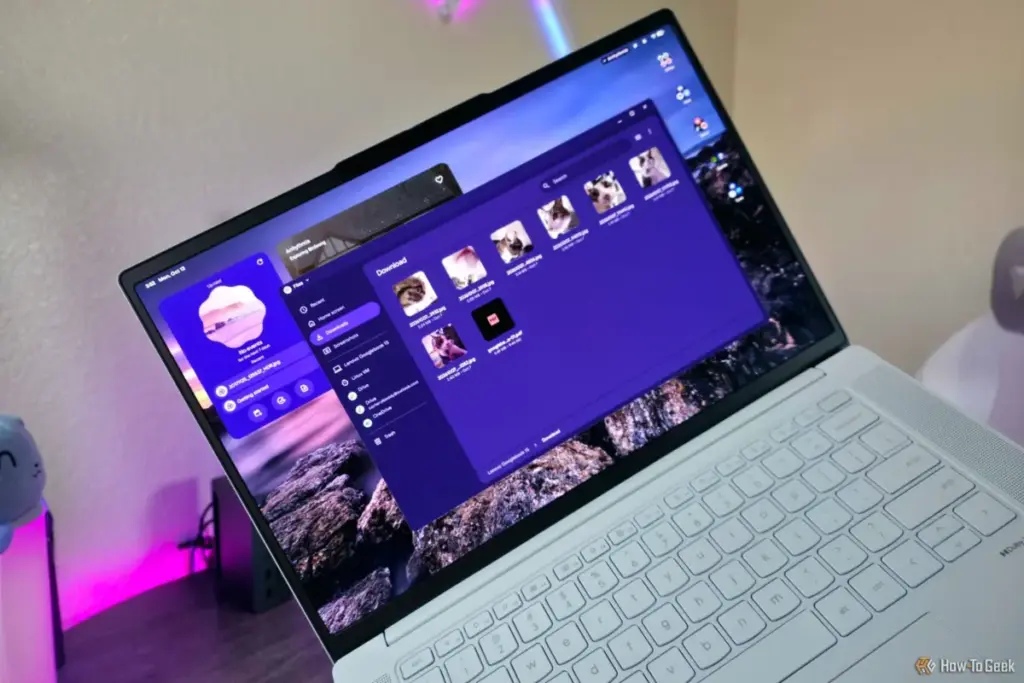
As reported by seasoned technology journalist Zachary Boddy, the transition to Googlebook OS brings with it a significantly "spruced up" version of the traditional Files application. While the Chromebook legacy was built on the idea of the "thin client"—a device that does little on its own but acts as a portal to the web—the Googlebook is designed to be a self-sufficient workhorse. This necessitates a file management system that can handle the complexities of local data with the same grace as Windows or macOS.
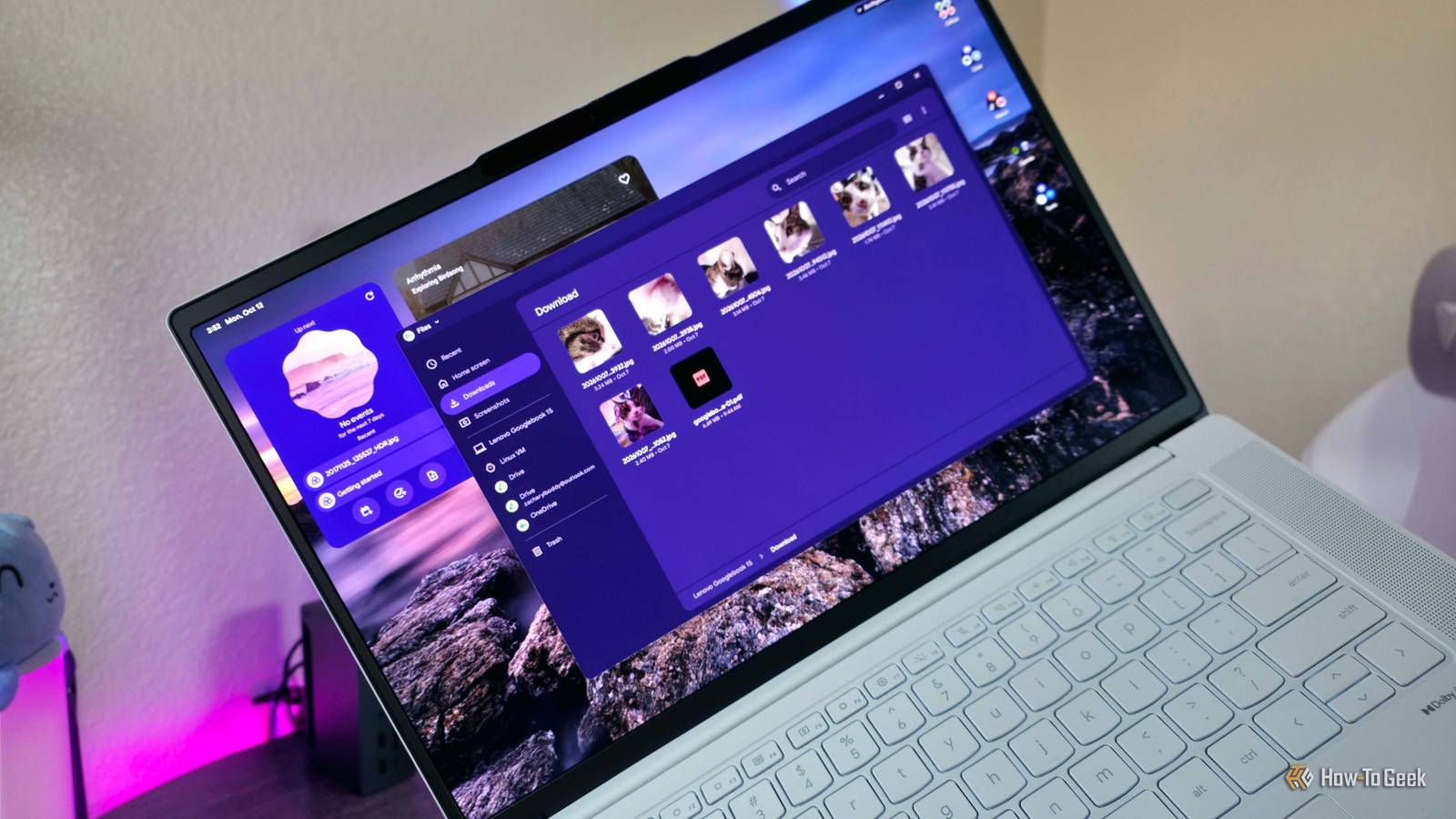
The new Files app in Googlebook OS is the central nervous system for this new hardware. Google has overhauled the interface, providing a refreshed aesthetic that aligns with modern design languages while focusing heavily on always-available local storage. In previous iterations of ChromeOS, users often felt that their local files were treated as temporary or secondary. The Googlebook OS changes this by placing the local file system at the forefront of the user experience.
By default, the "Download" folder remains the primary repository for the vast majority of user activity. Whether a user is saving an image from the Chrome browser, receiving a document via the updated Quick Share feature, or generating content through an integrated Android application, the Files app serves as the unified destination. This consolidation is a strategic move to reduce the "misplaced file" phenomenon that plagued earlier web-based versions of the OS. By ensuring that Chrome—which remains the primary gateway for web interaction—defaults to this local directory without the immediate option for alternative download locations, Google is forcing a more organized, localized structure onto the user experience.
Bridging the Gap with Native Android Integration
One of the most significant pillars of the Googlebook OS is its native Android app integration. While Chromebooks have supported Android apps for several years, the experience often felt containerized or "bolted on," leading to friction when trying to move files between the web environment and mobile applications. Googlebook OS aims to erase these boundaries entirely.
In this new ecosystem, Android applications operate with a level of system-level access that allows them to interact directly with the local file system. When a user edits a photo in a professional-grade Android editing suite or manages a database through a mobile-first productivity tool, the resulting files are instantly accessible within the main Files app. This level of synergy is intended to make the Googlebook feel less like a laptop running a mobile emulator and more like a cohesive, multi-purpose platform.
This integration also extends to how the OS handles system resources. By moving toward a "native" feel, Google has optimized how these apps utilize the supposedly more powerful local file system. The result is a smoother performance profile that benefits from the increased hardware specifications typically found in the Googlebook category, which often features higher-capacity solid-state drives and more efficient processors than the entry-level Chromebooks of the past.
The Role of Gemini and AI-Driven Management
Perhaps the most "next-generation" aspect of the Googlebook OS is the "deep Gemini integration." As artificial intelligence becomes an inextricable part of the computing experience, Google has embedded its proprietary AI, Gemini, into the very fabric of the operating system. While the original news highlights the presence of these features, the implications for file management are profound.
Gemini is not just a chatbot sitting in a sidebar; it is designed to assist in the organization and retrieval of data across the new local file system. In a traditional operating system, finding a specific document often requires a manual search through nested folders or a reliance on brittle keyword-matching search bars. With Gemini integration, Googlebook OS aims to provide a more semantic approach to file discovery. The AI can theoretically understand the context of a user’s request, helping to surface relevant downloads, recently edited documents from Android apps, or images shared via Quick Share with minimal friction.
This AI layer also acts as a bridge for the "easy to use" philosophy that Google maintains. By utilizing AI to handle the heavy lifting of organization, Google can keep the Files app interface clean and uncluttered—a design choice that keeps the OS feeling approachable for those moving over from mobile platforms like Android or iPadOS.
Comparing the Googlebook Experience to Legacy Desktops

Despite the advancements in the Googlebook Files app, it is important to contextualize its capabilities against established giants like Windows File Explorer or macOS Finder. As Zachary Boddy notes, the Googlebook Files app, while improved, is not yet a direct competitor to the depth of functionality found in Windows.
Power users who are accustomed to the granular control of Windows File Explorer may find the Googlebook OS somewhat limiting. Currently, the Files app lacks the ability to open multiple tabs within a single window, a feature that has become a staple for multitasking on other platforms. Furthermore, the lack of advanced selection boxes, in-depth view customization, and complex search filters means that for heavy-duty data management, the Googlebook still feels more like a mobile-first device than a traditional workstation.
Google’s design philosophy here appears to be a conscious choice. By avoiding the complexity of a "mature" desktop operating system, they maintain a level of speed and simplicity that has always been the hallmark of their hardware. The Googlebook OS is positioned as a "desktop-grade" successor, but it carries the DNA of a phone application. It is clean, it is fast, and it is designed for a generation of users who grew up with touchscreens and simplified app interfaces rather than the directory-heavy structures of the 1990s and 2000s.
A New Direction for Google’s Hardware Strategy
The arrival of Googlebooks and the accompanying OS suggests a long-term strategy to move away from the "budget" reputation of the Chromebook. By focusing on a more powerful local file system and deep AI integration, Google is signaling that it wants to compete in the premium laptop space currently dominated by the MacBook Air and high-end Windows Ultrabooks.
The emphasis on local storage is a clear response to a changing market where users want to do more than just browse the web. They want to edit video, manage large libraries of high-resolution photos, and run complex applications locally without worrying about cloud latency or data caps. The Googlebook OS provides the software foundation for this shift, even if the file management tools still have room to grow in terms of professional-grade features.
Ultimately, the Googlebook OS represents a middle ground. It offers more power and local control than the ChromeOS of old, yet it remains tethered to the simplicity and ease of use that defines the Google ecosystem. For the average user, the ability to find all their files in a single, intuitive "Download" folder—backed by the intelligence of Gemini and the versatility of Android—will likely be a welcome upgrade. For the power user, it remains a platform to watch as it continues to evolve toward a more robust desktop experience.
As Googlebooks begin to filter into the hands of consumers, the true test will be how this new local file system holds up under the weight of "desktop-grade" workloads. For now, the message from Google is clear: the era of the "web-only" laptop is over, and the era of the AI-integrated, locally-powered Googlebook has begun.
 Tech Tutorials & How-To Guides
Essential Ryobi 18V ONE+ Tools Under $80 for New Homeowners and DIY Enthusiasts
The landscape of home improvement has shifted significantly over the last decade,...
 Tech Tutorials & How-To Guides
The Limits of DNS Privacy: Why Changing Your Resolver Is Not a Total Cloaking Device
In the modern era of digital surveillance and data harvesting, internet users...
 Tech Tutorials & How-To Guides
Best Buy Slashes Price of LG 77-Inch B5 Series OLED TV by Fifty Percent in Early Holiday Sales Push
As the calendar turns and the final quarter of the year approaches,...







