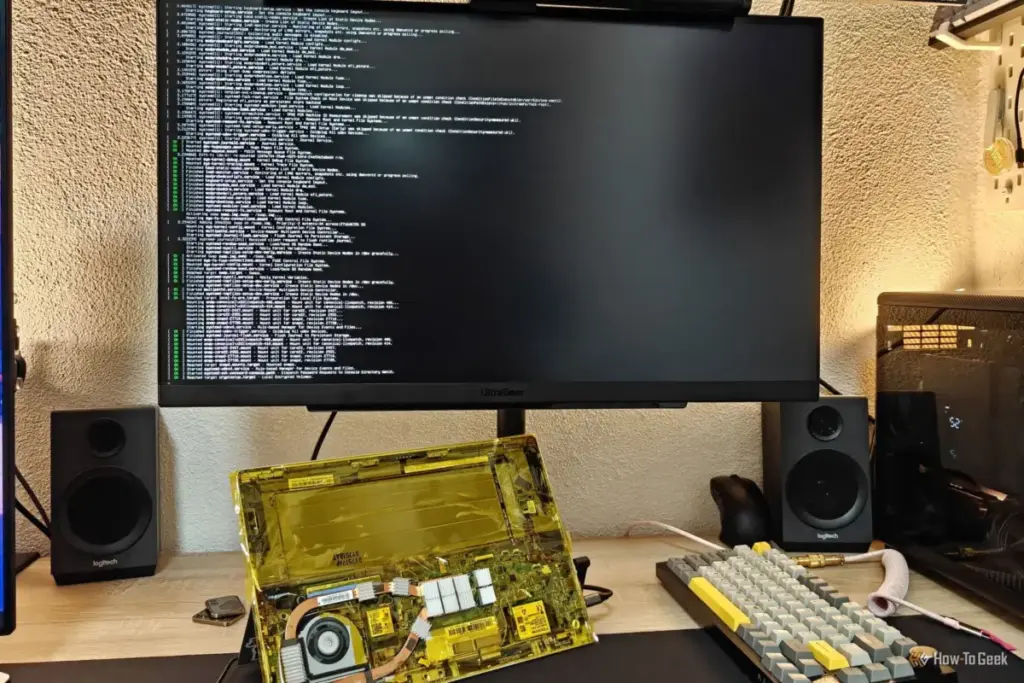
However, the perspective shifted as the owner began exploring the world of self-hosting and home servers. The realization dawned that while the laptop was a "potato" by the standards of a modern workstation, its components were actually quite powerful when compared to the low-power ARM-based microcomputers, such as the Raspberry Pi, that many people use to start their homelab journey. The i5-7200U, despite its age, still possessed enough computational power to handle multiple lightweight services simultaneously, provided it wasn’t burdened by a graphical user interface (GUI).
Ubuntu Server Turned My Underpowered, Broken Laptop Into a Proper Home Server
The transition from a discarded Windows machine to a functional server began with the selection of the right operating system. While various Linux distributions could have worked, Ubuntu Server was chosen for its balance of stability, extensive documentation, and lightweight footprint. Unlike the standard desktop version of Ubuntu, the Server edition does not install a GUI by default. It is designed to be managed entirely through a command-line interface (CLI), usually via a Secure Shell (SSH) connection from another computer.
By removing the need to render a desktop environment, the system resources that were previously consumed by Windows were suddenly available for actual work. The results of the installation were immediate and striking. Upon booting into the command line, a check of the system resources revealed that the OS was idling with only a few hundred megabytes of RAM in use. The CPU, which had previously struggled to stay under 50% utilization on the Windows desktop, was now sitting at near-zero activity.

It Was Time for a Completely Different Purpose
Setting up a server on a machine with a broken, partially blacked-out screen presented a unique set of challenges. During the initial installation phase, visibility was severely hampered by the cracks and the dead zones on the display. To circumvent this, a USB-C hub with an HDMI output was employed to mirror the console to an external monitor. Once the initial configuration was complete and SSH was enabled, the physical screen became irrelevant. The laptop could now be tucked away in a corner, connected to power and the network, and managed remotely.
This "headless" configuration is the standard for professional data centers, and bringing that methodology to a home environment allowed the aging Lenovo to punch well above its weight class. The 128GB SSD, previously cramped under Windows 10, now felt cavernous, as the base Ubuntu Server installation occupied less than 10GB of space. This left plenty of room for Docker containers—the virtualization technology that would allow the server to run dozens of independent applications without them interfering with one another.
My Abandoned Laptop Is Now the Backbone of My Homelab
The transformation of the laptop was not just a technical exercise; it resulted in a suite of services that the entire household now utilizes daily. The project began with a focus on media management. By installing Docker and deploying a Jellyfin container, the laptop became a private alternative to streaming services like Netflix or Hulu.
 Tech Tutorials & How-To Guides
The Persistence of Browser Hijackers: How a Tech Expert Used AI to Reclaim Chrome
In the modern digital landscape, the line between a helpful browser extension...
 Tech Tutorials & How-To Guides
The Fragile Alliance: Why Windows Continues to Disrupt Dual-Boot Linux Environments
For many technology enthusiasts and professionals, the ideal computing environment involves a...
 Tech Tutorials & How-To Guides
The Untapped Power of the ESP32: Why Your Bluetooth Proxy Is Only Reaching a Fraction of Its Potential
In the rapidly evolving landscape of the modern smart home, the ESP32...