
The Linux operating system is frequently celebrated for its stability, modularity, and the granular control it offers to its users. However, even the most robust distributions are not immune to the occasional catastrophic failure. Whether triggered by a volatile kernel update, a misconfigured graphics driver, or a corrupted configuration file, the experience of a system that refuses to reach the login screen is a universal rite of passage for many enthusiasts and professional administrators alike. For the uninitiated, the immediate instinct might be to reach for a bootable USB drive and perform a total reinstallation—a process often referred to in the community as "nuking and paving." Yet, the architecture of Linux is designed with recovery in mind, providing a sophisticated suite of boot-time interventions that can often restore a system to full functionality without the loss of a single byte of user data.
Understanding the mechanics of the Linux boot process and the specific parameters that can be passed to the kernel is more than just a technical exercise; it is a critical skill set that transforms a user from a passive consumer of a desktop environment into an active administrator of their own machine. By leveraging the Grand Unified Bootloader (GRUB) and the systemd initialization system, users can bypass failing components, roll back problematic updates, and access low-level environments specifically designed for surgical repair.
The Safety Net of the Kernel Rollback
The Linux kernel is the fundamental bridge between a computer’s hardware and its software. Because it manages everything from memory allocation to peripheral communication, any regression in a new kernel version can have immediate and visible consequences. A routine update might inadvertently break compatibility with a specific Wi-Fi chipset, cause a filesystem to mount improperly, or—most commonly—conflict with proprietary graphics drivers.

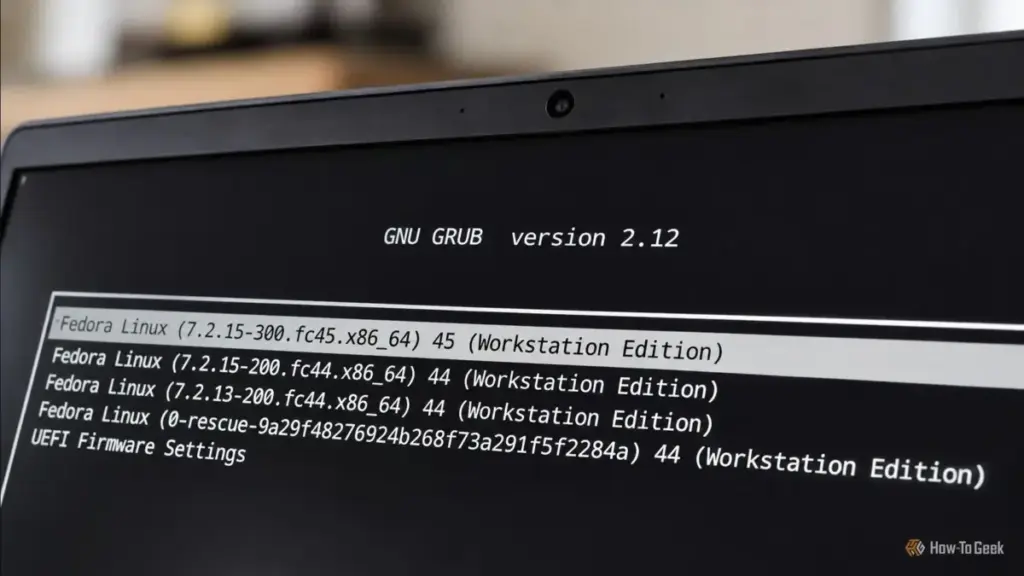
The foresight of most modern Linux distributions, such as Fedora, Ubuntu, and Arch, is evident in their retention of older, known-working kernel versions. When a new kernel is installed, the previous version is typically preserved as a fallback. This creates a built-in safety net that can be accessed through the GRUB menu. If a system fails to boot after an update, the first line of defense is to enter the "Advanced Options" menu during the initial startup sequence.
Accessing this menu requires precise timing. On older BIOS-based systems, holding the Shift key during the initial boot phase usually triggers the menu, while modern UEFI systems often require the user to repeatedly tap the Escape key. Once inside the advanced menu, the user is presented with a list of installed kernels. Selecting a version that was functional prior to the update allows the system to bypass the problematic code. This temporary measure is often enough to reach the desktop, where the user can then investigate the failure, check mailing lists for known bugs, or wait for a subsequent patch that addresses the regression.
Harnessing Systemd for Rescue and Repair
When the kernel itself is functional but the system stalls during the initialization of services, the problem likely resides within the init system—which, for the vast majority of modern distributions, is systemd. Systemd operates using "targets," which are essentially different states of system operation. The "graphical.target" is what most users interact with daily, but systemd provides more specialized environments for when things go wrong.
 Tech Tutorials & How-To Guides
Beyond PowerToys: How Open-Source Community Tools are Redefining Windows 11 Customization
For decades, the Windows operating system has served as a canvas for...
 Tech Tutorials & How-To Guides
Netflix Bolsters November Lineup with High-Stakes Thrillers and the Return of Fan-Favorite Dramas
As the final months of 2026 approach, Netflix is signaling that it...
 Tech Tutorials & How-To Guides
Samsung One UI 9: Redefining the Galaxy Experience Through Integrated AI and User-Centric Design
For over a decade, Samsung has maintained its position at the forefront...







