
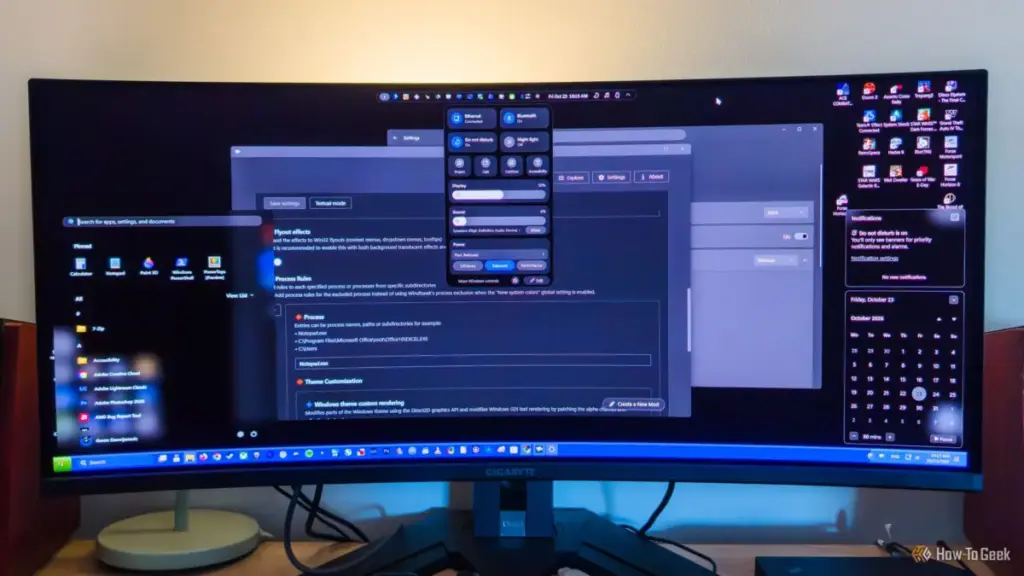
For decades, the Windows operating system has served as a canvas for power users seeking to bend the desktop environment to their specific workflows. While Microsoft has historically offered a rigid user interface, the rise of open-source development has ushered in a new era of "shell" modification. While official tools like Microsoft PowerToys provide a safe, curated set of utilities, a growing segment of the user base finds these capabilities far too restrictive. As Windows 11 continues to evolve with a focus on simplified aesthetics, a robust ecosystem of third-party, open-source modding tools has emerged, allowing users to dismantle and rebuild the Windows experience from the ground up.
The limitations of built-in customization have become a point of contention for many long-time Windows enthusiasts. Out of the box, Windows 11 offers a modest array of tweaks: users can toggle transparency effects, apply a handful of pre-installed themes, and, after significant community pressure, Microsoft eventually restored the ability to move the taskbar. However, more granular control—such as reverting the context menu to a classic style or deeply altering the behavior of system-level animations—often requires diving into the complexities of the Registry Editor. For those who find the "vanilla" Windows experience lacking but find the Registry too daunting or PowerToys too basic, the open-source community has stepped in with powerful, specialized alternatives.
Windhawk
An open-source "marketplace" that contains a plethora of cool mods
Among the most versatile entries in the modern modding scene is Windhawk. Rather than acting as a single-purpose utility, Windhawk functions as a centralized marketplace or repository for system modifications. Developed with the philosophy of modularity, the application itself serves as a framework. Once installed, it allows users to browse and inject community-created "mods" directly into the Windows Shell and other running processes. This approach is significantly different from traditional modding, where users might have to download dozens of disparate executable files to achieve a highly customized look.
The depth of customization available through Windhawk is staggering. While many users initially seek out the tool to fix common complaints regarding the Start menu or taskbar, a deeper dive into the marketplace reveals mods that touch almost every corner of the OS. For instance, users can install modifications that bring a macOS-style menu bar to the top of the screen or an iPhone-inspired "Dynamic Island" that displays system notifications in a sleek, floating pill at the top of the desktop.

Beyond mere aesthetics, Windhawk offers functional improvements that Microsoft has yet to implement natively. These include the ability to scroll through Google Chrome tabs using the mouse wheel, removing window borders for a truly "seamless" look, and controlling volume on a per-app basis simply by hovering the mouse over a taskbar icon and scrolling. It even addresses minor annoyances, such as the F1 key accidentally opening help pages in various applications. Because these mods are community-driven, the repository is constantly expanding, reflecting the real-time needs and desires of the Windows user base.
However, this level of power requires a degree of caution. Because Windhawk allows for the stacking of multiple mods, conflicts can arise if two different modifications attempt to alter the same UI element. A user attempting to combine a transparency mod with a taskbar-to-dock conversion might find their search button misaligned or visual elements "clipping" through one another. Despite these potential overlaps, Windhawk remains perhaps the most comprehensive "one-stop shop" for those looking to explore the frontiers of Windows modding without needing to write a single line of code themselves.
 Tech Tutorials & How-To Guides
Beyond the Cloud: Why a Shift to Offline Password Management Is Becoming a Necessity for the Security-Conscious
In the modern digital landscape, the password manager has transitioned from a...
 Tech Tutorials & How-To Guides
Exploring the Frontiers of the Unknown: Three Essential Science Fiction Films to Stream on Netflix This Weekend
As the autumn of 2026 unfolds, the digital landscape of the American...
 Tech Tutorials & How-To Guides
Essential Ryobi 18V ONE+ Tools Under $80 for New Homeowners and DIY Enthusiasts
The landscape of home improvement has shifted significantly over the last decade,...







