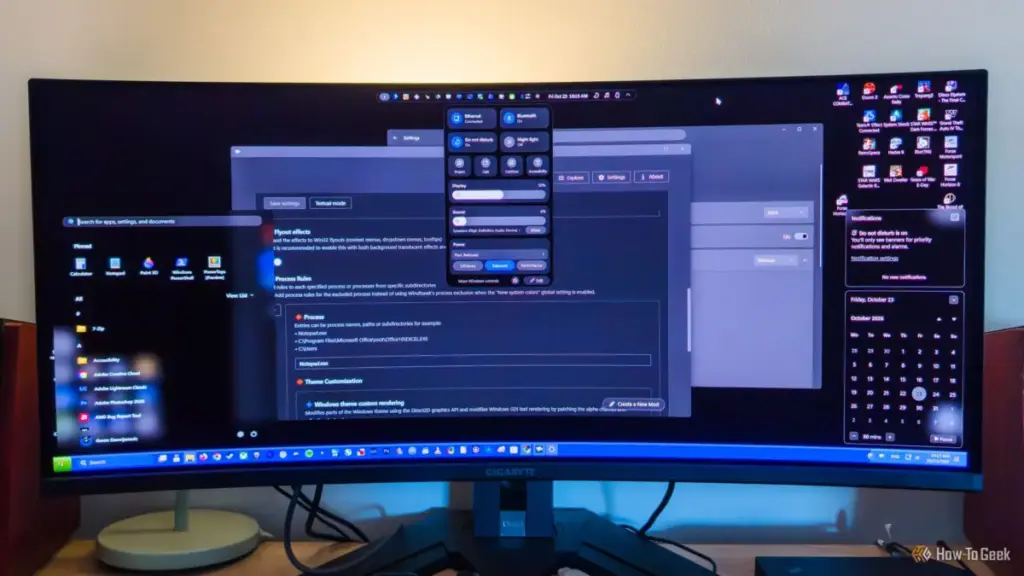
For decades, the Windows operating system has served as a canvas for power users seeking to bend the desktop environment to their specific workflows. While Microsoft has historically offered a rigid user interface, the rise of open-source development has ushered in a new era of "shell" modification. While official tools like Microsoft PowerToys provide a safe, curated set of utilities, a growing segment of the user base finds these capabilities far too restrictive. As Windows 11 continues to evolve with a focus on simplified aesthetics, a robust ecosystem of third-party, open-source modding tools has emerged, allowing users to dismantle and rebuild the Windows experience from the ground up.
The limitations of built-in customization have become a point of contention for many long-time Windows enthusiasts. Out of the box, Windows 11 offers a modest array of tweaks: users can toggle transparency effects, apply a handful of pre-installed themes, and, after significant community pressure, Microsoft eventually restored the ability to move the taskbar. However, more granular control—such as reverting the context menu to a classic style or deeply altering the behavior of system-level animations—often requires diving into the complexities of the Registry Editor. For those who find the "vanilla" Windows experience lacking but find the Registry too daunting or PowerToys too basic, the open-source community has stepped in with powerful, specialized alternatives.
Windhawk
An open-source "marketplace" that contains a plethora of cool mods
Among the most versatile entries in the modern modding scene is Windhawk. Rather than acting as a single-purpose utility, Windhawk functions as a centralized marketplace or repository for system modifications. Developed with the philosophy of modularity, the application itself serves as a framework. Once installed, it allows users to browse and inject community-created "mods" directly into the Windows Shell and other running processes. This approach is significantly different from traditional modding, where users might have to download dozens of disparate executable files to achieve a highly customized look.
The depth of customization available through Windhawk is staggering. While many users initially seek out the tool to fix common complaints regarding the Start menu or taskbar, a deeper dive into the marketplace reveals mods that touch almost every corner of the OS. For instance, users can install modifications that bring a macOS-style menu bar to the top of the screen or an iPhone-inspired "Dynamic Island" that displays system notifications in a sleek, floating pill at the top of the desktop.

Beyond mere aesthetics, Windhawk offers functional improvements that Microsoft has yet to implement natively. These include the ability to scroll through Google Chrome tabs using the mouse wheel, removing window borders for a truly "seamless" look, and controlling volume on a per-app basis simply by hovering the mouse over a taskbar icon and scrolling. It even addresses minor annoyances, such as the F1 key accidentally opening help pages in various applications. Because these mods are community-driven, the repository is constantly expanding, reflecting the real-time needs and desires of the Windows user base.
However, this level of power requires a degree of caution. Because Windhawk allows for the stacking of multiple mods, conflicts can arise if two different modifications attempt to alter the same UI element. A user attempting to combine a transparency mod with a taskbar-to-dock conversion might find their search button misaligned or visual elements "clipping" through one another. Despite these potential overlaps, Windhawk remains perhaps the most comprehensive "one-stop shop" for those looking to explore the frontiers of Windows modding without needing to write a single line of code themselves.
ExplorerPatcher
If you miss the Windows 10 taskbar and Start menu, ExplorerPatcher is the tool for you
While some users want to push Windows into the future, others are more interested in reclaiming the functional elements of the past. The transition from Windows 10 to Windows 11 was marked by a significant redesign of the taskbar and Start menu—a move that stripped away several features relied upon by professionals. ExplorerPatcher was born out of the necessity to bridge this gap. It is a specialized tool designed to restore the classic Windows 10 taskbar and Start menu functionality within the Windows 11 environment.
ExplorerPatcher goes far beyond a simple "skin" or visual theme. It restores deep-level features that were removed in the name of minimalism. This includes the restoration of "Toolbars" (or deskbands), the ability to cascade open windows, and the option to show windows stacked or side-by-side directly from the taskbar’s right-click menu. For many, the most vital restoration is the Windows 10-style volume control and system tray behavior, which many users find more informative and faster to navigate than the "Quick Settings" panel introduced in Windows 11.
The tool includes a robust, albeit utilitarian, settings menu labeled "Properties," accessible via a right-click on the taskbar. From here, users can toggle between different window switchers, customize the system tray, and even bring back the sharp, non-rounded window corners that defined the Windows 10 era. It also offers the ability to disable specific "hidden" features, such as Office hotkeys, which can sometimes interfere with professional creative software. ExplorerPatcher is essentially a surgical tool for those who appreciate the underlying kernel of Windows 11 but find its user interface to be a regression in productivity.

Nilesoft Shell
You should check out Nilesoft Shell even if you don’t want to mod Windows
One of the most criticized aspects of Windows 11 is the redesigned context menu. By hiding classic options behind a "Show more options" button, Microsoft added an extra click to common tasks like zipping files or accessing third-party app shortcuts. Nilesoft Shell addresses this specific pain point with a level of elegance that makes it a recommendation even for those who generally prefer to keep their systems "stock."
Nilesoft Shell replaces the standard Windows context menu with a highly optimized, custom version. Out of the box, it removes the redundant "Show more options" layer and populates the menu with a wealth of useful shortcuts. Users can access File Explorer options, toggle hidden files, and navigate to system-level folders directly from a right-click. It also integrates shortcuts for Command Prompt, PowerShell, and the Windows Terminal, as well as the ability to change file extensions and attributes on the fly.
For power users, the true strength of Nilesoft Shell lies in its extensibility. The tool uses a unique syntax for its configuration files, allowing users to define their own menu items, sub-menus, and themes. While this requires a bit of learning—often involving a dive into the official documentation or community tutorials—the result is a context menu that is perfectly tailored to a user’s specific workflow. It effectively turns the right-click menu from a simple list of actions into a powerful command center for file management and system navigation.
Seelen UI
A powerful Windows UI modding tool that brings a macOS desktop experience to Windows PCs
For users who find the entire Windows desktop metaphor uninspiring, Seelen UI offers the most radical transformation available. Rather than tweaking existing elements, Seelen UI reimagines the desktop by bringing a macOS-inspired aesthetic and workflow to the Windows environment. Upon installation, the traditional taskbar is replaced by a sleek "Dock" and a "Fancy Toolbar" at the top of the screen.
What sets Seelen UI apart from previous "Mac transformation packs" is its retention of Windows’ inherent flexibility. It does not simply mimic macOS; it blends the two worlds. For example, while it provides a macOS-like top bar, it maintains a system tray and offers a custom Start menu that can be swapped back to the native Windows version if desired. The "Fancy Toolbar" is highly modular, allowing users to add widgets, system monitors, and folder shortcuts that aren’t available on a standard Mac.
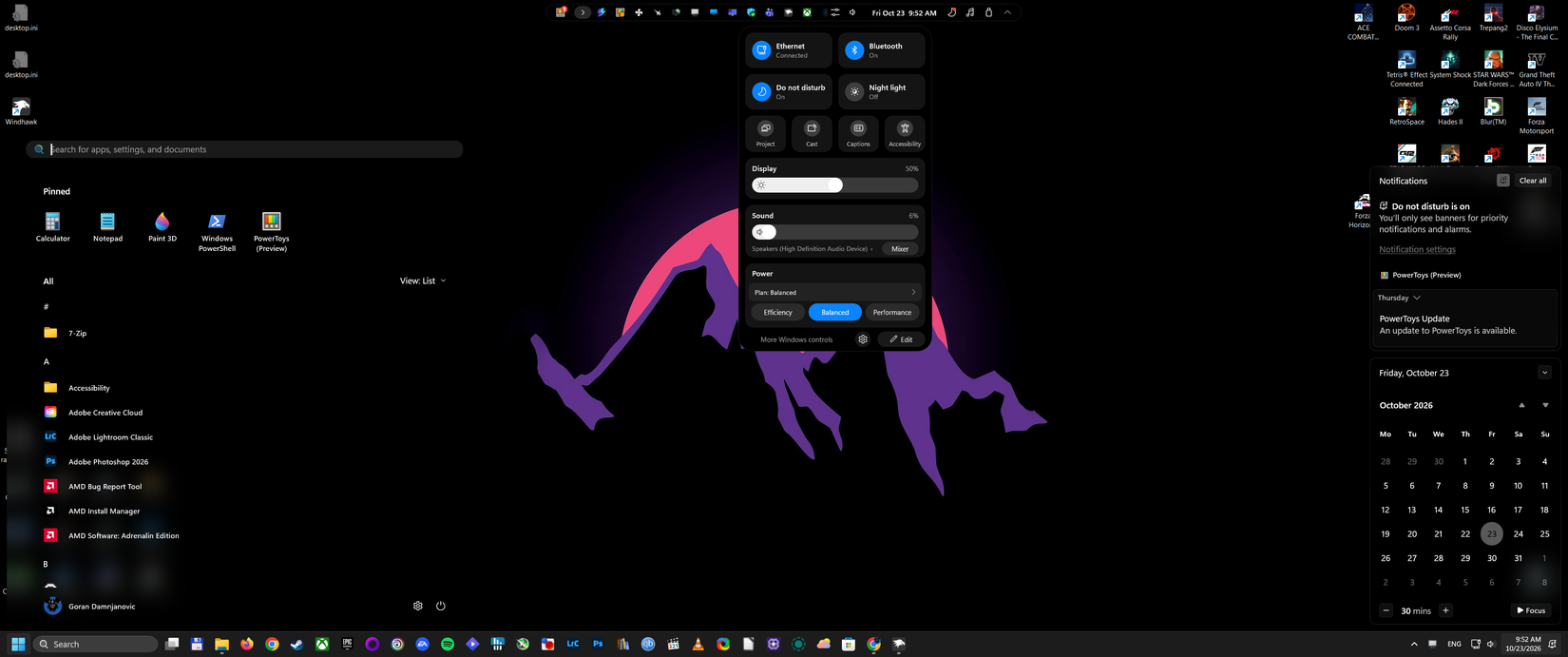
The settings menu in Seelen UI is remarkably deep, offering controls for task switching, window management, and even custom "flyouts" for volume and brightness adjustments. It supports community-made themes and icon packs, allowing for a level of visual cohesion that is difficult to achieve with disparate tools. While Windhawk is better for surgical tweaks, Seelen UI is a holistic "total conversion" tool. It is designed for those who want the clean, focused look of macOS but refuse to give up the software compatibility and hardware freedom associated with a Windows PC.
The Case for the Modified Desktop
The existence and popularity of these tools highlight a fundamental truth about modern computing: the "one size fits all" approach to UI design rarely satisfies everyone. While Microsoft must design Windows for hundreds of millions of users—ranging from tech-illiterate novices to enterprise administrators—the open-source community is free to design for the individual.
Whether it is the modular marketplace of Windhawk, the nostalgic functionality of ExplorerPatcher, the streamlined efficiency of Nilesoft Shell, or the aesthetic overhaul of Seelen UI, these tools empower users to reclaim ownership of their digital environment. There is no longer a need to settle for "vanilla" Windows when a global community of developers has provided the keys to a more personalized, productive, and visually pleasing experience. For those willing to spend a little time exploring these open-source offerings, the Windows desktop is no longer a static product, but a starting point for endless possibilities.
 Tech Tutorials & How-To Guides
Unlocking the Hidden Diagnostic Power of Amazon Fire TV: A Deep Dive into Developer Tools and System Transparency
The Amazon Fire TV ecosystem has evolved from a simple portal for...
 Tech Tutorials & How-To Guides
The Limits of DNS Privacy: Why Changing Your Resolver Is Not a Total Cloaking Device
In the modern era of digital surveillance and data harvesting, internet users...
 Tech Tutorials & How-To Guides
The Ghost in the Machine: Investigating the Root Causes of Unexpected Windows Wake Events
For many Windows users, the experience is unnervingly familiar: a desktop or...