
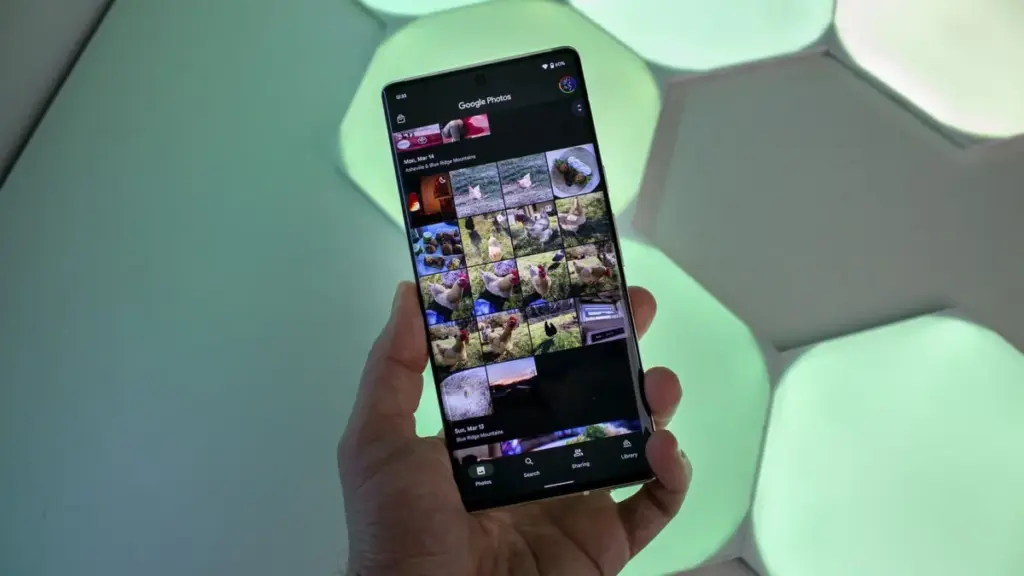
The Google Pixel ecosystem has long been celebrated for its seamless integration of hardware and software, particularly when it comes to the photography experience. For many users, the primary draw of a Pixel device is not just the camera sensor itself, but the sophisticated post-processing and organization provided by the Google Photos app. However, that reputation for reliability is currently being tested. Late this week, a growing number of Pixel owners began reporting a frustrating and debilitating bug that renders the Google Photos app unresponsive after performing basic editing tasks.
The issue, which appears to have surfaced following a major feature update, has sparked significant discussion across social media platforms and technical forums. Users are describing a scenario where the app’s interface becomes a "digital cul-de-sac," trapping them in a state where they can view their photos but cannot interact with them in any meaningful way.
A Breakdown of the Unresponsive Interface
The reports gained significant traction on September 25, when a detailed account surfaced on Reddit, subsequently highlighted by various technical news outlets. A user, purportedly operating a device from the latest Pixel iterations, provided a vivid description and video evidence of the glitch. The problem manifests most frequently after a user attempts to crop an image—a fundamental task for almost anyone using a smartphone camera.
According to the report, the user was attempting to crop a photograph of a newspaper. Under normal circumstances, saving a crop would allow the user to then share the image, delete the original, or continue editing. Instead, the user found that once the edited version of the photo was saved and opened in the gallery view, the application’s primary navigation and action buttons became entirely inert.
The video evidence shared by the frustrated user shows repeated attempts to engage the "Share," "Edit," and "Trash" buttons located on the bottom navigation bar. Despite clear tactile input, the app offers no response. There are no error messages, no "Application Not Responding" (ANR) pop-ups, and no loading spinners to indicate that the software is processing a heavy task in the background. The app simply sits in a state of paralysis. Interestingly, the "Add To" function—which brings up a folder menu—appears to remain functional in some cases, but this offers little consolation when the primary goal of the user is to distribute or further refine the image.
This specific bug does not seem to affect the entire library. Users have noted that unedited photos remain fully interactive. The "freeze" only attaches itself to the file once an edit, specifically a crop, has been applied and saved. This suggests a potential conflict in how the app handles the metadata or the rendering of newly created image versions within the local database.
Widespread Impact Across Pixel Generations
While the initial high-profile report came from a user claiming to be on a "Pixel 11 Pro XL"—a naming convention that likely points to a typo or a user on a future-looking beta track, given that the Pixel 9 is the current flagship—the thread quickly filled with corroborating accounts from owners of a wide range of devices. Users with the Pixel 9 series, as well as older models, have chimed in to confirm they are experiencing identical symptoms.
 Mobile Device Management (MDM) & Mobile OS
Amazon Slashes Samsung Galaxy S26 Ultra Price by $450 Following Recent Market Adjustments
In a surprising turn of events for the mobile industry, the Samsung...
 Mobile Device Management (MDM) & Mobile OS
RayNeo GT Arrives to Shake Up the Competitive $300 Smart Glasses Market with Enhanced Ergonomics and 3DoF Tracking
The landscape of augmented reality and wearable displays is moving at a...
 Mobile Device Management (MDM) & Mobile OS
Google Prepared to Expand Wearable Lineup with New Fitbit Edge Tracker
The landscape of the wearable technology market is undergoing a significant shift...







