Alongside the rollout of the flagship operating system, the official Ubuntu 26.10 release cycle brings a synchronized wave of updates across Canonical’s wider family of community flavours. The arrival of Ubuntu 26.10 marks an important milestone for the extended ecosystem, featuring updated iterations of long-standing mainstays such as Kubuntu and Xubuntu, while celebrating the formal return of Ubuntu MATE under a reconstituted leadership team.
While each community edition targets distinct desktop preferences and computational workflows, all official Ubuntu flavours continue to share the exact same technical foundations established by the upstream base. At the heart of each variant sits the Linux 7.3 kernel, providing modern hardware enablement, power management improvements, and low-level subsystem refinements. Graphics capabilities across the entire roster are powered by the Mesa 26.2 open-source driver stack, delivering essential performance enhancements for both integrated chipsets and discrete GPUs. Additionally, all flavours benefit from refreshed system tooling and native integration with the Snap Store, ensuring users retain consistent access to sandboxed application deployment regardless of which desktop environment they choose to deploy.
For users weighing an upgrade or exploring alternative desktop environments, the 26.10 cycle highlights ongoing architectural transitions across the Linux ecosystem, particularly around display servers, system configuration utilities, and core application stacks.
Ubuntu 26.10 Flavour Recap
The interim 26.10 release cycle provides each development team with an opportunity to refine experimental technologies, upgrade native application suites, and tune desktop ergonomics ahead of future development tracks. Below is a detailed look at the changes, technical shifts, and available installation media across the broader Ubuntu ecosystem.
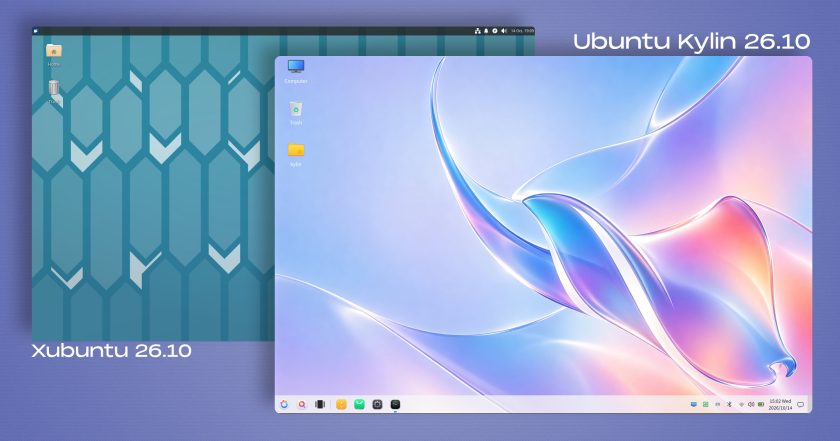
Xubuntu 26.10
Xubuntu 26.10 arrives powered by the Xfce 4.20 desktop environment, emphasizing the distribution’s traditional balance between lightweight efficiency and user configurability. Upstream work in this cycle focuses heavily on general stability, bug fixes, and ongoing maintenance, alongside iterative progress on the desktop’s evolving Wayland implementation—an architecture the development team wryly notes remains available for users adventurous enough to test it in daily operation.
Several core utilities that comprise the default Xfce application bundle have received functional upgrades:
- Ristretto Image Viewer: The default photo viewer introduces an image-shuffling viewing mode, enhances existing printing routines, and gains the capability to open and render images directly from web addresses.
- Xfce Terminal: The native terminal emulator has been optimized to reduce overall CPU utilization during active sessions and now provides an explicit configuration toggle to disable URL highlighting in command output.
- Screenshooter: The desktop capture tool has updated its screen-grabbing pipelines to support both regional and full-screen captures within Wayland environments. Additionally, the utility removes its legacy direct-upload integration with Imgur.
- Catfish File Search: The standalone search utility refines its behavior so that newly initiated queries now automatically start within the currently active folder rather than defaulting to broader directory paths.
- Creative Tooling: Graphics workflows benefit from an update to GIMP 3.2.6, delivering current image manipulation tools directly within the default software selection.
Further technical breakdowns are documented in the official Xubuntu 26.10 release notes, with updated installation media available directly from the project’s distribution mirrors.
Ubuntu Kylin 26.10
Ubuntu Kylin 26.10 functions primarily as a stability-oriented maintenance release. The system relies on iterative package bumps and under-the-hood bug fixes rather than drastic structural changes to the primary user interface. Its default desktop environment—the Windows 7-style UKUI shell—remains on the same version branch previously distributed with the Ubuntu 26.04 Long-Term Support release in April.
Despite the continuity of its desktop framework, the release introduces a distinctive aesthetic signature through a new default background. The desktop wallpaper utilizes an artificial-intelligence-generated composition that reinterprets Ubuntu’s official release mascot—the stingray—through a fluid, "glassmorphism" design language defined by translucent layers and iridescent pastel gradients.

This visual direction follows a precedent established in Ubuntu Kylin 26.04, which famously featured a surreal photograph of a raccoon-shaped island enveloped by ocean waves beneath upside-down seagulls. The continuation of this stylized mascot artwork indicates an emerging visual tradition for the localized distribution, blending technical consistency with unique desktop styling. Installation images for Kylin 26.10 are accessible through the standard release archives.
Lubuntu 26.10
Targeting resource-constrained machines and users who prefer minimal resource overhead, Lubuntu 26.10 ships with the LXQt 2.4.0 desktop environment. Upstream maintainers describe this specific milestone as focusing primarily on code cleanup and resolving existing bugs, though several quality-of-life adjustments have made their way into the interface.
Among the user-visible adjustments, the panel-based sound applet now features a horizontal orientation layout designed to integrate more cleanly across modern taskbar configurations. Furthermore, the desktop notification daemon has been patched to ensure transient desktop alerts dismiss properly rather than lingering on screen after their active duration expires.
From an architectural standpoint, Lubuntu 26.10 maintains the traditional X11 windowing system as its default out-of-the-box session. However, the distribution continues its steady progress toward modern display protocols by including an optional Wayland session powered by the Miriway compositor, accessible directly from the login display manager for testing and evaluation. System images are available via Canonical’s central image repository.
Ubuntu Unity 26.10
Ubuntu Unity 26.10 delivers a focused maintenance update designed to preserve the operational viability of the classic desktop layout. The distribution remains centered on the Unity 7.7 interface, pairing the desktop shell with a series of cleanups and targeted bug fixes aimed at deprecating legacy dependencies and transitioning away from unmaintained upstream packages.
The primary objective of this maintenance effort is to sustain the stability and responsiveness of the traditional Unity desktop experience while development resources continue to target the broader, long-term migration toward the Lomiri environment.
To bridge this technological evolution, Ubuntu Unity 26.10 integrates several core applications from the Lomiri ecosystem straight into the default installation image. Users will find Lomiri’s dedicated Calculator, Files, and Terminal applications preinstalled and running natively within the environment, providing a preview of the workflow and design paradigms slated for future releases. Direct ISO downloads are hosted on the Ubuntu Unity distribution servers.
Kubuntu 26.10
Kubuntu 26.10 continues to deliver Canonical’s premier KDE-centric experience, integrating the KDE Plasma 6.7 desktop environment. While the team’s promotional materials promote access to the latest Plasma experience, the 26.10 media incorporates the mature 6.7 release rather than the newly published Plasma 6.8 branch. Even so, the desktop represents an upgrade of one full version compared to the software stack deployed in Kubuntu 26.04.
Plasma 6.7 brings notable productivity enhancements to desktop navigation, particularly for multi-monitor workstations:
- Independent Virtual Desktops: Users operating multi-display configurations can now designate virtual desktops specifically to individual monitors, accompanied by updated keyboard shortcuts to streamline workspace navigation.
- Visual Transitions and Desktop Applets: Desktop notifications now incorporate a smooth glide visual effect, while the Digital Clock applet has been updated to render timezone offset labels directly within the widget display.
- System Search and Polish: The release introduces an option to enable type-ahead desktop search capabilities, alongside patches addressing inconsistencies when toggling dark mode configurations and overall system themes.
Architecturally, Kubuntu 26.10 defaults strictly to a Wayland session. While a legacy Plasma X11 session remains absent from the default image, it can still be manually installed from the repositories. Notably, 26.10 represents the final Kubuntu release where manual X11 installation remains possible, as the upstream Plasma 6.8 release has formally removed the plasma-session-x11 package from its codebase entirely. The final ISO images are now live on the Kubuntu image servers.
Ubuntu MATE 26.10
Ubuntu MATE marks a noteworthy return to the official release schedule with version 26.10, representing the project’s inaugural release under the direction of a restructured maintenance team. The flavour had previously opted to sit out the Ubuntu 26.04 Long-Term Support cycle to facilitate organizational reorganization and stabilize its packaging infrastructure.
The updated media does not bump every individual MATE utility to the newest upstream tag; instead, the team prioritized curating a dependable package set focused on reliability and core defect resolution. Notably, this release incorporates several fundamental base changes aligned with modern Ubuntu engineering standards:
- Dracut Migration: Ubuntu MATE 26.10 is the project’s first release to adopt Ubuntu’s overarching switch to the Dracut initial ramdisk generation tool.
- Network Stack Transition: The distribution has retired the traditional
ifupdownconfiguration framework, replacing it with modernnetplannetwork management. - Package Management Cleanup: Legacy tools such as
gdebihave been excised from the preinstalled software bundle.
The new maintenance team has documented several known issues—including operational quirks inside virtualized machines, display issues with the Redshift utility, and missing icon assets—confirming that the restoration of the flavour remains an active, ongoing effort. Nonetheless, the successful compilation and release of the 26.10 image establishes an operational baseline for the community moving forward. Download links are hosted directly on the Ubuntu MATE portal.
Ubuntu Studio 26.10
Ubuntu Studio 26.10 broadens its specialized toolkit for multimedia production, introducing new options for professional audio creators, digital artists, and video editors. Music production environments receive the most visible expansion in this cycle, featuring the addition of the Sonic Pi live-coding software and the SuperCollider programming environment, catering directly to algorithmic composition and experimental sound design.
System administrators and sound engineers also gain access to jnoise, a command-line white-noise generation tool designed for audio testing and calibration. These specialized utilities sit alongside comprehensive software version upgrades across the entire preinstalled open-source creative suite:
- Video and Streaming: OBS Studio and Kdenlive receive current point updates for broadcast capture and non-linear editing.
- Digital Art and Imaging: Updated versions of Krita and GIMP are bundled to support advanced vector, raster, and illustration pipelines.
- Audio Engineering: The Ardour digital audio workstation has been updated to its latest stable release.
To assist users in managing storage footprints and workflow specialization, the Ubuntu Studio installer now allows individual software components to be selected directly from broader metapackage groupings during installation. In addition, the distribution’s proprietary Audio Configuration Wizard has received a streamlined user interface, simplifying the setup of low-latency audio processing pipelines. System media can be obtained via the official Ubuntu Studio project site.
Additional Flavours in the 26.10 Ecosystem
The 26.10 cycle also brings iterative updates to several other specialized flavours across the Ubuntu community catalog:
- Edubuntu 26.10: Geared toward educational deployments, Edubuntu’s installer introduces granular controls that enable system administrators to cherry-pick individual application packages from broad age-group software tiers at install time. In addition, the distribution updates its bundled Paperboy news aggregation application, designed specifically to assist educators in conducting media literacy coursework across secondary and tertiary academic environments.
- Ubuntu Budgie 26.10: The Budgie desktop environment adds a specialized panel widget for searching and streaming online internet radio stations without requiring a dedicated standalone audio player. The release also implements integrated dynamic wallpaper switching that automatically alternates desktop backgrounds in accordance with day and night cycles.
- Ubuntu Cinnamon 26.10: Centered on the Cinnamon desktop environment pioneered by the Linux Mint project, this release upgrades its flagship interface to Cinnamon version 6.6.9, delivering upstream interface polish, stability improvements, and updated desktop applets.
Together, these varied updates showcase the operational diversity of the broader Ubuntu 26.10 release, giving home users, creative professionals, and system administrators a wide range of desktop environments and preconfigured toolsets built upon an identical, modernized Linux foundation.
 Linux & Open Source Solutions
Ubuntu 26.10 Beta Rescheduled to October 1 Following Unforeseen Infrastructure Issues
Canonical has officially postponed the public beta release of its upcoming operating...
 Linux & Open Source Solutions
Hylki Brings Modern Rust Engineering and Deep Customization to the GNOME Desktop
For years, the Linux desktop has maintained a complicated relationship with the...
 Linux & Open Source Solutions
The Document Foundation Unveils New Visual Identity to Establish Distinct Institutional Profile Apart from LibreOffice
The Document Foundation, the charitable non-profit entity responsible for overseeing the development...