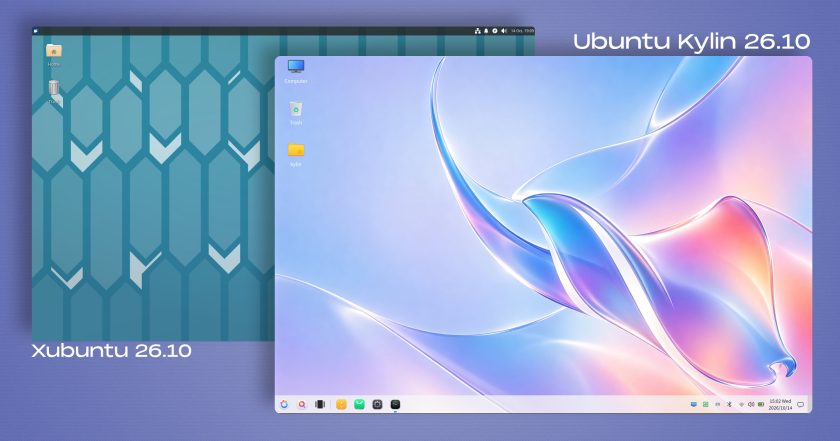
- Independent Virtual Desktops: Users operating multi-display configurations can now designate virtual desktops specifically to individual monitors, accompanied by updated keyboard shortcuts to streamline workspace navigation.
- Visual Transitions and Desktop Applets: Desktop notifications now incorporate a smooth glide visual effect, while the Digital Clock applet has been updated to render timezone offset labels directly within the widget display.
- System Search and Polish: The release introduces an option to enable type-ahead desktop search capabilities, alongside patches addressing inconsistencies when toggling dark mode configurations and overall system themes.
Architecturally, Kubuntu 26.10 defaults strictly to a Wayland session. While a legacy Plasma X11 session remains absent from the default image, it can still be manually installed from the repositories. Notably, 26.10 represents the final Kubuntu release where manual X11 installation remains possible, as the upstream Plasma 6.8 release has formally removed the plasma-session-x11 package from its codebase entirely. The final ISO images are now live on the Kubuntu image servers.
Ubuntu MATE 26.10
Ubuntu MATE marks a noteworthy return to the official release schedule with version 26.10, representing the project’s inaugural release under the direction of a restructured maintenance team. The flavour had previously opted to sit out the Ubuntu 26.04 Long-Term Support cycle to facilitate organizational reorganization and stabilize its packaging infrastructure.
The updated media does not bump every individual MATE utility to the newest upstream tag; instead, the team prioritized curating a dependable package set focused on reliability and core defect resolution. Notably, this release incorporates several fundamental base changes aligned with modern Ubuntu engineering standards:
- Dracut Migration: Ubuntu MATE 26.10 is the project’s first release to adopt Ubuntu’s overarching switch to the Dracut initial ramdisk generation tool.
- Network Stack Transition: The distribution has retired the traditional
ifupdownconfiguration framework, replacing it with modernnetplannetwork management. - Package Management Cleanup: Legacy tools such as
gdebihave been excised from the preinstalled software bundle.
The new maintenance team has documented several known issues—including operational quirks inside virtualized machines, display issues with the Redshift utility, and missing icon assets—confirming that the restoration of the flavour remains an active, ongoing effort. Nonetheless, the successful compilation and release of the 26.10 image establishes an operational baseline for the community moving forward. Download links are hosted directly on the Ubuntu MATE portal.
Ubuntu Studio 26.10
Ubuntu Studio 26.10 broadens its specialized toolkit for multimedia production, introducing new options for professional audio creators, digital artists, and video editors. Music production environments receive the most visible expansion in this cycle, featuring the addition of the Sonic Pi live-coding software and the SuperCollider programming environment, catering directly to algorithmic composition and experimental sound design.
System administrators and sound engineers also gain access to jnoise, a command-line white-noise generation tool designed for audio testing and calibration. These specialized utilities sit alongside comprehensive software version upgrades across the entire preinstalled open-source creative suite:
- Video and Streaming: OBS Studio and Kdenlive receive current point updates for broadcast capture and non-linear editing.
- Digital Art and Imaging: Updated versions of Krita and GIMP are bundled to support advanced vector, raster, and illustration pipelines.
- Audio Engineering: The Ardour digital audio workstation has been updated to its latest stable release.
To assist users in managing storage footprints and workflow specialization, the Ubuntu Studio installer now allows individual software components to be selected directly from broader metapackage groupings during installation. In addition, the distribution’s proprietary Audio Configuration Wizard has received a streamlined user interface, simplifying the setup of low-latency audio processing pipelines. System media can be obtained via the official Ubuntu Studio project site.
Additional Flavours in the 26.10 Ecosystem
The 26.10 cycle also brings iterative updates to several other specialized flavours across the Ubuntu community catalog:
- Edubuntu 26.10: Geared toward educational deployments, Edubuntu’s installer introduces granular controls that enable system administrators to cherry-pick individual application packages from broad age-group software tiers at install time. In addition, the distribution updates its bundled Paperboy news aggregation application, designed specifically to assist educators in conducting media literacy coursework across secondary and tertiary academic environments.
- Ubuntu Budgie 26.10: The Budgie desktop environment adds a specialized panel widget for searching and streaming online internet radio stations without requiring a dedicated standalone audio player. The release also implements integrated dynamic wallpaper switching that automatically alternates desktop backgrounds in accordance with day and night cycles.
- Ubuntu Cinnamon 26.10: Centered on the Cinnamon desktop environment pioneered by the Linux Mint project, this release upgrades its flagship interface to Cinnamon version 6.6.9, delivering upstream interface polish, stability improvements, and updated desktop applets.
Together, these varied updates showcase the operational diversity of the broader Ubuntu 26.10 release, giving home users, creative professionals, and system administrators a wide range of desktop environments and preconfigured toolsets built upon an identical, modernized Linux foundation.
 Linux & Open Source Solutions
Canonical Hardens Ubuntu 26.10 Boot Security by Stripping Advanced Filesystem Parsers from Signed GRUB
Canonical has implemented a significant architectural shift in how Ubuntu 26.10 boots...
 Linux & Open Source Solutions
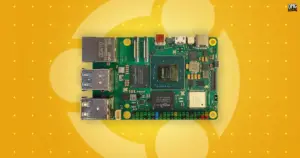
Canonical Releases Official Ubuntu Desktop Images for RISC-V Hardware Ahead of Ubuntu 26.10
Installing Ubuntu on RISC-V hardware is poised to become significantly more straightforward...
 Linux & Open Source Solutions
Canonical Publishes Official Ubuntu Desktop Images for RISC-V Hardware Ahead of Ubuntu 26.10
Installing an official Ubuntu desktop operating system on 64-bit RISC-V hardware is...