
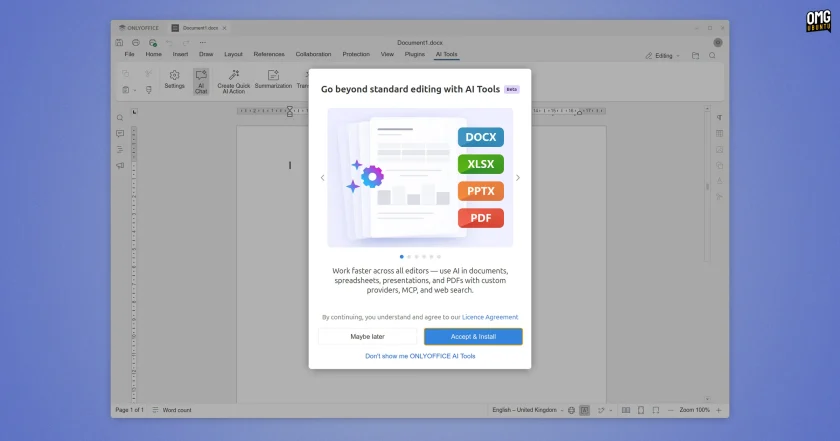
Furthermore, the new AI Tools architecture includes support for web access and the ability to interface directly with Model Context Protocol (MCP) servers. By connecting to MCP servers, the assistant can query external data stores, bridge external information pipelines, and fetch live context from external systems, transforming the office suite from a self-contained text editor into a flexible node capable of interacting with broader organizational knowledge graphs.
Non-AI changes in v10.0
While the restructured AI infrastructure represents a major philosophical pivot, the core of ONLYOFFICE Desktop Editors 10.0 is dominated by practical document manipulation improvements, visual refinements, and engine optimizations designed to benefit daily office workflows.
One structural shift in this release involves document templates. The suite no longer ships with a local library of pre-installed offline document templates; instead, users now access template resources exclusively through cloud-based options. Linux users will also notice subtle visual polish across the desktop environment: window border thickness has been trimmed down for a sleeker profile, and a dedicated drop shadow effect has been added to desktop windows, helping the application blend more naturally into modern Linux desktop environments.
Security and Annotation Tools in the PDF Editor
The suite’s built-in PDF Editor receives critical privacy and document management upgrades in version 10.0. The built-in Redact tool has been significantly expanded, allowing users not only to black out visible text, but also to cleanly strip underlying document metadata and completely purge existing annotations before a file is exported or shared. This provides users with stronger safeguards against the accidental leakage of sensitive author records, editing histories, or hidden properties.
In addition to improved redaction, digital signatures can now be inserted directly through the application’s Comment tab. The review workspace has been modernized with an upgraded Comments panel that compiles a comprehensive, centralized inventory of every annotation applied to the active PDF, and a new dedicated annotation settings panel has been integrated to allow fine-grained customization of comment properties, styling, and visual indicators.
Document Editor Refinements and Collaborative Cursor Tracking
The standard Document Editor incorporates a series of subtle quality-of-life adjustments aimed at reducing formatting friction. When copying and pasting numbered text into a section of a document that already contains an active list, users are now provided with explicit controls to either continue the existing numerical sequence seamlessly or restart the numbering from the beginning.
Collaborative document editing has also been upgraded with visual navigation tools. During simultaneous multi-user co-editing sessions, contributors can now locate another collaborator’s active cursor with a single click and follow their movements across the document canvas in real time. This capability simplifies remote meetings, document walkthroughs, and peer review sessions by keeping all participants visually aligned on the exact paragraphs being discussed.
Typesetting and internationalization features have also been improved. Paragraphs formatted with exact line-spacing measurements are now cleanly clipped on a line-by-line basis, eliminating visual overlap and layout glitches on strict page designs. Additionally, the editor’s bidirectional text engine has been refined so that right-to-left (RTL) scripts correctly handle complex mathematical equations and embedded inline objects without disrupting the surrounding reading order.
 Linux & Open Source Solutions
OpenShot Video Editor Arrives on the Canonical Snap Store, Bringing Version 4.0 to Ubuntu Users
In a major milestone for open-source desktop multimedia production, the popular Qt-based...
 Linux & Open Source Solutions
Ex-Microsoft dev builds a new task manager for Linux
For millions of personal computer users over the past three decades, Plummer’s...
 Linux & Open Source Solutions
Kagi Halts Development of Orion Browser for Linux and Windows, Plans to Open Source Codebase
Kagi has officially announced that it is ending the internal development of...







