
The developers behind ONLYOFFICE have officially released version 10.0 of ONLYOFFICE Desktop Editors, marking a significant milestone for the free and open-source productivity suite. Characterized as a thoroughly rebuilt application from the ground up, the new major release arrives on Linux, Windows, and macOS with more than a thousand bug fixes, substantial performance refinements, and a fundamental architectural overhaul of how artificial intelligence tools are integrated across the office suite.
Alongside the deep code refactoring, the developers have advised users that upgrading from previous releases may require a degree of manual reconfiguration. Because the desktop suite has undergone an extensive internal rebuild, existing custom settings and user preferences established in earlier versions may not automatically transfer over to the new installation. Users stepping into version 10.0 are greeted by an application designed to run faster, handle complex documents with greater stability, and provide cleaner boundaries between core document editing functions and optional external integrations.
Decoupling Artificial Intelligence: The Move to an Opt-In Add-on
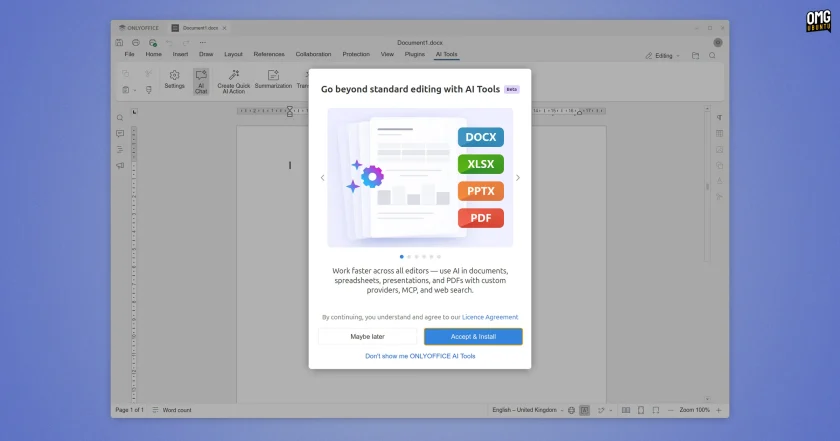
Among the most notable design decisions in ONLYOFFICE Desktop Editors 10.0 is the complete decoupling of its artificial intelligence features. In preceding versions, AI capabilities were packaged and distributed directly within the core desktop software as an embedded default plugin. In version 10.0, this plugin has been removed entirely from the primary open-source application builds.
According to the development team, the removal of the pre-bundled AI components was driven by direct user feedback within the open-source community. Many desktop users and privacy-conscious organizations prefer their office productivity tools to remain lean, decoupled from external machine learning services, and free of automatic connections to remote endpoints unless explicitly desired. In response to these concerns, AI functionality in version 10.0 has been repositioned as a completely modular, standalone add-on branded as AI Tools.
Users who wish to take advantage of machine learning assistance must now download and install the AI Tools component separately, guided by a dedicated setup flow integrated into the application interface. Once the add-on is installed, users retain full control over the underlying infrastructure powering the capabilities. The system supports connections to commercial cloud provider application programming interfaces (APIs), but it can also be configured to communicate with locally hosted large language models running entirely offline via frameworks such as Ollama. This flexibility allows users to balance automated productivity against data privacy and compliance requirements, ensuring sensitive corporate or personal data does not need to leave the local workstation.
Context-Aware Document Processing and MCP Server Integration
When configured, the new AI Tools add-on provides substantially deeper capabilities across the entirety of the ONLYOFFICE desktop ecosystem than earlier iterations allowed. The engineering team noted that the new implementation is built so that the AI actively understands the specific context of each open file, allowing its suggestions, automated adjustments, and generated text to remain consistently relevant to the material being worked on.

Within the dedicated PDF Editor, the AI tooling can analyze entire open documents to generate concise executive summaries or interactively answer questions regarding specific sections of the text, streamlining the process of reviewing dense manuals, contracts, and research reports. Inside the standard Document Editor, the system is capable of executing granular writing and formatting tasks, such as cleaning up messy typography, improving stylistic flow, or generating a structured table of contents based on existing document headings.
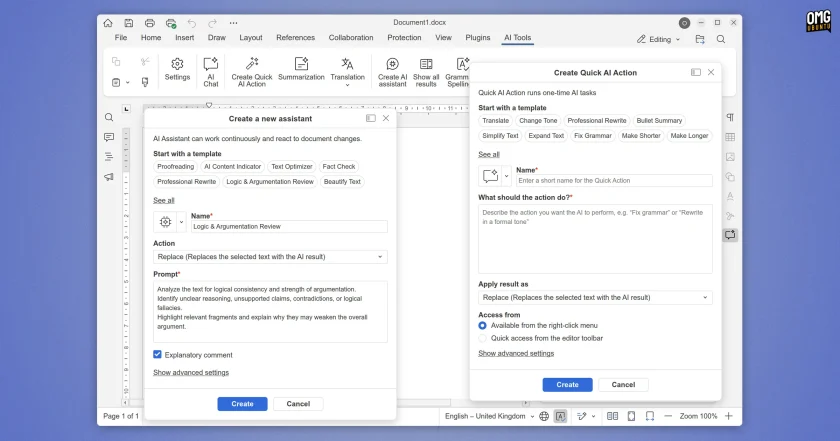
Interaction with these machine learning tools is coordinated through an enhanced AI Chat interface. The panel features a roster of preset prompts tailored to everyday administrative and editorial tasks, but it also allows users to configure custom Quick Actions for recurring single-step requests. For more comprehensive workflows, users can deploy persistent AI Assistants designed to operate as collaborative co-editors, working alongside the user inside the document window in real time as content is drafted, edited, and revised.
Furthermore, the new AI Tools architecture includes support for web access and the ability to interface directly with Model Context Protocol (MCP) servers. By connecting to MCP servers, the assistant can query external data stores, bridge external information pipelines, and fetch live context from external systems, transforming the office suite from a self-contained text editor into a flexible node capable of interacting with broader organizational knowledge graphs.
Non-AI changes in v10.0
While the restructured AI infrastructure represents a major philosophical pivot, the core of ONLYOFFICE Desktop Editors 10.0 is dominated by practical document manipulation improvements, visual refinements, and engine optimizations designed to benefit daily office workflows.
One structural shift in this release involves document templates. The suite no longer ships with a local library of pre-installed offline document templates; instead, users now access template resources exclusively through cloud-based options. Linux users will also notice subtle visual polish across the desktop environment: window border thickness has been trimmed down for a sleeker profile, and a dedicated drop shadow effect has been added to desktop windows, helping the application blend more naturally into modern Linux desktop environments.
Security and Annotation Tools in the PDF Editor
The suite’s built-in PDF Editor receives critical privacy and document management upgrades in version 10.0. The built-in Redact tool has been significantly expanded, allowing users not only to black out visible text, but also to cleanly strip underlying document metadata and completely purge existing annotations before a file is exported or shared. This provides users with stronger safeguards against the accidental leakage of sensitive author records, editing histories, or hidden properties.
In addition to improved redaction, digital signatures can now be inserted directly through the application’s Comment tab. The review workspace has been modernized with an upgraded Comments panel that compiles a comprehensive, centralized inventory of every annotation applied to the active PDF, and a new dedicated annotation settings panel has been integrated to allow fine-grained customization of comment properties, styling, and visual indicators.
Document Editor Refinements and Collaborative Cursor Tracking
The standard Document Editor incorporates a series of subtle quality-of-life adjustments aimed at reducing formatting friction. When copying and pasting numbered text into a section of a document that already contains an active list, users are now provided with explicit controls to either continue the existing numerical sequence seamlessly or restart the numbering from the beginning.
Collaborative document editing has also been upgraded with visual navigation tools. During simultaneous multi-user co-editing sessions, contributors can now locate another collaborator’s active cursor with a single click and follow their movements across the document canvas in real time. This capability simplifies remote meetings, document walkthroughs, and peer review sessions by keeping all participants visually aligned on the exact paragraphs being discussed.
Typesetting and internationalization features have also been improved. Paragraphs formatted with exact line-spacing measurements are now cleanly clipped on a line-by-line basis, eliminating visual overlap and layout glitches on strict page designs. Additionally, the editor’s bidirectional text engine has been refined so that right-to-left (RTL) scripts correctly handle complex mathematical equations and embedded inline objects without disrupting the surrounding reading order.
Performance Gains and Legacy Formats in the Spreadsheet Editor
In the Spreadsheet Editor, calculations involving complex array formulas have undergone deep architectural optimization. When processing array formulas that reference full columns or full rows, the calculation engine now executes queries noticeably faster while consuming significantly less system memory, preventing interface freezes on large datasets.
From an interaction standpoint, the spreadsheet interface now automatically highlights the exact cell ranges referenced by a formula directly in the formula bar, making complex calculations easier to audit and troubleshoot. A new toggle has been added to give users granular control over cell value AutoComplete suggestions, allowing operators to disable automatic text predictions when performing high-volume or specialized data entry.
Furthermore, ONLYOFFICE has expanded backward compatibility by introducing the ability to save spreadsheets directly to the legacy binary .xls file format. While modern OpenXML .xlsx files remain the default standard, native support for .xls export allows users to easily collaborate with legacy enterprise installations or older third-party databases that do not yet support modern XML-based container formats.
Presentation Editor Print Controls
Rounding out the core suite updates, the Presentation Editor introduces an overhauled print subsystem that mirrors the application’s diverse on-screen view modes. Users now have extensive control over how slide decks translate onto physical paper or static print-to-PDF files.
The print dialog provides dedicated configuration toggles that dictate whether hidden slides, full slide background graphics, slide bounding frames, review comments, or slide page numbers are included on the printed output, providing presentation designers with the exact layout controls needed to produce formal handouts or minimalist speaker reference cards.
Get ONLYOFFICE 10.0
ONLYOFFICE Desktop Editors 10.0 remains completely free and open-source software, supporting Windows, macOS, and standard Linux distributions. Users can acquire the software directly from the project’s official website, where standalone installation packages for various platforms are hosted.
For the open-source community, the developers maintain official release binaries on the project’s GitHub repository, offering native .deb packages tailored for Ubuntu, Linux Mint, Debian, and related distributions, alongside cross-platform tarballs. Because standalone manual installations on Linux platforms do not typically benefit from automatic background version updates, users who prefer hands-off maintenance can also install the official ONLYOFFICE Snap package via the Snapcraft store, ensuring continuous delivery of subsequent point releases and maintenance fixes.
 Linux & Open Source Solutions
Banshee Music Player Returns to Modern Linux Desktops as a Snap Package
A familiar name from the golden era of the Linux desktop has...
 Linux & Open Source Solutions
Ubuntu 26.10 Beta Rescheduled to October 1 Following Unforeseen Infrastructure Issues
Canonical has officially postponed the public beta release of its upcoming operating...
 Linux & Open Source Solutions
NexPhone Multi-OS Smartphone Delayed to March 2027 as Hardware Challenges and Price Adjustments Emerge
The NexPhone, an ambitious multi-operating system smartphone designed to bridge the divide...







