
Microsoft has announced a significant evolution of its artificial intelligence strategy, unveiling a redesigned Microsoft Copilot experience intended to integrate more deeply into the "flow of human ambition." Moving beyond its initial role as a reactive assistant, the new Copilot is being positioned as a comprehensive platform designed to help individuals and organizations build, customize, and scale AI capabilities across the modern workplace.
The transformation introduces a fundamental shift in how AI interacts with professional environments. According to Jared Spataro, who leads Microsoft’s AI at Work efforts, the goal is to enable work as it evolves, connecting the tools people rely on daily with next-generation capabilities that can act independently and proactively. This new era of Copilot is defined by three primary pillars: a centralized Home experience, a democratized solution-building environment called Code, and a persistent autonomous agent known as Autopilot.
A New Experience for Every Mode of Work
At the center of this reimagined ecosystem is the new Copilot app, which serves as a unified starting point for all AI-driven tasks. The app is structured around a "Home" interface where two distinct modes of operation—Chat and Cowork—converge. As modern professionals navigate a constant stream of meetings, emails, and documents, Microsoft envisions Home as the "grounding" element that allows users to maintain their bearings and resume work exactly where they left off.
The Chat functionality remains the familiar, conversational interface designed for rapid-fire questions, information lookups, and initial drafts. However, it is now joined by Cowork, a capability designed for complex, delegated tasks. Unlike a simple chat, Cowork allows a user to define a comprehensive task—such as responding to a Request for Proposal (RFP), creating a product launch kit, or finalizing a financial close package—and allows the AI to run the process end-to-end. Soon, Microsoft plans to remove the need for users to manually choose between these modes; Copilot will automatically route requests to Chat, Cowork, or Code based on the nature of the task.
A major component of this new Home experience is "Office in Copilot." This integration brings the full functionality of Word, Excel, and PowerPoint directly into the Copilot environment. This move is designed to eliminate the friction of "app-switching," where context is often lost when moving between a brainstorming session in a chat and a formal document. Within the Copilot app, users can now ask the AI to draft a brief or model a budget, and the system creates a live, editable Office file. These files are synchronized in real-time, meaning that @mentions and edits made by teammates appear instantly across both the Copilot app and the traditional Office applications.

The specific Office apps are also receiving targeted upgrades. PowerPoint can now automatically maintain brand consistency while fine-tuning images or applying custom templates. Excel features improved transparency, allowing users to see exactly what changes Copilot or other collaborators have made and why. Furthermore, Microsoft is introducing "Skills"—specialized, role-specific workflows such as legal expertise in Word or financial analysis in Excel—to help organizations scale best practices across their workforce.
Expanding Solution Building Beyond Developers
One of the most ambitious aspects of the announcement is the introduction of "Code." Historically, the fundamental unit of knowledge work has been the file—the document, the spreadsheet, or the slide deck. Microsoft is now proposing a fourth unit: the purpose-built solution.
The Code feature is designed to allow non-developers to build their own apps, trackers, and automations using natural language. Powered by the same underlying technology as GitHub Copilot, Code enables users to describe a business problem and watch as the AI chooses an approach to build it. These solutions can range from simple desktop widgets for quick data reference to cloud-hosted internal applications that can be shared across an entire team.
To ensure these user-generated solutions meet enterprise standards, Microsoft is introducing the Microsoft Copilot Managed Runtime. This hosting infrastructure allows code to run safely within a company’s existing Microsoft 365 environment. While it is designed to be easy for any employee to use, it remains under the governance of IT departments. This foundation also supports applications built in Copilot Studio and is being opened to third-party and professional developers to create a more robust ecosystem of custom AI tools.
The Rise of the Persistent Digital Teammate
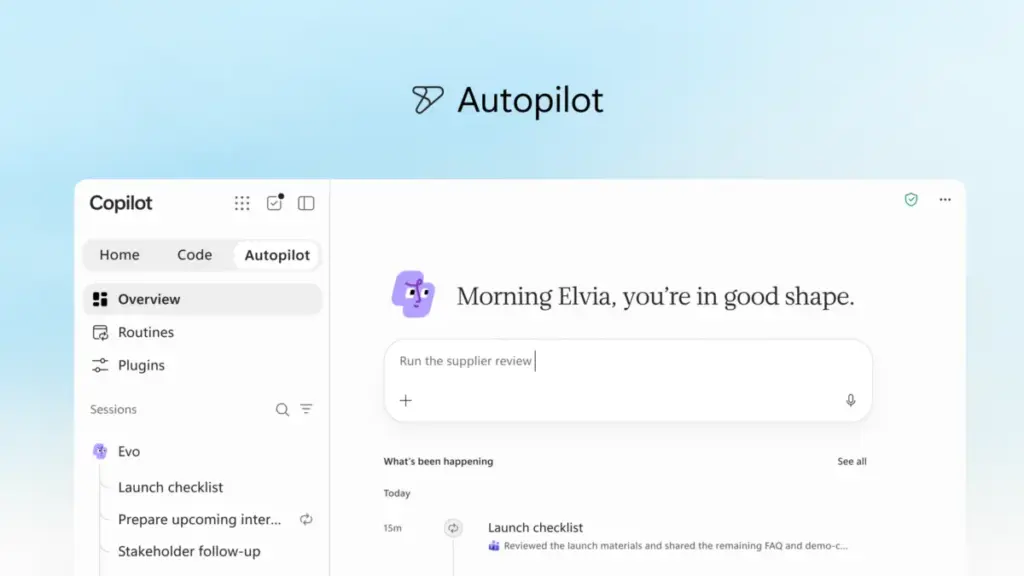
Perhaps the most significant departure from traditional AI assistants is "Autopilot," a feature previously known during its development as Scout. Autopilot is described by Microsoft as a "digital teammate" that operates with a high degree of autonomy. Unlike standard AI that waits for a prompt, Autopilot is proactive and persistent.
Users can assign Autopilot a specific name, role, and goal. Once activated, the agent can monitor communication channels, follow up on email threads, and manage recurring workflows without human intervention. For example, Autopilot can manage a full supplier review process, which involves building a schedule, handling preparatory work, attending meetings, and reaching out to stakeholders for updates. Because it is cloud-hosted, Autopilot continues to work even when the user is offline, ensuring that projects maintain momentum around the clock.

Autopilot is built on Microsoft IQ, the company’s unified intelligence platform. This allows the agent to have its own identity, memory, and workspace within a tenant, giving it a deep understanding of how a specific organization operates. It is designed to appear where people already work—such as in Teams, Outlook, and various chat channels—allowing colleagues to @mention the agent as they would any other member of the staff.
Expanding Business Context and Governance
For AI to be truly effective in a corporate setting, it requires access to the specific data and context of the business. Microsoft is addressing this through Fabric IQ, which connects Copilot to more than 20 million semantic models in Power BI. This ensures that the insights provided by the AI are grounded in the company’s actual data.
Furthermore, Copilot is now being integrated with data and workflows from Dynamics 365 and the Power Platform. This means a salesperson drafting a proposal can have Copilot automatically pull in deal histories or customer support tickets without ever leaving the document.
To manage the proliferation of these new capabilities, Microsoft is launching a new plugin registry. This unified catalog will house plugins from Microsoft, partners, and custom-built internal tools. The registry provides IT departments with a centralized location to approve and govern AI extensions, ensuring that new capabilities are introduced at scale without compromising organizational security or compliance.
Managing the Economics of AI
As AI capabilities expand, so does the complexity of managing the associated costs. Microsoft is introducing a dual-track pricing and management model to help organizations optimize their "FinOps for AI."
For everyday tasks like drafting emails or summarizing meetings, Microsoft utilizes a User Subscription License (USL). At the heart of this is a feature called "Auto," which acts as an intelligent router. Auto evaluates every request for its required accuracy, speed, and cost, then automatically selects the most appropriate AI model for the job.

For more intensive, "agentic" work—such as the long-running tasks performed by Autopilot or Cowork—Microsoft is moving toward usage-based billing (UBB). This allows organizations to match their costs directly to the value generated by high-end frontier models. To help administrators keep track of this, new cost management capabilities are being added to Agent 365, providing visibility into credit usage and allowing for the setting of spending policies at scale.
The Road Ahead: Today and @Copilot
Looking toward the immediate future, Microsoft offered a glimpse of upcoming features designed to further personalize the AI experience. A new command center called "Today" is set to enter private preview in October. "Today" is designed to be a proactive hub that surfaces what a user has missed across mail, calendars, and Teams, while also preparing drafts and proposing schedule changes automatically.
Additionally, the company is testing "@Copilot in Teams," a feature that grants the AI access to the shared context of a specific channel or group chat. This allows the AI to explain the reasoning behind past decisions or prepare cross-functional reviews that highlight dependencies and open questions for the entire team.
These innovations are currently rolling out through Microsoft’s Frontier program. The company has invited the broader tech and business community to learn more about these developments at the upcoming Microsoft Ignite conference, scheduled for November 17–20 in San Francisco and online.
As the workplace continues to adapt to the presence of generative AI, Microsoft’s latest updates signal a transition from AI as a novelty tool to AI as a foundational infrastructure for business operations. By combining creative assistance, autonomous agency, and rigorous financial governance, the new Copilot aims to redefine the boundaries of organizational productivity.
 Productivity Software & Office Suites
Microsoft Unveils ‘Autopilots’ and Microsoft Scout: The Next Evolution of Autonomous AI Agents for the Enterprise
The landscape of digital productivity is undergoing a fundamental shift, moving away...
 Productivity Software & Office Suites
Microsoft Launches Copilot Cowork Globally, Bringing Agentic AI to the Fortune 500
Microsoft has officially announced the general availability of Copilot Cowork, marking a...
 Productivity Software & Office Suites
Microsoft Unveils ‘Autopilots’ and Scout: A New Frontier for Autonomous AI Agents in the Enterprise
The nature of professional productivity is undergoing a fundamental shift, moving away...







