In a major strategic shift aimed at redefining the intersection of human ambition and artificial intelligence, Microsoft has announced a comprehensive reimagining of its Copilot platform. The technology giant is moving beyond the concept of a simple digital assistant, introducing a "new Copilot" designed to serve as a unified experience where individuals and organizations can build, customize, and scale AI capabilities directly within their daily workflows.
The update represents a fundamental evolution in how Microsoft envisions the future of productivity. By connecting the tools that billions of people rely on with a next generation of agentic capabilities, the company aims to help users navigate an increasingly complex digital landscape. This reimagined experience is built on the premise that work is constantly evolving, and the tools used to perform that work must be capable of moving in sync with the flow of human intent.
A New Experience for Every Mode of Work
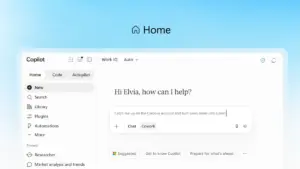
At the heart of this transformation is a redesigned entry point called Home. Microsoft describes Home as the new starting point for the Copilot experience, a centralized hub where Chat and Cowork are brought together into a single, cohesive interface. As modern professionals find themselves constantly shifting between meetings, emails, document editing, and various applications, Home is intended to act as a grounding mechanism, allowing users to get their bearings and maintain momentum.
Within this new interface, users can review their recent activity, receive tailored suggestions on how Copilot can assist with current projects, and resume work exactly where they left off. The distinction between the two primary modes is clear: Chat remains the conversational engine for instant questions, quick lookups, and rapid drafting, while Cowork is designed for delegated, end-to-end tasks. In Cowork, a user defines a complex objective—such as generating a Request for Proposal (RFP) response, a product launch kit, or a financial close package—and the AI executes the task autonomously, iterating until a completed result is delivered.
Perhaps the most significant addition to the Home experience is "Office in Copilot." This feature integrates the full functionality of Microsoft Word, Excel, and PowerPoint directly into the Copilot interface. This integration is designed to eliminate the friction of broken formatting, version control issues, and the need to rebuild context when moving between different applications. From within Home, a user can ask Copilot to draft a brief or model a budget, and the system creates a live, editable document or workbook that is synchronized for the entire team. This allows for side-by-side refinement where edits made in Copilot reflect instantly in the standalone Office apps and vice versa.

The enhancements extend deep into the individual Office applications as well. PowerPoint now features automated brand alignment and the ability to fine-tune imagery using custom templates. Excel has been updated to provide transparency into data modifications; when Copilot or a human collaborator makes an edit, the system explains the "why" behind the change and suggests optimal visualizations. Furthermore, specialized "Skills" are being introduced across the Microsoft 365 suite, allowing organizations to inject role-specific expertise—such as legal or financial workflows—directly into the apps.
Democratizing Solution Building Through Code
Microsoft is also challenging the traditional boundaries of software development with a new capability called Code. Historically, the primary unit of knowledge work has been the file—the document, the spreadsheet, or the presentation deck. While these remains essential, Microsoft argues that a fourth unit is emerging: the purpose-built solution.
The Code feature is designed to move solution-building into the hands of non-developers. By describing an app, an automation workflow, or a data dashboard in natural language, users can prompt Copilot to build and host a functional tool. These can range from persistent desktop widgets for quick data reference to cloud-hosted internal applications that can be shared across a team.
This capability is powered by the same underlying technology as GitHub Copilot, but it is tailored for a broader audience. To ensure enterprise-grade security, Microsoft is introducing the Copilot Managed Runtime. This hosting infrastructure allows the code generated by Copilot to run safely within a company’s existing Microsoft 365 environment. It provides a "sandboxed" space that is governed by IT departments but remains easily accessible to end-users. This managed runtime also serves as the foundation for apps built in Cowork and Copilot Studio, and Microsoft has announced plans to open this infrastructure to third-party and professional developers.
The Rise of Autopilot: A Persistent Digital Teammate
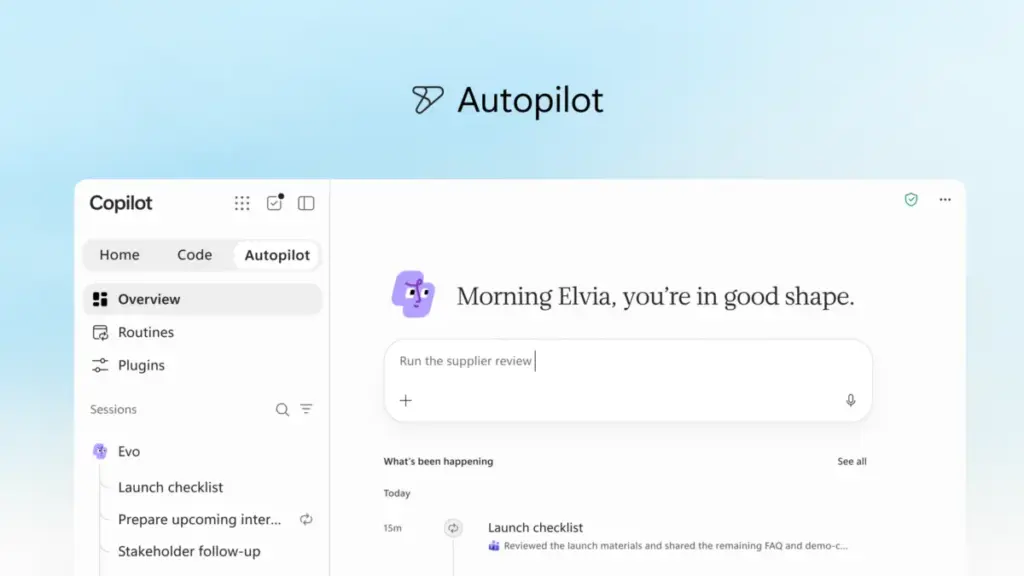
One of the most ambitious elements of the new Copilot is Autopilot, a feature previously known as Scout. Unlike traditional AI tools that require constant prompting, Autopilot is designed to function as a persistent, proactive digital teammate. Users can assign Autopilot a name, a specific role, and a long-term goal, after which the agent begins working independently.
Autopilot is capable of monitoring communication channels, following up on email threads, and managing recurring processes without human intervention. For example, it can oversee a full supplier review process by building a schedule, handling meeting preparations, and reaching out to stakeholders for status updates. Because it is cloud-hosted, Autopilot continues to operate even when the user is offline.

To function effectively within an organization, Autopilot is granted its own identity, memory, and workspace within the company’s tenant. It is built on Microsoft IQ, ensuring it understands the specific context and operational nuances of the business. Users can interact with it as they would a human colleague, @mentioning it in Teams or Outlook, while IT maintains full audit and governance control over its actions.
Expanding Business Context and Data Integration
The effectiveness of any AI is limited by the data it can access. To address this, Microsoft is expanding the business context available to Copilot through Microsoft IQ, a unified intelligence platform. A key component of this is Fabric IQ, which brings context from over 20 million semantic models in Power BI directly into Copilot’s grounding layer.
Furthermore, Copilot is now being grounded in data and workflows from Dynamics 365 and the Power Platform. This means that a salesperson drafting a proposal can have Copilot automatically incorporate deal histories or customer support tickets into the document without ever leaving the application.
To help organizations manage these expanding capabilities, Microsoft is launching a new plugin registry. This unified catalog serves as a single location for discovering and governing plugins from Microsoft, third-party partners, and custom internal builds. This allows IT departments to approve and deploy trusted capabilities at scale while giving developers a single point of publication to reach users across all Copilot-supported surfaces.
Managing AI Spend with FinOps
As AI usage scales, the challenge of managing costs becomes a primary concern for leadership. Microsoft is addressing this through a dual-pronged approach to pricing and a new suite of "FinOps for AI" capabilities.
For "everyday AI" tasks like drafting and summarization, Microsoft utilizes a User Subscription License (USL), which provides a fixed-cost model. At the center of this is "Auto," a system that evaluates the accuracy, speed, and cost of each request to route it to the most appropriate AI model.

However, for more complex, long-running agentic work—such as that performed by Cowork, Code, and Autopilot—Microsoft is moving toward Usage-Based Billing (UBB). This model allows organizations to match their costs directly to the value generated, providing access to frontier models like Astra and Fable.
The new FinOps capabilities are designed to give organizations granular control over this spend. Administrators can now manage spending policies via APIs, route credit requests through existing approval workflows, and restrict certain model families to specific groups of users. For the end-user, Copilot will now display credit usage and remaining balances, encouraging a culture of responsible AI consumption within organizational guardrails.
A Glimpse into the Future: Today and @Copilot in Teams
Looking ahead, Microsoft provided a preview of upcoming features designed to make Copilot even more personalized. A new command center called "Today" is set to enter private preview in October. This feature acts as a proactive dashboard across mail, calendar, and tasks, surfacing what needs immediate attention and even pre-drafting responses or scheduling changes before the user asks.
Additionally, a new "@Copilot" capability in Teams will allow the AI to participate in group chats and channels with a shared understanding of the team’s context. It will be able to pull background information from past conversations to explain why decisions were made and offer to prepare cross-functional reviews that identify dependencies and owners.
These announcements come ahead of the Microsoft Ignite conference in November, where the company expects to share further innovations. For now, the rollout of these new features has begun through the Microsoft Frontier program, marking the start of a new chapter in the company’s efforts to turn AI from a novelty into the foundational engine of modern work.
 Productivity Software & Office Suites
Microsoft Announces General Availability of Work IQ APIs, Ushering in the Era of Agentic Software
REDMOND, Wash. — In a move that signals a fundamental transformation in...
 Productivity Software & Office Suites
Microsoft Unveils Natural Language App Creation in Copilot Studio, Bridging the Gap Between AI Innovation and Enterprise Governance
The landscape of software development is undergoing a fundamental transformation, driven by...
 Productivity Software & Office Suites
Microsoft Reimagines Copilot as a Central Hub for AI-Driven Enterprise Productivity
In a significant move to redefine the landscape of modern work, Microsoft...