
Microsoft has announced a significant evolution of its AI strategy, unveiling what it describes as the "new Copilot." This overhaul moves the technology beyond a simple sidebar assistant, transforming it into a comprehensive orchestration layer designed to integrate seamlessly into the flow of professional productivity. By introducing new capabilities such as a centralized "Home" interface, autonomous "Autopilot" agents, and a natural-language "Code" environment, Microsoft aims to redefine how individuals and organizations interact with artificial intelligence to manage complex workflows and scale their operations.
The shift reflects a broader trend in the technology industry toward "agentic AI"—systems that do not merely respond to prompts but can proactively manage tasks, follow up on threads, and execute multi-step processes with minimal human intervention. Jared Spataro, who leads Microsoft’s AI at Work efforts, emphasized that this reimagining is intended to help organizations solve unique business problems and drive value creation as the nature of work continues to evolve.
A Unified Experience for Every Mode of Work
At the heart of this transformation is the new "Home" experience, designed to serve as the primary starting point for the modern worker. As professional life increasingly fragments across various meetings, chat threads, documents, and specialized applications, Microsoft’s new interface acts as a grounding mechanism. It is here that two distinct modes of AI interaction—Chat and Cowork—converge.
Chat remains the familiar, conversational interface optimized for instant queries, quick lookups, and the drafting of simple communications. However, it is the introduction of "Cowork" that signals a shift in capability. Cowork is designed for delegated tasks that require an end-to-end completion of complex projects. Instead of a back-and-forth dialogue, a user defines a high-level objective—such as generating a formal RFP response, a product launch kit, or a financial close package—and the system iterates on the task until a finished result is delivered.
To simplify the user experience, Microsoft plans to remove the need for manual mode selection in the near future. Users will eventually be able to state their objective in natural language, and Copilot will automatically route the request to Chat, Cowork, or the new Code environment, depending on which capability is best suited for the specific requirements of the job.

The integration deepens with "Office in Copilot," which embeds the full functionality of Word, Excel, and PowerPoint directly into the Copilot experience. This move addresses a common friction point in AI productivity: the need to copy and paste content between a chat window and a document. Within the new interface, users can ask Copilot to draft briefs or model budgets, and the system creates or updates live, editable files that are synced across the Microsoft 365 ecosystem. This ensures that formatting remains intact and that all team members can collaborate on the AI-generated content in real-time, using familiar features like @mentions to loop in human colleagues.
Democratizing Solution Building with Natural Language
One of the most ambitious additions to the suite is "Code," a feature that seeks to move software and solution building out of the exclusive domain of developers. Microsoft posits that while the traditional units of knowledge work—the document, the spreadsheet, and the slide deck—remain vital, a fourth unit is emerging: the purpose-built digital solution.
The Code feature allows non-technical users to describe an application, an automation workflow, or a data dashboard in natural language. Powered by the same underlying technology as GitHub Copilot, the system then architects and builds the solution. These can range from persistent desktop widgets for quick data reference to cloud-hosted internal applications shared across a department.
To ensure these user-generated solutions meet enterprise security standards, Microsoft is introducing the "Microsoft Copilot Managed Runtime." This hosting infrastructure allows the generated code to run safely within the organization’s existing Microsoft 365 environment. It provides IT departments with the necessary governance and oversight while giving employees the freedom to connect their custom apps to live data. This managed runtime is also being opened to third-party and professional developers, creating a unified foundation for apps built in Cowork, Code, and Copilot Studio.
The Rise of Autonomous Agents: From Scout to Autopilot
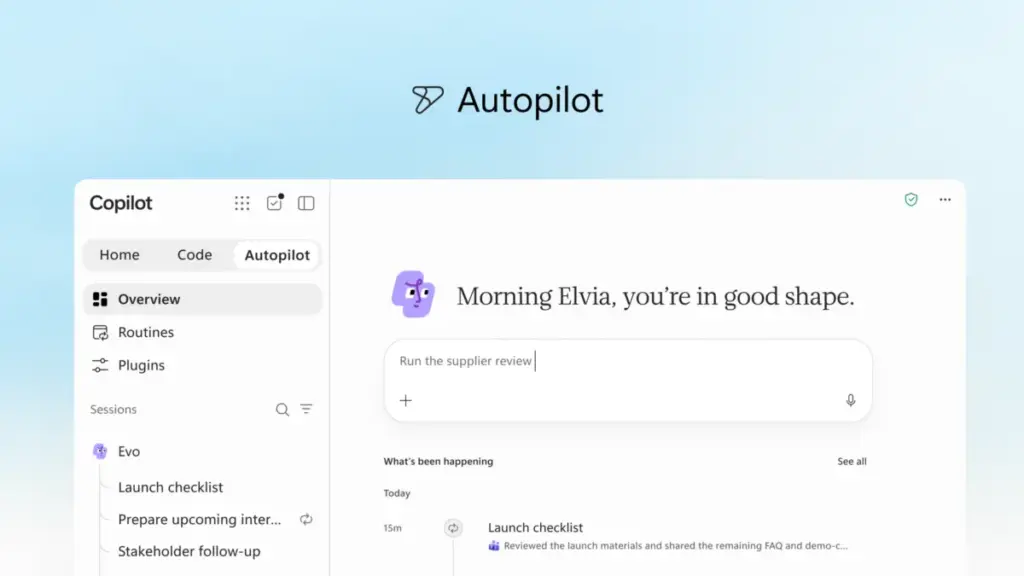
Perhaps the most significant leap toward autonomous AI is "Autopilot," the feature formerly known as Scout. Unlike traditional AI assistants that wait for a user to initiate contact, Autopilot is designed to be a proactive digital teammate. It operates with its own identity, memory, and workspace within a company’s digital environment.
Users can assign Autopilot a specific name, role, and goal. Once activated, the agent can monitor communication channels, follow up on email threads, and manage recurring administrative processes without being prompted. For example, in a supply chain context, Autopilot could manage a full supplier review process—building a schedule, handling preparatory meetings, and reaching out to various stakeholders for updates—while the human user focuses on higher-level strategy.

Because Autopilot is cloud-hosted and integrated into Microsoft IQ—the company’s unified intelligence platform—it maintains continuity. It continues to work while the user is offline, ensuring that projects do not stall during the "white space" between active working hours. It is accessible through Teams, Outlook, and other Microsoft 365 apps, allowing team members to interact with it as they would a human colleague.
Grounding AI in Deep Business Context
For AI to be effective in a corporate setting, it must be grounded in the specific data and workflows of the organization. Microsoft is expanding this context through "Fabric IQ," which brings more than 20 million semantic models from Power BI into the Copilot environment. This allows the AI to provide insights based on trusted, real-time data from across the enterprise.
Furthermore, Copilot is now gaining deeper integration with Dynamics 365 and the Power Platform. This means that a sales professional drafting a proposal can have Copilot automatically pull in deal histories, customer support tickets, and pricing data without having to switch between different enterprise resource planning (ERP) or customer relationship management (CRM) tools.
To manage the growing ecosystem of AI capabilities, Microsoft is launching a new unified plugin registry. This catalog brings together first-party, partner-built, and custom plugins into a single location. It allows IT administrators to approve and govern the tools available to their workforce, while developers can publish a single plugin that extends Copilot’s functionality across multiple Microsoft interfaces.
The Economics of AI: Managing Spend and Value
As AI usage scales, organizations are increasingly concerned with the associated costs. Microsoft is addressing this through a dual-pronged pricing strategy and the introduction of "FinOps for AI" capabilities.
For everyday productivity tasks like drafting and summarization, Microsoft utilizes a User Subscription License (USL), providing high-quality AI at a fixed cost. Within this model, a feature called "Auto" intelligently routes requests to the most appropriate model based on the complexity of the task, balancing speed, accuracy, and cost.

For more intensive, "agentic" work—such as the long-running processes handled by Autopilot or Cowork—Microsoft is moving toward Usage-Based Billing (UBB). This model gives organizations granular control over their spend, allowing them to match the cost of advanced frontier models, like Astra and Fable, to the specific business value they generate.
The new FinOps for AI tools provide administrators and business leaders with the visibility needed to manage these costs. Admins can set spending policies, manage credit requests, and determine which model families are available to specific user groups. Meanwhile, end-users can track their own AI usage and remaining balances directly within the Copilot interface, fostering a culture of responsible AI consumption within organizational guardrails.
Personalization and the Future of Proactive Assistance
Looking ahead, Microsoft provided a glimpse into upcoming features aimed at making Copilot even more personalized. "Today" is a forthcoming command center that will act as a proactive daily brief. It is designed to surface what a user missed, what requires immediate attention, and what tasks can be deferred. Beyond just listing tasks, "Today" will prepare the work in advance—having drafts ready for review or schedule changes proposed before the user even opens their inbox.
Additionally, the company is testing "@Copilot" in Microsoft Teams. This feature allows a team to invoke the AI within a group chat or channel, where it will have the shared context of the entire conversation history. It can explain the reasoning behind past decisions or prepare cross-functional reviews that identify owners and dependencies, keeping entire projects aligned without requiring manual summaries.
The new Copilot experience is currently rolling out through Microsoft’s Frontier program, with broader availability expected in the coming months. As these tools move from private preview to general release, the company continues to position AI not just as a tool for individuals, but as a fundamental shift in how organizations orchestrate labor, data, and ambition. Further details on these innovations and their impact on the future of work are expected to be a central theme at the upcoming Microsoft Ignite conference in November.
 Productivity Software & Office Suites
Microsoft Unveils Strategic Roadmap for Enterprise AI, Prioritizing Agentic Workflows and Flexible Economic Models
In an era defined by rapid-fire technological breakthroughs and a relentless cycle...
 Productivity Software & Office Suites
Microsoft Reimagines Copilot as a Comprehensive AI System for Enterprise Automation and Custom Development
In a significant shift that signals the next phase of the generative...
 Productivity Software & Office Suites
Microsoft Announces New AI-Integrated Office Suites to Streamline Small Business Operations
In the demanding ecosystem of small business management, success is often measured...







