
In a significant shift for the future of digital productivity, Microsoft has announced a comprehensive reimagining of its Copilot platform. The tech giant is moving beyond the concept of a simple AI assistant to create a unified environment designed to integrate directly into the flow of human ambition. This evolution aims to expand what individuals and organizations can achieve by connecting essential tools with a new generation of AI capabilities focused on building, customizing, and scaling intelligence across the modern enterprise.
Jared Spataro, who leads Microsoft’s AI at Work efforts, emphasized that the goal is to enable work as it evolves. The new Copilot experience is built to ground users in their daily tasks while providing the power to delegate complex workflows to autonomous agents. By introducing several core pillars—Home, Code, and Autopilot—Microsoft is positioning Copilot as the primary interface through which professional work is conducted, managed, and automated.
A New Experience for Every Mode of Work
The centerpiece of this transformation is the introduction of "Home," a new starting point designed to ground users in their daily activities. As modern work frequently fluctuates between meetings, chats, documents, and emails, Home serves as a digital command center where users can get their bearings and maintain momentum. Within this interface, two distinct modes of interaction coexist: Chat and Cowork.
Chat remains the conversational heart of the experience, optimized for instant interactions, quick lookups, and the creation of initial drafts. However, it is the introduction of "Cowork" that marks a significant shift in how AI is utilized. Unlike traditional chatbots that require constant prompting, Cowork is designed for tasks that a user delegates entirely. Once a task is defined—such as responding to a Request for Proposal (RFP), creating a product launch kit, or preparing a financial close package—the AI runs the process end-to-end. This allows the user to focus on higher-level strategy while the AI handles the iterative, complex work required to return a completed result.
Further bridging the gap between AI and traditional productivity, Microsoft is launching "Office in Copilot." This feature integrates the full power of Word, Excel, and PowerPoint directly into the Copilot experience. The intent is to eliminate the friction of context switching and broken formatting. Users can now ask Copilot to draft a brief or model a budget from within the Home interface, and the system will create or update a real, editable document that remains live for the entire team. This synchronization ensures that as a user refines a document side-by-side with the AI, or as a teammate makes edits via an @mention, the progress remains consistent across both the Copilot interface and the standalone Office applications.
The individual Office apps are also receiving specialized updates. PowerPoint can now automatically keep presentations on-brand while allowing for the fine-tuning of images and custom templates. Excel users can now see a clear audit trail of changes made by Copilot or other collaborators, with the AI providing recommendations for the most effective data visualizations. Across the Microsoft 365 suite, "Skills" are being introduced to bring role-specific expertise, such as legal or financial workflows, directly into the applications to scale organizational best practices.

Empowering Non-Developers with ‘Code’
Microsoft is also looking to redefine the boundaries of software development through its new "Code" capability. Traditionally, the fundamental units of knowledge work have been files—the document, the spreadsheet, and the presentation deck. Microsoft argues that a fourth unit is emerging: the purpose-built solution.
The "Code" feature allows users to describe an application, tracker, or automation workflow using natural language. Copilot then selects the appropriate technical approach and builds the solution, ranging from desktop widgets for quick reference to cloud-hosted internal apps for team collaboration. This capability is powered by the same underlying technology as GitHub Copilot, ensuring a high level of sophistication.
To address security concerns, Code operates within a sandboxed environment and can be hosted securely within a company’s specific tenant. Through "Microsoft IQ," every solution created is grounded in the user’s specific work context, with plugins syncing automatically. While professional developers will continue to use GitHub Copilot for deep coding tasks, the new Code feature democratizes the ability to create functional tools for everyday business problems.
To support this surge in custom-built solutions, the company is introducing the "Microsoft Copilot Managed Runtime." This hosting infrastructure allows code to run safely within the Microsoft 365 environment under IT governance. It provides a foundation where apps built in Cowork, Code, and Copilot Studio can be shared easily, connected to live data, and accessed from anywhere, effectively making AI-powered app deployment accessible to non-technical staff.
Autopilot: The Autonomous Digital Teammate
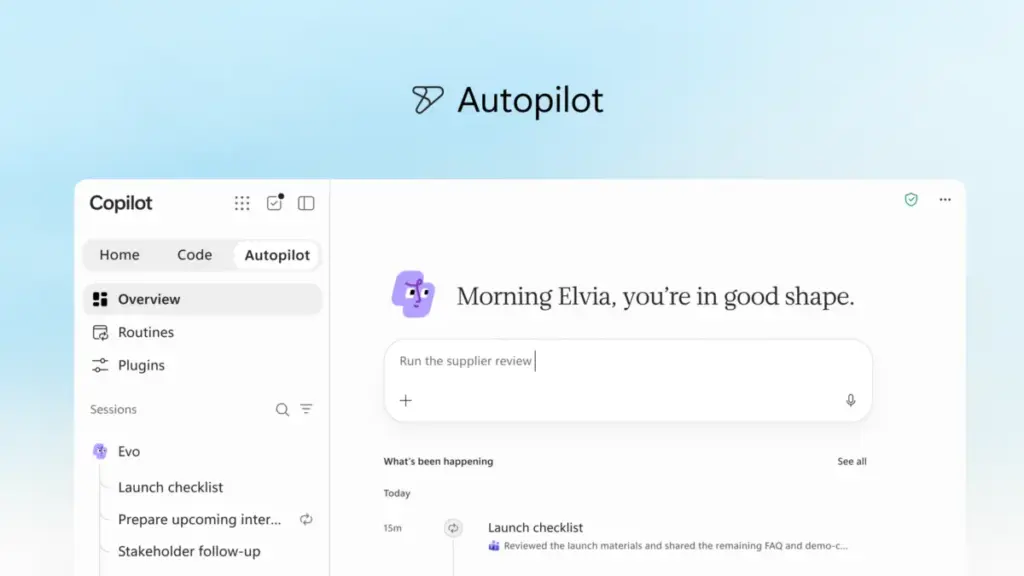
One of the most ambitious additions to the suite is "Autopilot," a feature previously known during its development phase as "Scout." Microsoft describes Autopilot as a persistent, proactive digital teammate that continues to work even when the user is offline. Unlike a standard AI that waits for a command, Autopilot is given a name, a role, and a specific goal.
Once activated, Autopilot can monitor communication channels, follow up on email threads, and manage recurring workflows. For example, it can oversee a full supplier review process—building the schedule, handling the preparation for meetings, and reaching out to stakeholders for necessary updates without constant human intervention. Because it is cloud-hosted, it operates independently of the user’s local machine.

Autopilot lives within the organization’s tenant with its own identity, memory, and workspace. It is built on Microsoft IQ, allowing it to understand the nuances of how a specific organization operates. Users can interact with it much like a human colleague, @mentioning it in Teams, Outlook, or shared documents. Despite its autonomy, Microsoft emphasizes that the user remains in control, setting the boundaries and objectives while receiving regular updates on the agent’s progress.
Expanding Business Context and Grounding
The effectiveness of these AI tools relies heavily on their access to relevant data. Microsoft is expanding the business context available to Copilot through "Fabric IQ." This unified intelligence platform connects Copilot to more than 20 million semantic models in Power BI, grounding the AI’s responses in the organization’s actual data.
Furthermore, Copilot is now becoming grounded in data and workflows from Dynamics 365 and the Power Platform. This means a salesperson working on a proposal can have Copilot pull deal histories or customer support tickets directly into a document without having to switch applications. To facilitate this ecosystem, a new unified plugin registry is being introduced, allowing IT departments to centrally approve and manage both first-party and third-party plugins. This ensures that the AI can be extended with trusted capabilities at scale.
Managing AI Spend and Optimization
As organizations scale their use of AI, managing costs has become a primary concern. Microsoft is addressing this through "FinOps for AI," a discipline focused on optimizing AI spend for business value. The company is introducing a bifurcated pricing and routing strategy to balance quality and cost.
For everyday tasks like summaries and drafts, Microsoft utilizes a User Subscription License (USL). At the heart of this is "Auto," a routing system that evaluates each request based on accuracy, speed, and cost to select the most appropriate model. For more complex "agentic" work—such as the long-running tasks performed by Cowork, Code, and Autopilot—Microsoft is moving toward Usage-Based Billing (UBB). This model allows organizations to use advanced frontier models like Astra and Fable while maintaining control over their expenditures.
New administrative capabilities in "Agent 365" will allow business leaders to manage spending policies, route credit requests, and analyze which AI tasks are generating the strongest returns on investment. End users will also be able to view their own credit usage and history directly within Copilot, fostering a culture of responsible AI usage within organizational guardrails.

A Sneak Peek at What’s Next
The announcement also included a look at upcoming features intended to make Copilot even more personalized. A new feature called "Today" will serve as a proactive command center across mail, calendar, and tasks. It is designed to surface what needs immediate attention and even prepare drafts or schedule changes before the user asks for them. "Today" is expected to enter private preview in October.
Additionally, Microsoft is enhancing the collaborative nature of AI with "@Copilot in Teams." This feature will allow an entire team to invoke Copilot within a channel or group chat, where the AI will have access to the shared context of the conversation. It can help explain past decisions or prepare cross-functional reviews that identify dependencies and open questions, ensuring that projects maintain momentum even as they grow in complexity.
The rollout of these new capabilities has begun through the Microsoft Frontier program, with broader availability expected in the coming weeks and months. As Microsoft prepares for its Ignite conference in November, the company continues to signal that the "New Copilot" is not just a tool, but a fundamental reimagining of the workplace itself.
 Productivity Software & Office Suites
Microsoft Unveils Advanced AI ‘Skills’ and Data Connectors to Transform Excel for Finance Professionals
The evolution of modern computing has historically followed a predictable trajectory, moving...
 Productivity Software & Office Suites
Microsoft Unveils Specialized AI Capabilities for Finance Professionals in Excel to Address Sector-Specific Complexity
The trajectory of transformative technology has followed a consistent, predictable rhythm for...
 Productivity Software & Office Suites
Microsoft Reimagines Copilot as a Comprehensive AI System for Enterprise Automation and Custom Development
In a significant shift that signals the next phase of the generative...







