
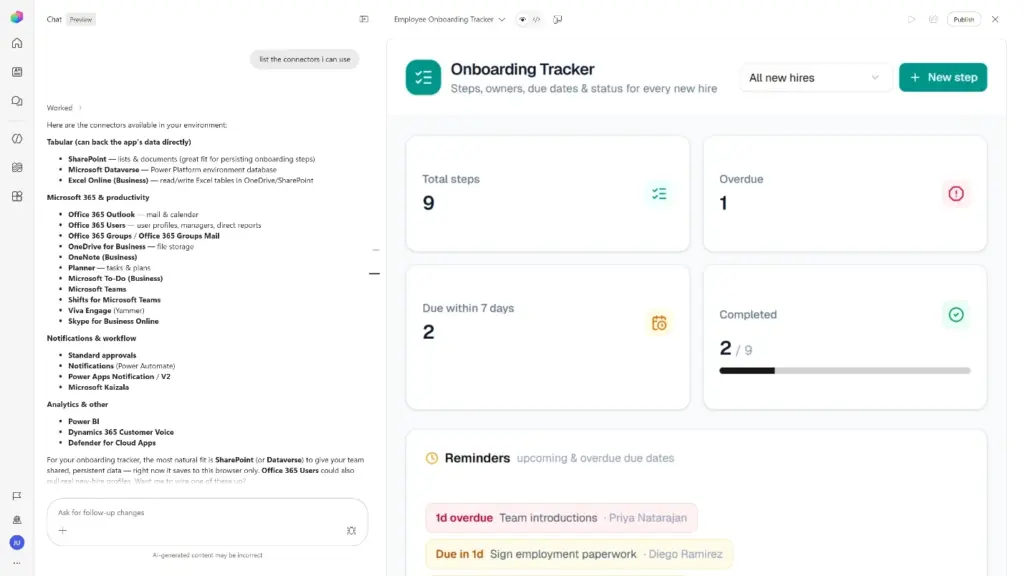
The landscape of software development is undergoing a fundamental transformation as artificial intelligence shifts the power of creation from professional developers to the broader workforce. In a significant expansion of its AI ecosystem, Microsoft has announced the introduction of natural language application building within Copilot Cowork and Copilot Studio. This move is designed to empower individuals who have never written a single line of code to transform a conceptual idea into a fully functional, enterprise-ready application in a matter of minutes.
For decades, the "citizen developer" movement has sought to lower the barriers to software creation, yet the technical hurdles of syntax, data integration, and security protocols often remained too high for the average business professional. By leveraging "agentic coding" solutions, Microsoft is attempting to bridge this gap, allowing users to simply describe the desired outcome, the intended users, and the necessary data sources to generate a working application scaffold.
However, the tech giant acknowledges that the mere generation of an application is only one piece of a much larger puzzle. For software to be truly useful within a corporate environment, it must be more than a standalone tool; it must integrate seamlessly with existing enterprise data, operate under strict security frameworks, and align with the established workflows that employees use daily. Furthermore, as the number of application builders within an organization increases, IT departments require robust governance and oversight to ensure these new solutions do not compromise the integrity or security of the enterprise.
Build an app by describing what you need
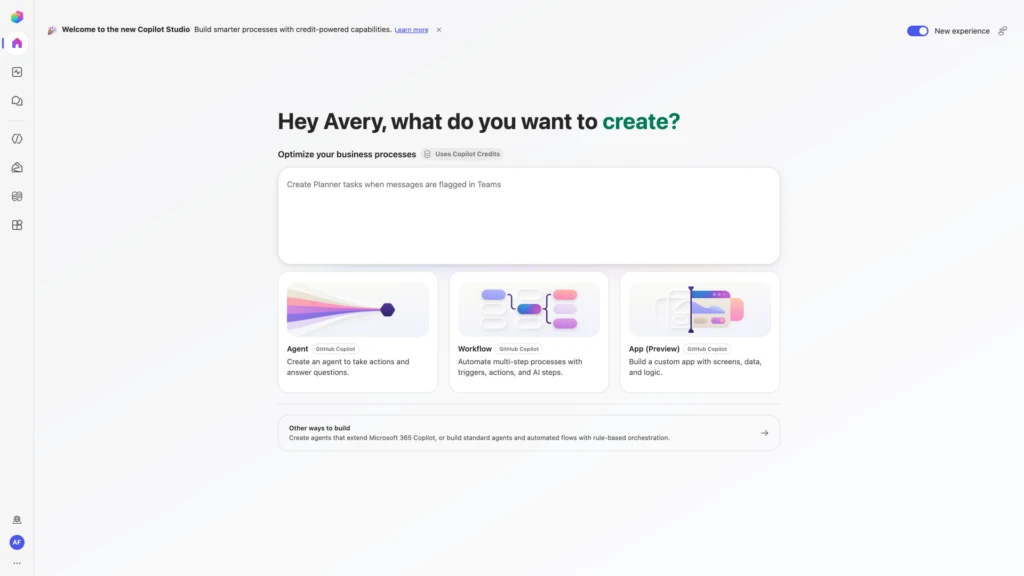
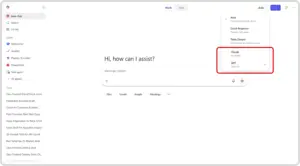
The journey from a business problem to a digital solution now begins with a simple conversation. Microsoft has integrated this capability into two primary entry points: Copilot Cowork and Copilot Studio. Within Copilot Cowork, users can invoke the new "/app" skill, while in Copilot Studio, a dedicated "App (Preview)" tile is now available on the home screen.

The process is inherently iterative. Once a user describes their intent, the agentic coding engine translates that natural language into a functional application structure. This is not a static output; builders can continue to refine the application through ongoing dialogue with the AI. They can inspect the application in a preview mode, making real-time adjustments to the user interface or functionality.
Importantly, this experience is tailored to a diverse spectrum of users. For the information worker—the marketing manager or the HR specialist—the focus remains entirely on the business solution and the user experience. For more advanced "makers" or professional developers, the platform provides the ability to dive deeper into the underlying code and structure. This hybrid approach ensures that while the barrier to entry is low, the ceiling for customization remains high, allowing for more granular control when a project demands it.
Connect apps to your business data
A common criticism of early low-code and no-code tools was their tendency to create "data silos"—applications that worked well in isolation but could not communicate with the broader enterprise ecosystem. Microsoft is addressing this by ensuring that apps built through Copilot Cowork and Copilot Studio are inherently connected.
The platform utilizes an extensive library of connectors to link applications with critical business data. Central to this connectivity is "Work IQ," a feature that allows the AI to access and understand organizational context. This means that a custom-built app is not just a hollow shell; it is grounded in the specific data and services that define a company’s operations.
The functionality extends beyond merely surfacing or displaying information. These applications are designed to take action, such as writing results and updates back into the systems within the Microsoft 365 tenant boundary. Microsoft provided the example of an onboarding application that can track a new hire’s progress, surface relevant learning materials, and update HR records in real-time. Similarly, a field service application could retrieve technical specifications from a third-party database, guide a technician through a repair, and then log the completed work back into the central management system. By grounding the app experience in the actual data and services people use, Microsoft aims to make these AI-generated tools indispensable to the daily flow of work.
Build enterprise apps with open standards and centralized control
As the democratization of app building accelerates, the primary concern for IT administrators is often "Shadow IT"—the proliferation of unsupported and unmanaged software within the organization. Microsoft has built its new app-building capabilities with a "governance-first" mindset to mitigate these risks.
Despite being initiated through natural language, the resulting products are full-stack applications built on open standards. This technical foundation allows for professional-grade development practices, including Git-backed source control, version isolation, and defined deployment stages. These features ensure that teams can work on improving a second version of an application without the risk of disrupting the version currently in live use.
Security and identity management are also integrated by default. The applications respect Microsoft Entra (formerly Azure Active Directory) identity protocols, as well as existing organizational data and connector policies. This means that an app created by a business user cannot bypass the security permissions already established by the IT department.
To provide the necessary oversight, IT administrators are granted centralized visibility through the Microsoft 365 admin center. From this dashboard, they can view a full inventory of all published applications, manage their lifecycles, and exercise operational controls. This creates a balanced environment where business users have the freedom to innovate and solve their own problems, while IT retains the visibility and control required to maintain a secure and compliant digital estate.
Start building apps with Copilot Studio

The rollout of these features is already underway. Organizations looking to get an early start can join the Microsoft Frontier program, which provides immediate access to the "/app" skill within Copilot Cowork. For those waiting for the native integration within Copilot Studio, the public preview is scheduled to roll out over the coming week.
Once the update reaches an environment, users will see the new apps tile in Copilot Studio, marking the beginning of a new era of "agentic" creation where agents, workflows, and full applications live side-by-side. Microsoft has confirmed that the building and running of these applications will follow a usage-based billing model, aligning the cost of the tools with the actual value they provide to the organization.
When an application is ready for the limelight, it can be published to a new discovery portal located at managedapps.cloud.microsoft.com. This centralized hub allows employees to find and utilize the various enterprise-ready tools created by their colleagues, further integrating these custom solutions into the fabric of the company.
The introduction of natural language app building represents a strategic move by Microsoft to consolidate its lead in the enterprise AI space. By combining the ease of conversational AI with the power of full-stack development and the security of the Microsoft 365 ecosystem, the company is betting that the future of business productivity lies in the hands of the people who understand the problems best—the employees themselves. As these tools become more widely available, the focus will likely shift from who can write code to who can best describe the solutions that will drive the next wave of business innovation.
 Productivity Software & Office Suites
Microsoft Announces Microsoft 365 G7 and Agent 365 to Accelerate AI Adoption and Governance Across U.S. Government Agencies
In an era where the public sector faces the dual challenge of...
 Productivity Software & Office Suites
Microsoft to Headline ESPC 2026 in Amsterdam: A Deep Dive into the Future of AI-Powered Work and Agentic Ecosystems
The landscape of enterprise technology is currently undergoing one of its most...
 Productivity Software & Office Suites
Microsoft Announces New AI-Integrated Office Suites to Streamline Small Business Operations
In the demanding ecosystem of small business management, success is often measured...







