
In the modern digital landscape, the most sophisticated firewall or biometric lock is often no match for the simplest of vulnerabilities: the human element. As mobile devices become the central hubs for both personal and professional lives, cybercriminals have shifted their focus away from brute-force attacks on hardware and toward the psychological manipulation of users. From the long-standing threat of phishing to the more modern iterations of "smishing" and "vishing," the tactics used to deceive individuals into surrendering sensitive information are evolving at a staggering rate.
The latest addition to this arsenal of deception is "quishing"—a portmanteau of QR codes and phishing—where attackers replace legitimate QR codes in public spaces with malicious ones designed to harvest credentials or install malware. With the rise of easily accessible generative AI, these scams have become more polished, harder to detect, and increasingly personalized. In response to this shifting threat landscape, Google is rolling out a significant update to its Android security suite, introducing an "Enhanced Protection" mode within the Google Messages app. This feature, which is currently available for those who know where to look, provides a critical layer of defense designed to intervene at the exact moment a user’s judgment might falter.
The Evolving Landscape of Social Engineering
The reality of contemporary mobile security is that even the most tech-savvy individuals are susceptible to well-timed social engineering. A distracted moment while commuting, a sense of urgency created by a fake banking alert, or a convincing delivery notification can lead anyone to click a link they would otherwise ignore. The industry has seen a massive surge in these "human-centric" threats because they bypass traditional technical safeguards.
Smishing (SMS phishing) has become particularly prevalent as users tend to trust text messages more than emails. Vishing (voice phishing) uses the intimacy of a phone call to pressure victims, and now, quishing leverages the ubiquity of QR codes in the post-pandemic world. The introduction of AI into these schemes allows scammers to generate flawless, professional-sounding messages in any language, removing the grammatical red flags that once served as the primary warning signs for users.
Given these conditions, the consensus among security experts is that the most effective defense is a multi-layered one. If a user’s personal guard is down, the software must act as a secondary safety net. Google’s new Enhanced Protection is designed to be that net, offering a proactive "nudge" that asks the user to pause and reconsider before engaging with a potentially harmful message.
Unpacking the Enhanced Protection Framework
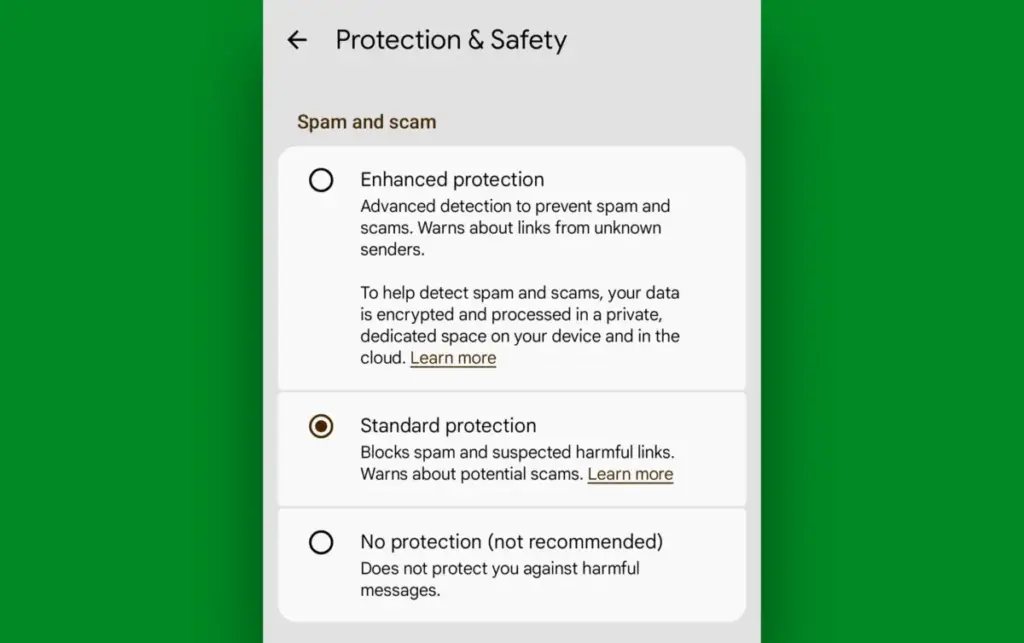
The core of this new initiative is housed within Google Messages, the de facto messaging standard for the Android ecosystem. While the app has long featured basic spam filtering, the new Enhanced Protection mode represents a much more aggressive and intelligent approach to security. According to Google, this mode introduces three primary forms of in-message defense tailored to combat the most common vectors of attack.

First, the system implements advanced link scanning. When a message arrives containing a URL, the app analyzes the destination without compromising user privacy. If the link exhibits characteristics common to known phishing sites or suspicious domains, the user is presented with a clear warning. This is particularly vital in combating quishing and smishing, where the goal is almost always to drive the user to a malicious external site.
Second, the update improves the identification of suspicious senders. By analyzing patterns of behavior—such as messages coming from unrecognized international numbers or senders that fit the profile of automated scam bots—the system can flag conversations before the user even reads the content. This serves as a psychological barrier, immediately putting the recipient on high alert.
Finally, the system includes sensitive content protection. This involves identifying messages that appear to be soliciting high-risk information, such as passwords, one-time verification codes, or financial details. By recognizing the language of a scam, the app can warn the user that the request is highly unusual for a standard SMS or RCS interaction.
A critical component of this rollout is Google’s commitment to a privacy-first architecture. The company has stated that these features rely on a combination of on-device processing and secure, cloud-based computing. The cloud elements occur within an encrypted, dedicated space, ensuring that the content of the messages remains inaccessible to third parties, including Google itself. This balance allows for high-level security analysis without sacrificing the end-to-end privacy that modern messaging users expect.
The Path to Early Adoption
While Google typically rolls out these features in stages, Android users do not necessarily have to wait for the official global release to reach their specific device or carrier. Because the Enhanced Protection mode is tied to the Google Messages app and the underlying Google Play Services, users can manually opt into the latest security versions to gain immediate access.
The first step in this process involves the Google Messages beta program. The beta channel allows users to test upcoming features before they are finalized for the general public. While beta software can occasionally be less stable than final releases, for a security-focused update like Enhanced Protection, the benefits of early access often outweigh the risks for power users and those concerned about the current wave of smishing attacks. Joining the beta is a straightforward process through the Google Play Store, typically requiring only a few taps to enroll the account and update the app.
However, updating the app itself is often not enough. Many of Android’s most advanced features are powered by Google Play Services—an invisible but essential system layer that handles everything from location services to security APIs. To ensure the new protection features are functional, users must ensure their Google Play system is fully up to date. This is distinct from standard OS updates and is found within the "Security" or "About Phone" sections of the system settings. Manually checking for a "Google Play system update" often triggers a download that enables the latest backend hooks required for Enhanced Protection.

Activating the Safety Net
Once the necessary software versions are in place, the final step is the manual activation of the feature. Google has placed these options within a newly expanded "Protection & Safety" menu inside the Google Messages settings. This centralized hub is where users can manage their spam filters and now, the Enhanced Protection toggle.
By selecting Enhanced Protection, the user is effectively giving the device permission to be more proactive in its defense. It moves the app from a passive filter to an active guardian. For the average user, the day-to-day experience will remain largely unchanged, but the background processes will be significantly more robust.
The broader implication of this update is a shift in how mobile operating systems view security. In the past, the focus was on preventing unauthorized access to the hardware. Today, the focus is shifting toward protecting the user from their own interactions. As scammers become more adept at exploiting human psychology, the software must become more adept at providing the "common sense" that can sometimes fail in a moment of stress or distraction.
The Future of Proactive Defense
The introduction of Enhanced Protection in Google Messages is likely just the beginning of a broader trend in mobile security. As AI continues to empower both the attacker and the defender, we can expect to see more features that rely on real-time analysis of communication patterns.
For now, the responsibility remains partially on the user to stay informed and utilize the tools available to them. By taking the steps to enable these hidden settings, Android users can significantly reduce their risk profile. While no security measure is 100% effective, adding layers of protection creates a cumulative defense that makes it much harder for a scammer to succeed. In a world where a single click can lead to identity theft or financial loss, having an automated system that asks, "Are you sure you want to do this?" is perhaps the most valuable security feature a modern smartphone can offer.
 Small Business IT & Cloud Computing
The Vanishing Secret: What Happens to Your Private Chatbot Data When an AI Company Goes Bankrupt?
For millions of users, the AI chatbot has become more than just...
 Small Business IT & Cloud Computing
Microsoft Issues Emergency Fixes Following Disruptive September Patch Tuesday Updates
The long-standing mantra for information technology professionals and cybersecurity experts has always...
 Small Business IT & Cloud Computing
AI-Driven Cyberattacks Target Online Retailers at a Cost of Just $25 Per Breach
The landscape of cybersecurity is undergoing a fundamental shift as the barrier...







