
However, updating the app itself is often not enough. Many of Android’s most advanced features are powered by Google Play Services—an invisible but essential system layer that handles everything from location services to security APIs. To ensure the new protection features are functional, users must ensure their Google Play system is fully up to date. This is distinct from standard OS updates and is found within the "Security" or "About Phone" sections of the system settings. Manually checking for a "Google Play system update" often triggers a download that enables the latest backend hooks required for Enhanced Protection.

Activating the Safety Net
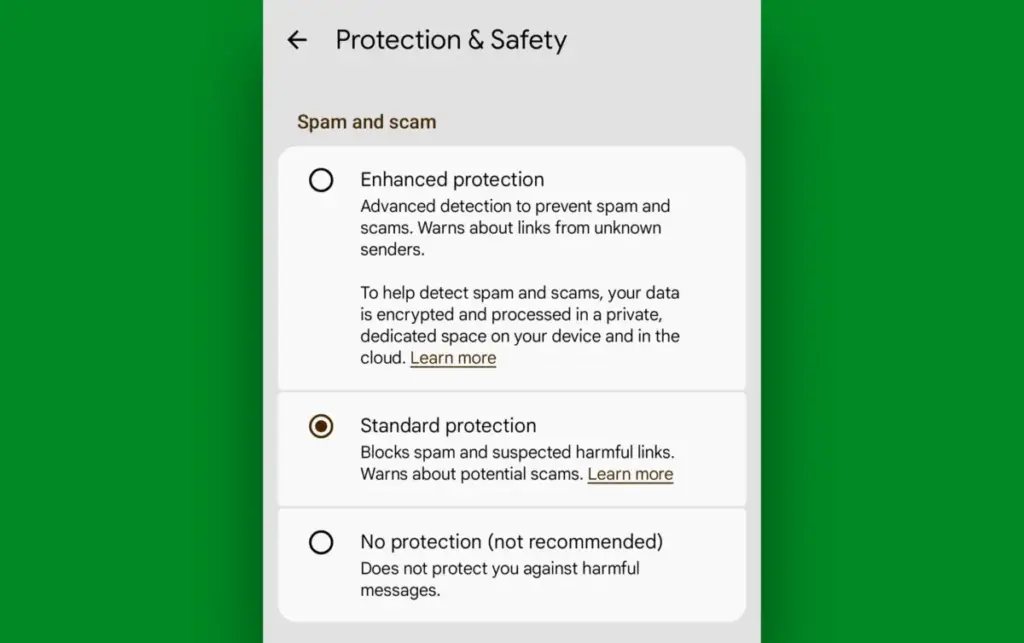
Once the necessary software versions are in place, the final step is the manual activation of the feature. Google has placed these options within a newly expanded "Protection & Safety" menu inside the Google Messages settings. This centralized hub is where users can manage their spam filters and now, the Enhanced Protection toggle.
By selecting Enhanced Protection, the user is effectively giving the device permission to be more proactive in its defense. It moves the app from a passive filter to an active guardian. For the average user, the day-to-day experience will remain largely unchanged, but the background processes will be significantly more robust.
The broader implication of this update is a shift in how mobile operating systems view security. In the past, the focus was on preventing unauthorized access to the hardware. Today, the focus is shifting toward protecting the user from their own interactions. As scammers become more adept at exploiting human psychology, the software must become more adept at providing the "common sense" that can sometimes fail in a moment of stress or distraction.
The Future of Proactive Defense
The introduction of Enhanced Protection in Google Messages is likely just the beginning of a broader trend in mobile security. As AI continues to empower both the attacker and the defender, we can expect to see more features that rely on real-time analysis of communication patterns.
For now, the responsibility remains partially on the user to stay informed and utilize the tools available to them. By taking the steps to enable these hidden settings, Android users can significantly reduce their risk profile. While no security measure is 100% effective, adding layers of protection creates a cumulative defense that makes it much harder for a scammer to succeed. In a world where a single click can lead to identity theft or financial loss, having an automated system that asks, "Are you sure you want to do this?" is perhaps the most valuable security feature a modern smartphone can offer.
 Small Business IT & Cloud Computing
SAP Integrates AI-Powered Roleplays into Recertification Program to Prioritize Practical Skills Over Rote Memorization
In a significant move to modernize its professional ecosystem, SAP has announced...
 Small Business IT & Cloud Computing
The Vanishing Secret: What Happens to Your Private Chatbot Data When an AI Company Goes Bankrupt?
For millions of users, the AI chatbot has become more than just...
 Small Business IT & Cloud Computing
Trump’s Rebranding of Artificial Intelligence to ‘Super Intelligence’ Sparks Unprecedented Domain Rush for Slovenia’s .si Registry
The global landscape of digital real estate is undergoing a seismic shift...







