

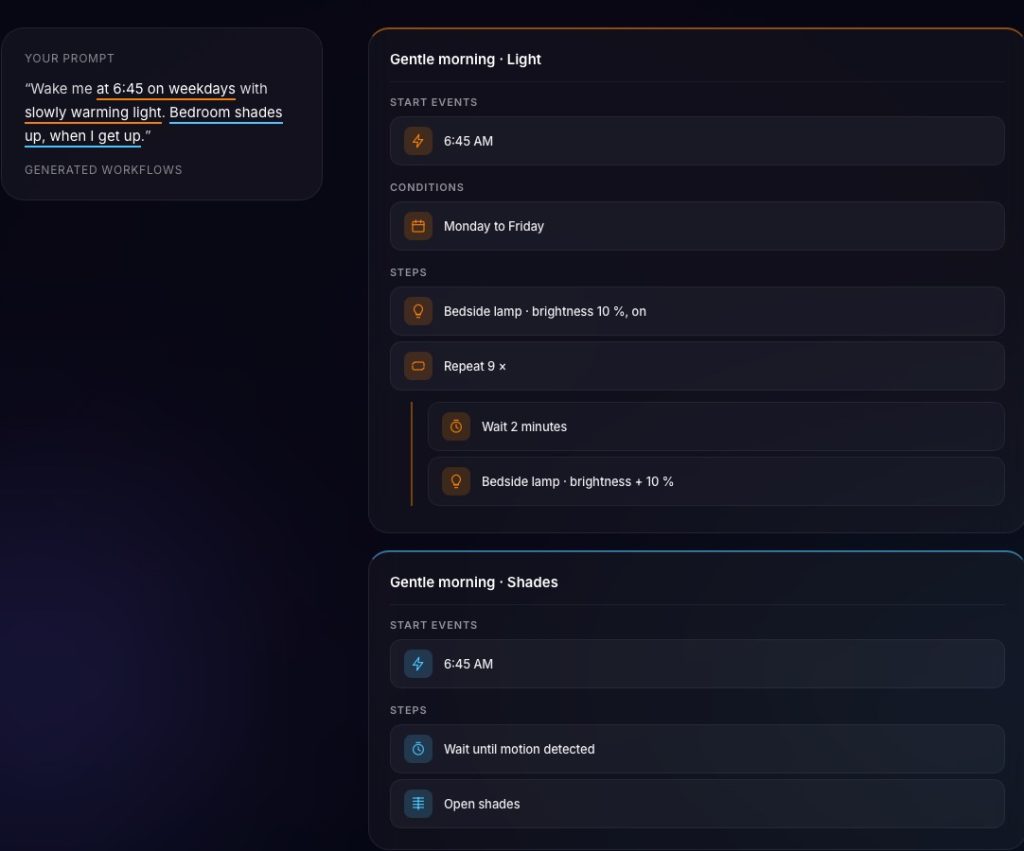
The app provides visual feedback on how these prompts are translated into actual HomeKit commands. In the case of the "Wake me at 6:45" prompt, the interface breaks down the natural language into a structured workflow. It identifies the specific time trigger, the filter for Monday through Friday, and the sequential actions required to simulate a sunrise effect with compatible smart bulbs. This transparency is crucial for power users who want to verify the logic before it goes live in their homes.
The timing of this release coincides with a broader industry trend where generative AI is being integrated into productivity and utility software. In the context of the smart home, the goal is to move away from "smart" meaning "remotely controllable" and toward "smart" meaning "autonomously helpful." By bridging the gap between human intent and machine execution, Controller for HomeKit is positioning itself as a sophisticated intermediary that does more than just display device toggles.
Initial testing of the feature, even in limited environments, suggests that the AI is remarkably adept at interpreting intent. In one test case, a user with a minimal setup consisting of only two smart lights and one smart plug asked the app to switch on a bedroom fan (connected via the smart plug) whenever the living room lights were turned off. Despite the simplicity of the hardware involved, the AI correctly identified the "off" state of one device as the trigger for the "on" state of another and successfully generated the automation. This suggests that the feature’s utility is not restricted to those with massive, complex installations, but can also help beginners solve simple logic puzzles without needing to learn the underlying architecture of the HomeKit framework.
For many users, the primary draw of an app like Controller for HomeKit over the standard Apple Home app has always been its ability to handle "advanced" features. This includes things like backups of home configurations, detailed logging of device activity, and the creation of complex workflows that Apple’s own software sometimes obscures. With the addition of the "Just say it" feature, the app is attempting to make that advanced power accessible to those who might find manual automation building too time-consuming or confusing.
The evolution of HomeKit has seen Apple slowly add more functionality to its native app, but third-party developers continue to find space to innovate. The challenge for many has been the steep learning curve. Setting up an automation that says "if the temperature is above 75 degrees and it’s between 2 PM and 5 PM, and someone is home, turn on the AC" involves several steps in the Home app that can be prone to user error. If an AI can reliably translate that sentence into a working automation, it removes a significant point of friction in the user experience.
However, this level of sophisticated software development comes with a corresponding price point. Controller for HomeKit operates on a subscription model, reflecting the ongoing costs of maintaining an app that must constantly adapt to Apple’s frequent OS updates and the evolving Matter standard. The "Essentials" tier is priced at $40 per year, while the "Plus" tier, which likely includes the full suite of AI features and advanced backup tools, costs $80 per year. For users who are deeply invested in the Apple ecosystem and have dozens of devices ranging from sensors and cameras to lights and thermostats, the cost may be justified by the time saved in management and the increased functionality of their home.
 Smart Home & IoT Solutions
Apple Ties New AI-Powered Home Security Features to Premium 2TB iCloud+ Subscription Tier
As Apple continues to integrate its sophisticated "Apple Intelligence" suite across its...
 Smart Home & IoT Solutions
SwitchBot Unveils Lock Vision Series Featuring 3D Facial Recognition and Native Matter Integration
In the rapidly evolving landscape of smart home security, the transition toward...
 Smart Home & IoT Solutions
Controller for HomeKit Introduces Natural Language AI Feature to Simplify Complex Smart Home Automations
In the rapidly evolving landscape of smart home technology, the gap between...







