At the Microsoft Ignite 2026 conference this morning, the tech giant signaled a paradigm shift in the evolution of artificial intelligence, moving beyond simple assistants to a comprehensive "agentic" ecosystem. The company unveiled a suite of major updates to Microsoft Copilot, detailing a vision where AI is no longer just a sidecar for tasks but a central, autonomous foundation for the modern enterprise. With the general availability of several core components—including a new unified "Home" interface, deep industry-specific integrations, and the rollout of autonomous "Autopilot" agents—Microsoft is betting that the future of productivity lies in the seamless orchestration of human and machine intelligence.
The announcements underscore a strategic pivot toward what Microsoft calls "raw intelligence to do real work." Recognizing that the AI landscape is becoming increasingly crowded, the company emphasized that Copilot is designed to be model-agnostic and deeply integrated into the fabric of the existing Microsoft 365 data estate. This approach aims to solve the "fragmentation crisis" of modern knowledge work, where information is scattered across thousands of emails, chat threads, and documents.
The New Foundation of Work
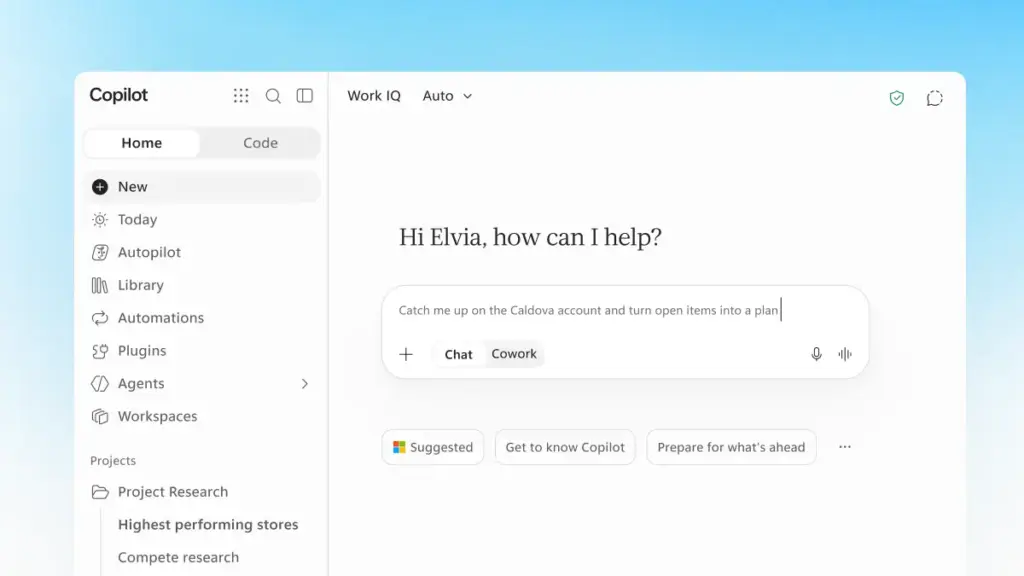
Central to this morning’s keynote was the launch of "Home," now generally available to all customers. Home serves as the new primary entry point for Copilot, merging the previously distinct "Chat" and "Cowork" functions into a single, cohesive interface. The goal is to provide users with a grounded starting point as they navigate a workday that spans meetings, emails, and complex projects.
In this new environment, work is designed to move fluidly between different modes of engagement. A user might start with a simple query in Chat and, as the complexity of the task grows, transition seamlessly into Cowork, where the AI takes a more active role in managing a multi-step workflow. This transition is managed by "Auto," an intelligent routing engine that dynamically selects the most appropriate AI models and levels of computational effort based on the task at hand. Under the hood, Auto balances quality, speed, and cost, ensuring that high-power models are reserved for complex reasoning while simpler tasks are handled efficiently to save energy and subscription costs.
Within the Home interface, Microsoft also introduced a private preview of "Today," a command center designed to act as a proactive digital chief of staff. Today synthesizes information from across Outlook, Teams, and Tasks to surface what requires immediate attention and what can wait. Rather than just listing notifications, Today prepares the work for the user—drafting replies to urgent emails, proposing schedule changes for conflicting meetings, and providing context for follow-ups that may have been overlooked.
Furthermore, Microsoft is bringing the full power of its core Office suite directly into the Copilot app. For years, Copilot has lived inside Word, Excel, and PowerPoint; now, those apps effectively live inside Copilot. Users can move from an initial brainstorm to a finished document or a complex spreadsheet without ever leaving the Copilot interface. This integration ensures that all work remains protected by the enterprise-grade security, sensitivity labels, and compliance controls inherent to Microsoft 365. Notably, Microsoft confirmed that creating PowerPoint decks or Excel spreadsheets within the Copilot app does not incur additional consumption costs, as the value is bundled into the existing subscription license.
Perhaps the most forward-looking announcement was the rollout of "Autopilot" to Frontier customers. Described as a "trusted autonomous agent," Autopilot represents a step beyond reactive AI. It is a personal, always-on agent that lives within a company’s tenant and possesses its own identity, memory, and toolset. Unlike traditional AI that waits for a prompt, Autopilot can proactively monitor Teams channels, follow up on emails, and manage recurring projects. For instance, it can independently set up a supplier review process, building a workback plan and reaching out to stakeholders for updates without human intervention.
 Productivity Software & Office Suites
Microsoft 365 Copilot Surpasses 30 Million Paid Seats as Enterprise AI Shifts from Assistance to Autonomous Agency
In a landmark update during its most recent earnings call, Microsoft announced...
 Productivity Software & Office Suites
Microsoft Reimagines Copilot as a Centralized Engine for the Future of AI-Driven Work
In a major strategic shift aimed at redefining the intersection of human...
 Productivity Software & Office Suites
Microsoft Unveils Strategic Roadmap for Enterprise AI, Emphasizing Agentic Workflows and Hybrid Pricing Models
In an era defined by a relentless cycle of artificial intelligence breakthroughs...