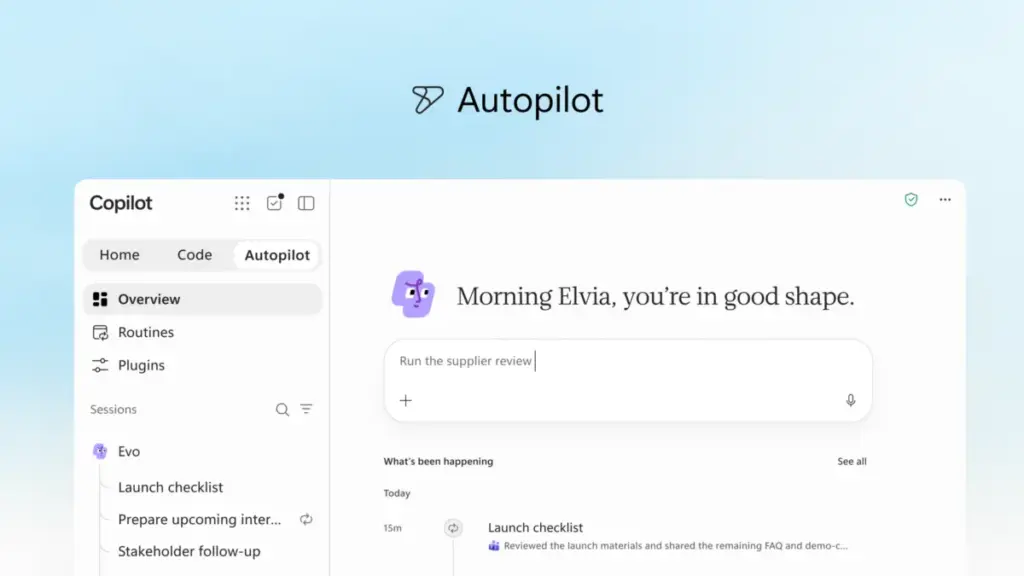
In a significant move to redefine the landscape of artificial intelligence in the workplace, Microsoft has announced a comprehensive reimagining of its Copilot platform. The technology giant is introducing what it calls the "new Copilot," a centralized AI experience designed to bridge the gap between traditional productivity tools and a new generation of autonomous agentic capabilities. The update represents a strategic shift from AI as a reactive chat interface to AI as a proactive, persistent collaborator capable of building custom solutions and managing complex workflows independently.
According to Microsoft, this evolution is aimed at helping both individuals and organizations scale their accomplishments within the natural "flow of human ambition." By connecting the tools that millions of workers rely on daily with advanced automation, Microsoft seeks to position Copilot not just as an assistant, but as a foundational layer for modern enterprise operations.
A Unified Experience for Every Mode of Work
At the heart of this redesign is the introduction of "Home," a new starting point within the Copilot app that serves as a command center for professional activity. Home is designed to solve the fragmentation often felt by modern workers who must constantly oscillate between meetings, email threads, documents, and various business applications. By consolidating these disparate streams, Home provides users with a way to get their bearings, review recent activity, and receive intelligent suggestions on where their attention is most needed.
Within this new interface, work is categorized into three primary modes: Chat, Cowork, and Code. While "Chat" remains the destination for instant, conversational needs—such as quick lookups or drafting short messages—the "Cowork" feature is designed for tasks that require delegation. In the Cowork mode, a user defines a complex objective, such as generating a Request for Proposal (RFP) response or a financial close package. Copilot then manages the task from end-to-end, iterating on the result until it is complete.
Microsoft is also deepening the integration between its flagship productivity suite and the AI platform through "Office in Copilot." This feature embeds the full functionality of Word, Excel, and PowerPoint directly into the Copilot experience. The company notes that this integration is intended to eliminate the friction of broken formatting or lost context that often occurs when moving data between different applications. From the Home screen, users can prompt Copilot to build a budget model in Excel or a presentation deck in PowerPoint. These files are created as live, editable documents that support real-time collaboration, allowing team members to @mention colleagues and see edits as they happen, ensuring that progress remains synchronized across all Microsoft 365 apps.

The company also highlighted specific enhancements within the Office suite. PowerPoint can now automatically ensure that decks remain on-brand while allowing for fine-tuned slide adjustments. In Excel, a new transparency feature allows users to see exactly what changes Copilot or other collaborators have made and why, while the AI provides recommendations for the most effective data visualizations. Furthermore, the introduction of specialized "Skills" allows organizations to bring role-specific expertise—such as legal or financial workflows—directly into these applications.
Democratizing Solution Building with ‘Code’
One of the most ambitious elements of the new Copilot is "Code," a feature intended to move solution-building beyond the exclusive domain of software developers. Historically, the primary unit of knowledge work has been the file—a document, a spreadsheet, or a slide deck. Microsoft is now introducing a fourth unit: the purpose-built solution.
The Code feature allows users to describe an application, an automation workflow, or an interactive dashboard using natural language. Copilot then selects the best technical approach and builds the solution, which can range from a persistent desktop widget for quick data reference to a cloud-hosted internal app shared across a team. This capability is powered by the same underlying technology as GitHub Copilot, but it is tailored for the general workforce.
 Productivity Software & Office Suites
Microsoft Announces Microsoft 365 G7 and Agent 365 to Accelerate AI Adoption and Governance Across U.S. Government Agencies
In an era where the public sector faces the dual challenge of...
 Productivity Software & Office Suites
Microsoft Unveils Microsoft 365 G7: A New AI-Driven Frontier Suite for Government Organizations
In an era where the public sector faces a dual mandate of...
 Productivity Software & Office Suites
Microsoft Unveils Microsoft 365 G7: A New Frontier for AI-Driven Governance in the Public Sector
In a move designed to redefine how the public sector interacts with...