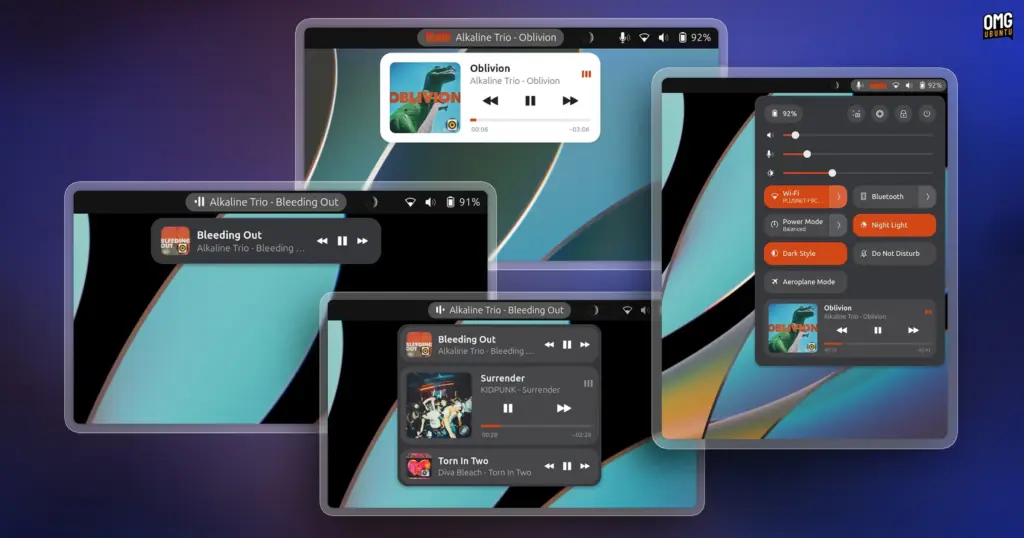
Modern computer usage rarely involves listening to a single continuous stream of audio in isolation. A typical desktop workflow often sees a user running a dedicated music client such as Spotify or a local music player, streaming a podcast in a secondary application, and periodically switching to a web browser to watch a video clip, webinar, or tutorial. Under GNOME’s default desktop paradigm, managing these competing media streams can become clumsy. GNOME provides a built-in media controller located within the calendar and notification pop-over tray, but its single-focused presentation is designed primarily around whichever application is currently active. When an audio stream is paused so the user can listen to another source, the paused stream frequently drops out of view or becomes awkward to retrieve, forcing the user to track down the specific window or browser tab to resume playback.
Now Playing Card approaches this challenge from a structural perspective by ensuring that pausing one media stream does not cause it to disappear from the user interface. Built upon the standard Media Player Remote Interfacing Specification (MPRIS) protocol used across the Linux desktop, the extension creates an aggregated environment where every open media-producing application or browser tab retains its own persistent presence. If a user pauses an album or a long-form podcast to check out a video on YouTube or listen to a brief voice note, the paused player does not vanish into the background. Instead, it remains immediately accessible within the extension’s interface, waiting to be resumed with a single click as soon as the competing audio finishes.
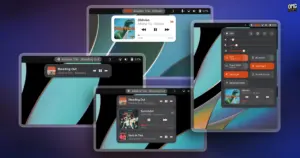
To present multiple playback sources cleanly without overwhelming the user interface, Now Playing Card organizes media sessions into distinct visual cards. Each card acts as an individualized command center for a specific audio or video source. Within each card, users are presented with the album or track artwork, an identifiable application icon indicating the source client, and a functional progress timeline. On media players that expose the appropriate position-tracking controls over MPRIS, this progress bar is fully interactive, allowing users to scrub or seek directly through a track without needing to bring the parent window into focus. The cards also incorporate standard playback navigation buttons, including play, pause, previous, and next controls, alongside contextual options such as shuffle and loop toggles whenever the underlying media player supports those features.
Displaying full playback controls for multiple active and paused applications simultaneously creates an obvious design problem: interface bloat. If several media players were to display large album art and seeking controls simultaneously, a menu pop-over would quickly consume the entire height of the screen. To resolve this spatial dilemma, Now Playing Card incorporates an interactive accordion layout. Under this mechanism, the extension restricts full expansion to only one media card at any given moment. The active card displays its complete interface, including enlarged artwork, full title and artist details, the interactive progress bar, and comprehensive playback buttons. Concurrently running or paused players are collapsed into compact summary strips beneath or alongside the active card.
When a user wishes to switch focus to a different player, clicking on any of the collapsed entries smoothly expands that player’s card into full view while automatically collapsing the previously active player into a compact format. This dynamic accordion behavior ensures that whether a user has two, three, or more audio players open at the same time, the interface retains a predictable, tidy footprint that fits comfortably within GNOME Shell’s pop-over dimensions.
 Linux & Open Source Solutions
Hylki Brings Modern Rust Engineering and Deep Customization to the GNOME Desktop
For years, the Linux desktop has maintained a complicated relationship with the...
 Linux & Open Source Solutions
Ubuntu 26.10 Releases Across Official Community Flavours: Desktop Refinements, Wayland Transitions, and the Return of MATE
Alongside the general availability of the primary distribution, the release of Ubuntu...
 Linux & Open Source Solutions
Ubuntu 26.10 Introduces Restricted Media Codec Installation to App Center’s Add-Ons Hub
Ubuntu 26.10 has expanded the functionality of its modern App Center by...