
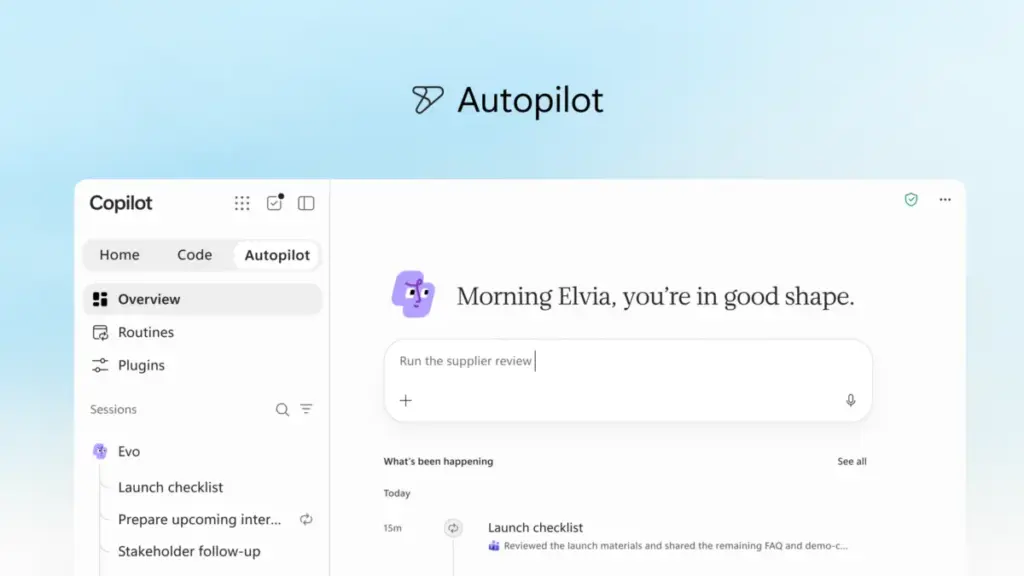
In a major strategic shift aimed at redefining the intersection of human ambition and artificial intelligence, Microsoft has announced a comprehensive reimagining of its Copilot platform. The technology giant is moving beyond the concept of a simple digital assistant, introducing a "new Copilot" designed to serve as a unified experience where individuals and organizations can build, customize, and scale AI capabilities directly within their daily workflows.
The update represents a fundamental evolution in how Microsoft envisions the future of productivity. By connecting the tools that billions of people rely on with a next generation of agentic capabilities, the company aims to help users navigate an increasingly complex digital landscape. This reimagined experience is built on the premise that work is constantly evolving, and the tools used to perform that work must be capable of moving in sync with the flow of human intent.
A New Experience for Every Mode of Work
At the heart of this transformation is a redesigned entry point called Home. Microsoft describes Home as the new starting point for the Copilot experience, a centralized hub where Chat and Cowork are brought together into a single, cohesive interface. As modern professionals find themselves constantly shifting between meetings, emails, document editing, and various applications, Home is intended to act as a grounding mechanism, allowing users to get their bearings and maintain momentum.
Within this new interface, users can review their recent activity, receive tailored suggestions on how Copilot can assist with current projects, and resume work exactly where they left off. The distinction between the two primary modes is clear: Chat remains the conversational engine for instant questions, quick lookups, and rapid drafting, while Cowork is designed for delegated, end-to-end tasks. In Cowork, a user defines a complex objective—such as generating a Request for Proposal (RFP) response, a product launch kit, or a financial close package—and the AI executes the task autonomously, iterating until a completed result is delivered.
Perhaps the most significant addition to the Home experience is "Office in Copilot." This feature integrates the full functionality of Microsoft Word, Excel, and PowerPoint directly into the Copilot interface. This integration is designed to eliminate the friction of broken formatting, version control issues, and the need to rebuild context when moving between different applications. From within Home, a user can ask Copilot to draft a brief or model a budget, and the system creates a live, editable document or workbook that is synchronized for the entire team. This allows for side-by-side refinement where edits made in Copilot reflect instantly in the standalone Office apps and vice versa.

The enhancements extend deep into the individual Office applications as well. PowerPoint now features automated brand alignment and the ability to fine-tune imagery using custom templates. Excel has been updated to provide transparency into data modifications; when Copilot or a human collaborator makes an edit, the system explains the "why" behind the change and suggests optimal visualizations. Furthermore, specialized "Skills" are being introduced across the Microsoft 365 suite, allowing organizations to inject role-specific expertise—such as legal or financial workflows—directly into the apps.
Democratizing Solution Building Through Code
Microsoft is also challenging the traditional boundaries of software development with a new capability called Code. Historically, the primary unit of knowledge work has been the file—the document, the spreadsheet, or the presentation deck. While these remains essential, Microsoft argues that a fourth unit is emerging: the purpose-built solution.
The Code feature is designed to move solution-building into the hands of non-developers. By describing an app, an automation workflow, or a data dashboard in natural language, users can prompt Copilot to build and host a functional tool. These can range from persistent desktop widgets for quick data reference to cloud-hosted internal applications that can be shared across a team.
 Productivity Software & Office Suites
Microsoft Reimagines Copilot as a Central Hub for Autonomous AI and Agentic Work
Microsoft has announced a significant evolution of its AI strategy, unveiling what...
 Productivity Software & Office Suites
Microsoft Reimagines Copilot as a Unified AI Platform for the Next Generation of Work
In a significant shift that signals the next phase of the artificial...
 Productivity Software & Office Suites
Microsoft Reimagines the Future of Productivity with a New Generation of Copilot and Autonomous Agents
Microsoft has announced a significant evolution of its artificial intelligence strategy, unveiling...







