
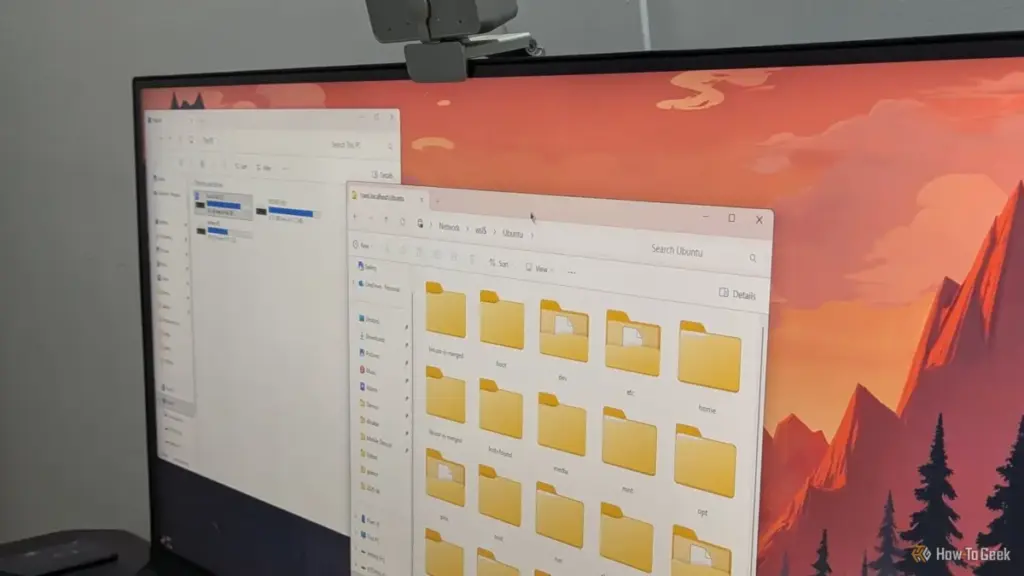
For many technology enthusiasts and professionals, the ideal computing environment involves a dual-boot configuration. This setup offers the best of both worlds: the broad software compatibility and gaming prowess of Windows, alongside the privacy, development tools, and customization of Linux. However, as many users have discovered, this arrangement is often an uneasy truce rather than a stable partnership. While Linux distributions have become increasingly adept at coexisting with other operating systems, Windows remains a notoriously difficult neighbor.
The challenges of maintaining a dual-boot system have evolved alongside modern hardware standards. From the transition to UEFI (Unified Extensible Firmware Interface) to the implementation of aggressive security protocols like Secure Boot and BitLocker, the hurdles for Linux users have grown more complex. Windows, designed with the assumption that it is the sole occupant of a machine’s hardware, frequently implements updates and setting changes that can inadvertently—or systematically—render a Linux installation unbootable.
There are four primary ways Windows disrupts these shared environments, ranging from bootloader interference to filesystem locks and encryption hurdles. Understanding these mechanisms is essential for any user looking to maintain a stable multi-OS workstation.
Overwriting the Bootloader: The Battle for Disk Control
One of the oldest and most persistent issues in the dual-boot world is the tendency for Windows to reclaim control of the boot process. Historically, in the era of BIOS and Master Boot Record (MBR) partitioning, this was a destructive process. A Windows installation or major repair would simply overwrite the MBR with its own code, effectively erasing the pointer to the Linux bootloader, such as GRUB (Grand Unified Bootloader).

In the modern era of UEFI, the conflict has shifted but not disappeared. On UEFI systems, bootloaders reside as files within a dedicated EFI System Partition (ESP). The computer’s firmware decides which operating system to launch based on a boot order stored in the NVRAM (Non-Volatile Random-Access Memory). While this system technically allows multiple bootloaders to coexist peacefully on the same disk, Windows is known for its lack of "disk etiquette."
Major Windows feature updates—which often function more like a partial OS reinstallation—frequently reset the UEFI boot priority. When the system restarts after an update, it may place the Windows Boot Manager back at the top of the list. From the user’s perspective, Linux appears to have vanished. In reality, the Linux files and its bootloader remain intact on the disk; they have simply been demoted in the firmware’s priority list, causing the machine to bypass the GRUB menu and boot directly into the Windows desktop.
The remedy for this issue usually requires external tools. Users often find themselves needing to boot from a Linux "Live USB" to access the installed system and reassert control. By using tools like efibootmgr to reorganize the boot order or reinstalling GRUB entirely, the dual-boot menu can be restored. However, this remains a significant point of friction, particularly for users who may not have a recovery drive readily available when an unexpected Windows update strikes. To mitigate this, many experts recommend installing Linux on a physically separate drive with its own EFI partition, creating a hardware-level barrier that Windows updates are less likely to cross.
Lockouts via Secure Boot
Secure Boot is a security standard designed to ensure that a device boots using only software that is trusted by the Original Equipment Manufacturer (OEM). While intended to prevent "bootkits" and other low-level malware from infecting the startup process, it has created a significant dependency on Microsoft for the Linux community.
 Tech Tutorials & How-To Guides
The Hidden Bottleneck: Why Standard Speed Tests Often Fail to Detect Faulty Network Hardware
In the modern digital household, few things are as frustrating as a...
 Tech Tutorials & How-To Guides
Thrills and Psychological Chills: Netflix Bolsters October Lineup With ‘Unabomber’ and Genre Classics
As the calendar turns to the first full week of October, the...
 Tech Tutorials & How-To Guides
Reliability Without the Premium Price: The Evolution of Affordable Multi-Tools for Modern Everyday Carry
The concept of "Everyday Carry," or EDC, has evolved from a niche...







