
In an era where IT Service Management (ITSM) is increasingly defined by the speed of collaboration and the seamlessness of automated workflows, SolarWinds has announced a significant series of updates to its Service Desk platform. The latest release, detailed in a comprehensive briefing from the SolarWinds product team, introduces a suite of enhancements designed to provide administrators with greater flexibility, deeper integration with essential collaboration tools, and more granular control over asset lifecycles. These updates reflect a broader strategic focus on reducing the complexity of day-to-day IT operations while empowering teams to customize their environments to meet specific organizational needs.
The updates, which range from General Availability features to early-access "Labs" capabilities, target several core pillars of the Service Desk experience: process integration, collaboration, asset tracking, and user interface customization. By addressing both high-level automation and the ergonomic details of the agent workspace, SolarWinds aims to streamline the bridge between technical tasks and business outcomes.
Choosing the Right Foundation for Each Process Integration
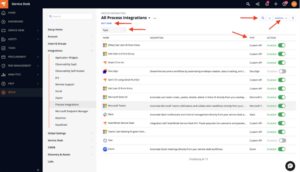
One of the most foundational changes in this release concerns how administrators build and manage Process Integrations. Recognizing that not all integrations are created equal, SolarWinds has overhauled the integration framework to offer a more tailored approach from the moment of inception. This update, now in General Availability across all plan types, moves away from a one-size-fits-all model toward a more intuitive, categorized system.

The updated index page for Process Integrations has been redesigned with modern data management in mind. Admins now have access to a more robust set of tools for navigating their integration library, including advanced search functionality, filtering, and pagination. The interface also supports column resizing and reordering, as well as mass actions, which significantly reduces the administrative overhead for organizations maintaining dozens of distinct connections. A new "Template" column has been introduced, providing immediate clarity on the origin and structure of each integration, which is particularly useful for teams with multiple contributors.
The most significant shift, however, lies in the creation workflow itself. The process now begins with a "Type" selection step, allowing teams to choose the most efficient path for their specific use case. For organizations that require total control over every aspect of a connection—such as custom headers, specific methods, and unique payloads—the "Custom API" type remains the standard. This ensures that legacy systems or highly specialized third-party tools can still be integrated without compromise.
Conversely, for more common applications, SolarWinds has introduced application-specific types. These offer a more guided, action-based setup that abstracts away much of the underlying complexity, allowing admins to focus on the business logic rather than the technical minutiae of API calls. To ensure a smooth transition, all existing stateless Process Integrations have been automatically assigned to the Custom API type, preserving current functionality while opening the door to future optimizations.
Bringing Microsoft Teams Actions Directly into Your Workflows
As remote and hybrid work models continue to dominate the corporate landscape, the divide between the service desk and collaboration platforms has become a primary source of friction. To bridge this gap, SolarWinds has introduced a built-in Microsoft Teams Process Integration, currently available in "Labs" for customers on Advanced and Premier plans. This feature is designed to bring the power of Teams directly into the ITSM workflow, enabling automated actions that were previously manual and time-consuming.
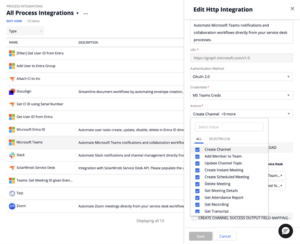
The integration focuses on the practical realities of incident response and team coordination. Through simplified, out-of-the-box actions, administrators can now automate the creation of Teams channels, add specific members to a team, and update channel details based on ticket triggers. This is particularly transformative for major incident management; rather than manually inviting stakeholders to a chat, the Service Desk can automatically spin up a dedicated "war room" channel the moment a high-priority incident is logged.
Beyond simple chat functions, the integration extends into meeting management. Admins can schedule and create meetings directly from within a ticket, retrieve meeting details, and even work with attendance records, recordings, and transcripts. This creates a powerful feedback loop: a meeting started from a ticket can have its transcript pulled back into the record automatically, ensuring that the context of a live discussion is preserved for future reference and compliance.
Because this capability is being released under the "Labs" banner, it represents an early-access opportunity for IT teams. SolarWinds is encouraging users to explore these workflows and provide feedback to help shape the future of the integration. The goal is to move beyond simple notifications and toward a truly integrated ChatOps environment where the Service Desk and Teams act as a single, unified workspace.
Making Asset Check-out and Check-in Easier to Manage
Effective asset management is about more than just knowing what equipment an organization owns; it is about understanding where those assets are and when they are coming back. In this latest release, SolarWinds has introduced the next phase of its Asset Checkout and Check-in features, which are now available in Labs for all plan types. This update focuses on enhancing visibility and accountability throughout the asset lifecycle.
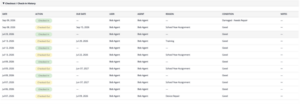
The primary improvement in this phase is the introduction of advanced filtering across checkout details. IT teams can now slice and dice their asset data based on checkout dates, the specific individual the asset is checked out to, the current status of the asset, its physical condition, and the expected return date. This level of granularity allows hardware managers to quickly identify potential bottlenecks or missing equipment without digging through individual records.
Accountability is further bolstered by the addition of a checkout history table and a new, configurable notification system. Managing the return of equipment—especially in a distributed workforce—can be a logistical challenge. The new system allows admins to set precise reminder schedules, determining when a user should be alerted that an asset is due back and how often follow-up messages should be sent if the asset becomes overdue.
Crucially, the system can also involve the user’s manager in the process, adding a layer of organizational oversight to ensure equipment is returned on time. For the IT team, the update includes scheduled summary emails—daily, weekly, or monthly—that highlight which assets are coming due and which are currently overdue. This proactive approach to asset management helps reduce the risk of lost hardware and ensures that inventory is available for the next user who needs it.
Building Index Views Around the Work That Matters Most
While functional updates drive productivity, the user experience of the platform is what determines daily efficiency. To that end, SolarWinds has introduced a significant update to how index views are managed within the Service Desk. Now in General Availability for all plan types, this update provides teams with unprecedented flexibility in customizing their workspace.
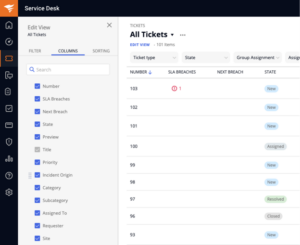
Historically, many index views in Service Desk included a set of default columns that could not be easily removed. While these fields were often useful, they could also clutter the screen and force users to scroll horizontally to find the information they actually needed. The new update allows users to uncheck these previously mandatory fields, freeing up valuable screen real estate for the system and custom fields that are most relevant to their specific workflows.
This customization capability is not limited to a single area of the platform; it has been rolled out across a vast array of Service Desk indexes. This includes core ITSM modules such as Incidents, Problems, Changes, and Releases, as well as the Service Catalog, Solutions, and the CMDB. It also extends to asset management categories like Computers, Printers, Mobile Devices, and Inventory, as well as administrative modules like Tasks, Contracts, Purchase Orders, Vendors, and Compliance.
In maintaining a balance between flexibility and usability, the primary field used to open each record remains constant, ensuring that the core navigation remains intuitive. Furthermore, SolarWinds has ensured that existing saved views remain unchanged. This allows customers to maintain their current workflows while they experiment with creating new, more streamlined views that better align with their evolving needs.
Refining the Everyday Experience
Beyond the headline-grabbing features, SolarWinds has emphasized that this release includes a series of smaller, deliberate updates aimed at refining the "everyday" parts of the Service Desk. The product team noted that these improvements, while perhaps not as complex as a new API integration, are essential for making the platform feel more responsive and easier to use.
These incremental updates are often the result of direct user feedback and represent a commitment to "quality of life" improvements. Whether it is a slight adjustment to a button placement, a faster page load time, or a more intuitive search result, these changes are designed to reduce the cumulative friction that IT agents face during a busy shift. By focusing on these details, SolarWinds aims to ensure that the Service Desk remains a tool that assists, rather than hinders, the person using it.
Looking Ahead
The September release of SolarWinds Service Desk represents a multifaceted approach to modern ITSM. By offering a mix of robust General Availability features and experimental Labs capabilities, SolarWinds is providing its users with both the stability they need for today’s operations and a glimpse into the future of automated, collaborative service management.
For current customers, the full release notes provide a centralized guide for configuring these new features and integrating them into existing processes. For organizations that have not yet adopted the platform, SolarWinds continues to offer a 30-day free trial of its Premier plan, providing an opportunity to experience the full breadth of these new capabilities in a live environment. As the IT landscape continues to evolve, the ability to adapt workflows, integrate with key tools, and manage assets with precision will remain the hallmark of a successful service desk.
 Helpdesk & IT Service Management (ITSM)
Asus Expands Snapdragon-Powered Lineup with Affordable Zenbook 14 for the Modern Professional
Asus has officially expanded its ultra-portable laptop portfolio with the introduction of...
 Helpdesk & IT Service Management (ITSM)
SolarWinds Announces Comprehensive September Webinar Series Addressing AI Integration, IT Observability, and Cloud Database Migration Challenges
The modern data landscape is currently undergoing a period of unprecedented transformation,...
 Helpdesk & IT Service Management (ITSM)
The Evolution of Service Delivery: Understanding the Strategic Shift Toward Enterprise Service Management
In the modern corporate landscape, the efficiency of an organization is often...