The Code feature is designed to move solution-building beyond the exclusive domain of software developers. Powered by the same underlying technology as GitHub Copilot, it allows any user to describe an application, an automation workflow, or a data dashboard using natural language. Copilot then selects the appropriate technical approach and builds the solution in a sandboxed environment. These solutions can range from persistent desktop widgets for quick data reference to cloud-hosted internal apps shared across a team.
To support this, Microsoft is launching the "Microsoft Copilot Managed Runtime." This hosting infrastructure allows custom code to run safely within an organization’s Microsoft 365 environment, governed by IT but accessible to non-technical staff. By grounding these creations in "Microsoft IQ"—the company’s unified intelligence platform—every app or automation created through Code is contextually aware of the user’s specific work environment. While professional developers will continue to use GitHub Copilot for deep coding tasks, the new Code capability in the Copilot app ensures that everyday employees can automate their own specialized workflows without needing to write a single line of syntax.
The Rise of Autonomous Agents: Introducing Autopilot
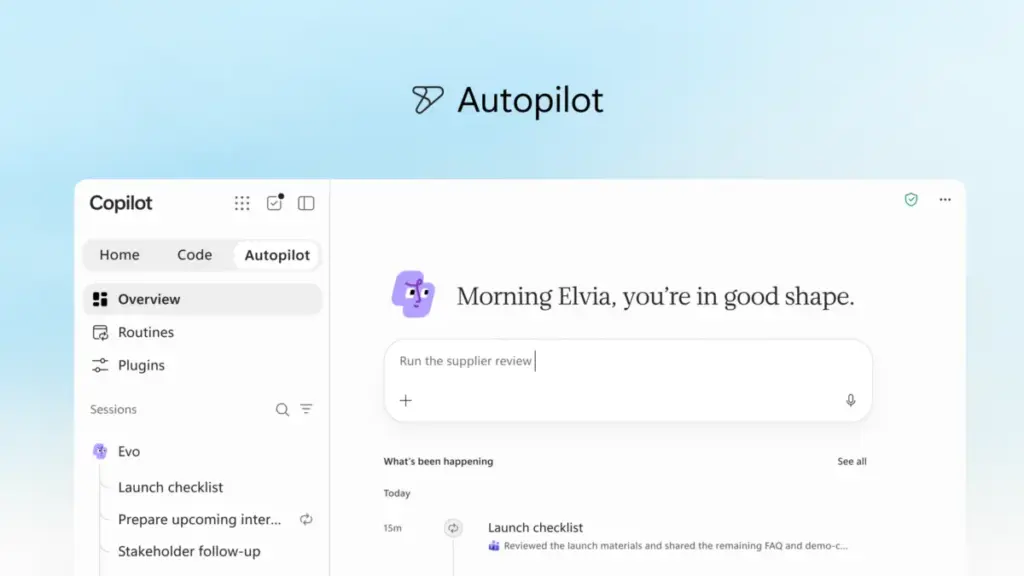
The third pillar of the update is "Autopilot," a rebranding and expansion of the capability previously known as "Scout." Unlike traditional AI assistants that require a prompt to act, Autopilot is designed to function as a digital teammate that works proactively.

Users can assign Autopilot a specific name, role, and goal. Once activated, the agent can monitor communication channels, follow up on email threads, and manage recurring administrative processes. For example, an Autopilot agent could be tasked with managing a full supplier review process. It would independently build a schedule, reach out to stakeholders for updates, and prepare meeting materials without constant human intervention.
Because Autopilot is cloud-hosted and possesses its own identity and memory within the organization’s tenant, it continues to work even when the user is offline. It operates within the existing security and governance frameworks of Microsoft 365, appearing in Teams and Outlook just like a human colleague. Users set the boundaries and objectives, while Autopilot handles the execution, keeping the human user informed through status updates and summaries.
Expanding Business Context and Data Integration
For any AI to be effective in an enterprise setting, it must be grounded in the specific data of that business. Microsoft is addressing this through "Fabric IQ," which connects Copilot to more than 20 million semantic models in Power BI. This integration is now generally available in Chat and Cowork, with Code integration expected to follow soon.
Additionally, Copilot is being grounded in data from Dynamics 365 and the Power Platform. This means that a salesperson drafting a proposal can now have Copilot automatically pull in deal histories or customer support tickets directly into the document. This deep integration eliminates the need for "app-switching" and ensures that the AI’s output is informed by real-time business intelligence.
 Productivity Software & Office Suites
Microsoft Reports 30 Million Paid Copilot Seats as Enterprise AI Shifts from Assistance to Autonomy
In a recent earnings call that signaled a pivotal moment for the...
 Productivity Software & Office Suites
Microsoft Reimagines Copilot as a Central Hub for AI-Driven Enterprise Productivity
In a significant move to redefine the landscape of modern work, Microsoft...
 Productivity Software & Office Suites
Microsoft Announces Fifth Annual Power Platform Community Conference to Address the Future of AI-Driven Business Processes
The modern enterprise is defined by its processes. From the simplest internal...