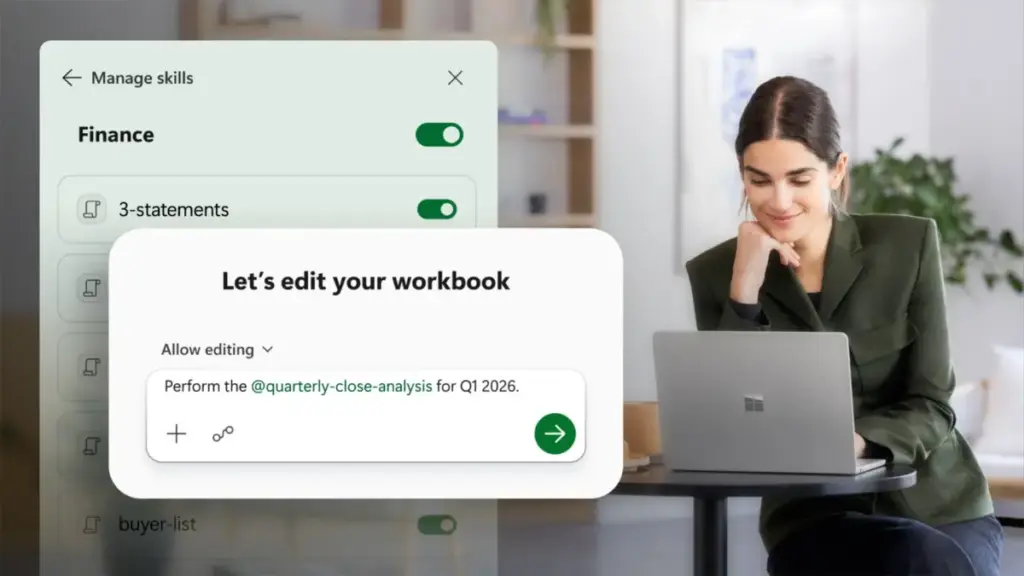
These skills act as a roadmap for the AI. Whether a team is building a Discounted Cash Flow (DCF) analysis, closing the monthly books, refreshing a reporting model, or conducting a variance analysis, a skill guides Copilot through the necessary steps. This ensures that the output adheres to the correct structure and formatting, making the final product easier to review and reuse. It effectively transforms the AI from a general assistant into a specialized analyst that understands the specific procedural requirements of a firm.
Microsoft is providing a library of sample finance skills to get users started, but the true power of the feature lies in customization. Users can create their own skills using an open-standard markdown file, known as a SKILL.md file. By saving this file in OneDrive, Copilot can ingest the instructions to build specific outputs, such as a board package or a three-statement model, following the exact process defined by the user. This move toward an open standard suggests a future where financial methodologies can be codified and shared across organizations or even the broader industry.
The ecosystem for these skills is also expanding. Developers and partners will soon be able to deploy specialized skills through the Microsoft Marketplace and Microsoft 365 Admin Center. Microsoft has already partnered with several key players in the finance and ERP space—including LSEG, Ramp, Rogo, Samaya AI, Velixo, and Vena—to create a first wave of industry-specific skills.
In addition to these procedural skills, Microsoft is introducing "Personalization" and "workbook rules." Personalization allows users to set their individual preferences once, which Copilot then applies consistently across its tasks. Workbook rules go a step further by capturing specific naming conventions, formula structures, and organizational standards within a dedicated sheet in the workbook. This ensures that the AI’s contributions remain consistent with the existing logic and aesthetic of the file, regardless of who is interacting with it.

Grounded in Data You Trust
A financial model is only as reliable as the data that feeds it. Historically, one of the most time-consuming and error-prone aspects of finance work has been the manual extraction of data from various external terminals and databases into Excel. To eliminate this friction, Copilot in Excel is expanding its range of financial connectors.
These connectors allow Copilot to pull market data, fundamental financial information, and research directly into the workbook. This grounding in "Work IQ" ensures that analyses begin with the most recent and accurate sources, rather than relying on outdated manual pulls. Building on the previously released connectors for LSEG and Moody’s, Microsoft is now incorporating more financial data providers to cover both public and private market data.
The inclusion of FactSet, which is currently in preview and slated for general availability in July, represents a significant addition for investment professionals and corporate researchers. By integrating these high-tier data sources directly into the Copilot interface, Microsoft is positioning Excel not just as a place to calculate data, but as a comprehensive research and analysis hub. This integration reduces the "alt-tab" fatigue often associated with financial research and minimizes the risk of transcription errors that occur when moving data between platforms.
Unlocking Finance Workflows
The combination of custom skills, trusted data connectors, and the broader "Work IQ" context allows Copilot to tackle scenarios that were previously too complex for AI. In a practical sense, this means finance teams can move from gathering data to interpreting it much faster.
 Productivity Software & Office Suites
The Agentic Edge: New Research Reveals the ‘Knowledge Spine’ Powering the World’s Most Advanced AI Enterprises
In the rapidly evolving landscape of corporate technology, the conversation among C-suite...
 Productivity Software & Office Suites
Microsoft Shifts Focus to Enterprise AI Utility: A New Strategic Framework for Agents, Economics, and Partnership
In an era defined by a relentless cycle of artificial intelligence breakthroughs,...
 Productivity Software & Office Suites
Microsoft Shifts Focus from AI Hype to Enterprise Utility as Jared Spataro Outlines New Strategic Roadmap
In a comprehensive message addressed to the global business community, Jared Spataro,...