
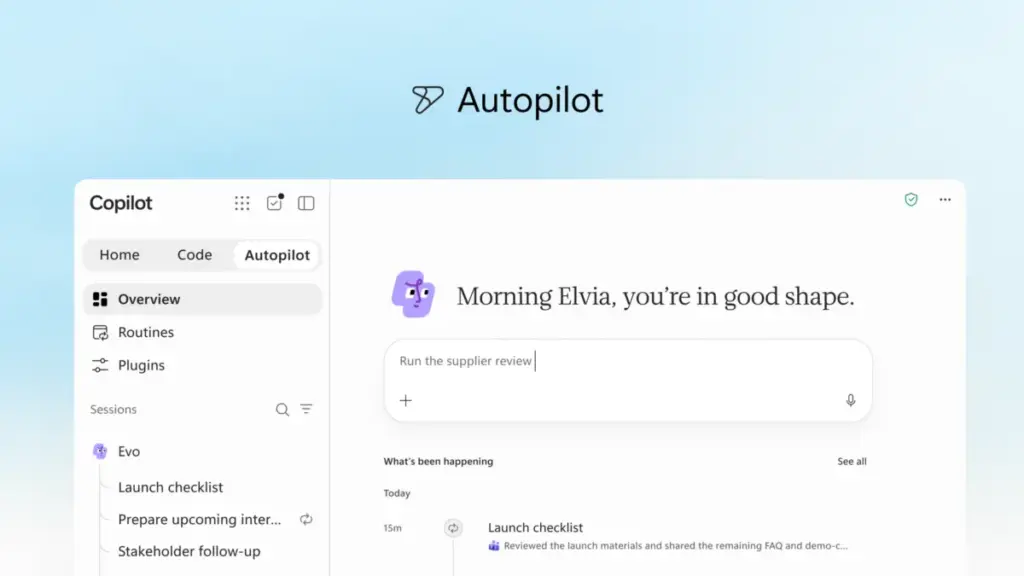
In a significant pivot toward the next era of enterprise productivity, Microsoft has announced a comprehensive reimagining of its Copilot ecosystem. The tech giant is introducing a suite of new capabilities designed to transition the platform from a reactive assistant into a proactive partner capable of managing complex, end-to-end workflows. This evolution, centered on a new "Home" interface and the introduction of "Autopilot" and "Code" features, aims to integrate artificial intelligence more deeply into the flow of human ambition and organizational scaling.
The core of this update is the "new Copilot," an experience intended to unify the fragmented tools that modern professionals rely on daily. By connecting traditional productivity applications with next-generation agentic capabilities, Microsoft seeks to enable a work environment where AI doesn’t just respond to prompts but anticipates needs and executes tasks independently.
A Unified Hub for the Modern Workflow
At the center of this transformation is "Home," a new starting point within the Copilot app that serves as a command center for the digital workday. Home is designed to solve the friction of modern work, which often requires employees to bounce between meetings, chats, documents, and emails. By bringing "Chat" and "Cowork" together in one place, Home allows users to maintain their bearings and keep projects moving forward without losing context.
The distinction between Chat and Cowork is fundamental to Microsoft’s new vision. Chat remains the conversational interface for instant interactions—quick questions, data lookups, or drafting brief responses. Cowork, however, represents a shift toward delegation. In this mode, a user defines a complex task, such as responding to a Request for Proposal (RFP), creating a product launch kit, or preparing a financial close package. Copilot then runs the task from start to finish, returning a completed result for the user to iterate upon. Microsoft has indicated that soon, the system will even remove the need for users to manually choose a mode; Copilot will automatically route requests to Chat, Cowork, or Code based on the nature of the task.
Furthering this integration is "Office in Copilot," which embeds the full functionality of Word, Excel, and PowerPoint directly into the Copilot experience. This update addresses a common pain point: the loss of formatting and context when moving drafts between an AI interface and a traditional document editor. Now, users can draft briefs or model budgets within Copilot, and the system creates live, editable files that are synchronized across the team. Changes made by colleagues or the AI itself are reflected in real-time, ensuring that progress is never siloed.

Microsoft has also refined the specific AI skills within these apps. PowerPoint can now automatically keep presentations on-brand while allowing for fine-tuned slide adjustments. Excel has been updated to provide better transparency, showing users exactly what Copilot changed in a spreadsheet and why, while also recommending the most effective visualizations for complex data sets.
Democratizing Solution Building with "Code"
Perhaps one of the most ambitious additions to the platform is "Code," a feature that moves software and solution building beyond the exclusive domain of professional developers. Microsoft argues that while documents and spreadsheets have long been the primary units of knowledge work, small, purpose-built solutions—such as trackers, dashboards, and automations—are becoming just as essential.
Powered by the same underlying technology as GitHub Copilot, the Code feature allows anyone to describe a desired application or workflow in natural language. Copilot then determines the best technical approach and builds the solution. These can range from persistent desktop widgets for quick data reference to cloud-hosted internal apps that can be shared across a team.
Crucially for enterprise users, these solutions run in a sandboxed environment and are hosted securely within the organization’s Microsoft 365 tenant. This is supported by the new "Microsoft Copilot Managed Runtime," a hosting infrastructure that allows custom code to run safely under IT governance. By opening this foundation to third-party and professional developers as well, Microsoft is positioning Copilot as a comprehensive platform for internal business applications.
The Rise of the Persistent Agent: Autopilot
The introduction of "Autopilot"—previously known by the internal codename "Scout"—marks Microsoft’s most significant move into the realm of autonomous AI agents. Unlike traditional AI tools that wait for a user to initiate a prompt, Autopilot is designed to be a persistent, proactive digital teammate.
Users can assign Autopilot a specific name, role, and goal. Once activated, the agent works independently, monitoring communication channels, following up on email threads, and managing recurring processes. For example, Autopilot could manage a full supplier review process by building a schedule, handling pre-meeting preparations, conducting follow-ups, and reaching out to stakeholders for updates—all without constant human supervision.

Because Autopilot is cloud-hosted and built on Microsoft IQ, it possesses its own identity, memory, and workspace within the organization’s tenant. It is designed to understand the specific nuances of how an organization operates. Users can @mention Autopilot in Microsoft Teams or Outlook just as they would a human colleague, while IT departments maintain full audit and governance control over the agent’s permissions and boundaries.
Expanding Grounding and Business Context
For AI to be effective in a corporate setting, it must be grounded in the specific data and context of the business. Microsoft is addressing this through "Fabric IQ," which brings more than 20 million semantic models from Power BI into the Copilot environment. This ensures that the AI’s responses and actions are informed by the organization’s actual data rather than general patterns.
Additionally, Copilot is now being grounded in data from Dynamics 365 and the Power Platform. This integration means that a salesperson drafting a proposal can have Copilot automatically incorporate deal history or customer support tickets directly into the document. This eliminates the need for distracting lookups and manual data entry from different business applications.
To manage the growing ecosystem of AI capabilities, Microsoft is also launching a new unified plugin registry. This catalog will bring together plugins from Microsoft, its partners, and custom-built solutions, allowing IT administrators to approve and manage them centrally. This streamlined approach is intended to make it easier for organizations to introduce trusted AI capabilities at scale.
Navigating the Economics of AI: FinOps for AI
As AI usage scales, so does the complexity of managing its costs. Microsoft is introducing a dual-pricing strategy to balance everyday utility with high-end agentic work.
For standard tasks like drafting and analysis, Microsoft offers a User Subscription License (USL). This model utilizes a routing system called "Auto," which weighs the accuracy, speed, and cost of each request to select the most appropriate model for the job. For more advanced, "agentic" work—such as the long-running tasks performed by Cowork, Code, and Autopilot—Microsoft is moving toward Usage-Based Billing (UBB). This allows organizations to match their costs directly to the value generated by frontier models.

To help organizations navigate these costs, Microsoft is introducing "FinOps for AI" capabilities. These tools, integrated into Agent 365 and Microsoft Copilot, allow administrators to set spending policies, route credit requests through automated approval workflows, and restrict specific model families to certain user groups. Business leaders can also use these tools to analyze which AI tasks are generating the highest return on investment, while end users can monitor their own credit usage and history to stay within organizational guardrails.
The Road Ahead: Personalized Command Centers and Shared Context
The announcements also included a preview of upcoming features aimed at making Copilot even more personalized. A new feature called "Today" will serve as a proactive command center within the Copilot Home, Outlook, and Teams. It is designed to surface what a user missed, what requires immediate attention, and what can be deferred. "Today" goes beyond simple notifications by preparing drafts, proposing schedule changes, and providing context for forgotten follow-ups, allowing users to catch up on work more efficiently.
Furthermore, Microsoft is enhancing collaborative AI with "@Copilot in Teams." When invoked in a channel or group chat, Copilot will have access to the shared context and permissions of that specific group. It can explain the reasoning behind past decisions by pulling from previous conversations and can even offer to prepare cross-functional reviews that identify dependencies and open questions.
The new Copilot experience is beginning to roll out through Microsoft’s Frontier program, with broader availability expected in the coming weeks. As the company prepares for its annual Microsoft Ignite conference in November, these updates signal a clear intent to move beyond the "AI chatbot" era and toward a future defined by autonomous, integrated, and governed AI agents that act as a fundamental part of the workforce.
 Productivity Software & Office Suites
Microsoft Reimagines Copilot as a Comprehensive AI System for Enterprise Automation and Custom Development
In a significant shift that signals the next phase of the generative...
 Productivity Software & Office Suites
Microsoft Reports 30 Million Copilot Seats as Enterprise AI Shifts from Assistance to Autonomous Agents
In its most recent earnings report, Microsoft announced a significant milestone in...
 Productivity Software & Office Suites
Microsoft Unveils Strategic Roadmap for Enterprise AI, Prioritizing Agentic Workflows and Flexible Economic Models
In an era defined by rapid-fire technological breakthroughs and a relentless cycle...







