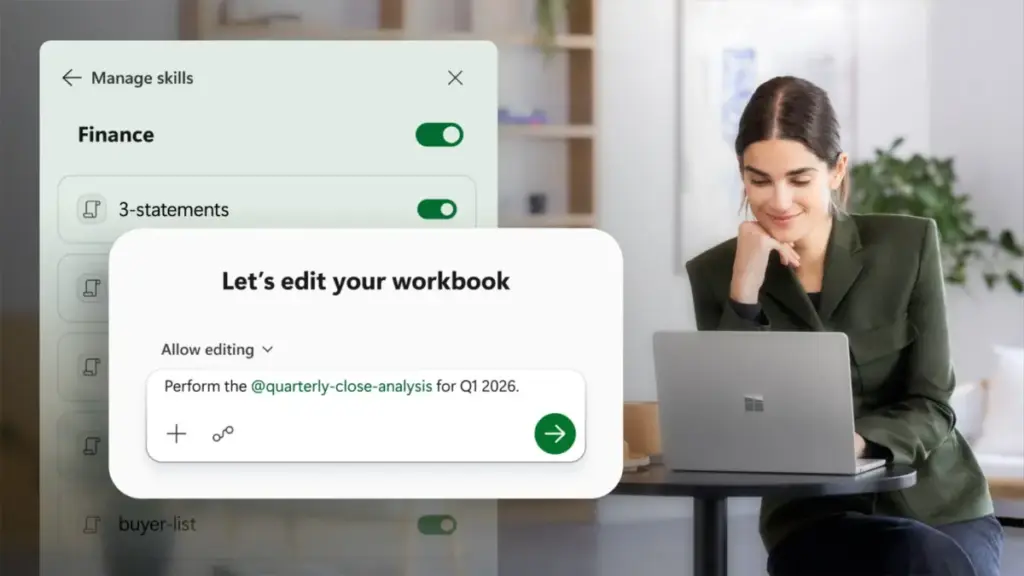
Whether it is building a discounted cash flow (DCF) model, closing the monthly books, refreshing a reporting model, or conducting a variance analysis, these skills act as a roadmap for the AI. Instead of the user having to provide exhaustive instructions every time, a predefined skill guides Copilot through the necessary steps. This ensures that the output follows the correct structure and formatting, making the final product easier to review, reuse, and trust.
Microsoft has released a library of sample finance skills to get teams started, but the true power of the feature lies in its customization. Users can create their own custom skills using an open-standard markdown file. By saving a file named "SKILL.md" in a OneDrive folder, Copilot can automatically ingest the instructions and apply them to complex tasks, such as generating a three-statement model or a board-ready reporting package. This allows an organization to codify its proprietary "house style" and ensure that the AI adheres to it consistently.
The ecosystem for these skills is also expanding to include third-party developers and partners. Soon, specialized skills will be available through the Microsoft Marketplace and Microsoft 365 Admin Center. Microsoft is already collaborating with a first wave of partners, including major names in the finance and Enterprise Resource Planning (ERP) space such as LSEG, Ramp, Rogo, Samaya AI, Velixo, and Vena. This open approach allows firms to bring their preferred tools and methodologies directly into the Excel environment.

Furthermore, Copilot is becoming more adaptable to individual user preferences. New personalization features allow professionals to set their formatting and logic preferences once, which Copilot then applies consistently across different tasks. Additionally, "workbook rules" have been introduced to capture specific naming conventions, structures, and formula styles as a dedicated sheet within the workbook, ensuring that the logic follows the file regardless of who is opening it.
Grounded in Data You Trust
In the world of finance, an analysis is only as good as the data that feeds it. Historically, this has meant hours of manual data pulls from various terminals and databases—a process prone to human error and version control issues. To solve this, Copilot in Excel is being equipped with direct connectors to the data sources that financial professionals rely on most.
By bringing market data, fundamentals, and research directly into the workbook, Copilot allows the analysis to begin from a foundation of live, trusted data. This follows the release of connectors for LSEG and Moody’s earlier this year. Microsoft is now expanding these options, providing even more avenues for bringing both public and private market data into the Excel environment. FactSet, a staple in the industry, is currently in preview and is scheduled for general availability in July. These connectors ensure that when a professional asks Copilot to compare a company’s performance against its peers or to pull historical volatility data, the information is coming from a verified, professional-grade source.
These data capabilities are further enhanced by "Work IQ," which provides Copilot with the necessary context regarding a user’s specific work environment. When combined with skills and connectors, this allows for highly sophisticated prompts. A user might, for example, ask Copilot to "update the revenue forecast in this sheet based on the latest market trends from the LSEG connector and apply our internal variance analysis skill." The AI then navigates the data, applies the logic, and presents a structured update that is ready for human review.
 Productivity Software & Office Suites
Microsoft Reimagines Copilot as a Central Hub for AI-Driven Enterprise Productivity
In a significant move to redefine the landscape of modern work, Microsoft...
 Productivity Software & Office Suites
Microsoft Reimagines Copilot as a Centralized AI Ecosystem for the Modern Enterprise
In a significant move to redefine the landscape of digital productivity, Microsoft...
 Productivity Software & Office Suites
Microsoft Reimagines Copilot: New "Autopilot" and "Code" Features Lead a Major Shift Toward Agentic Work
In a significant pivot toward the next era of enterprise productivity, Microsoft...