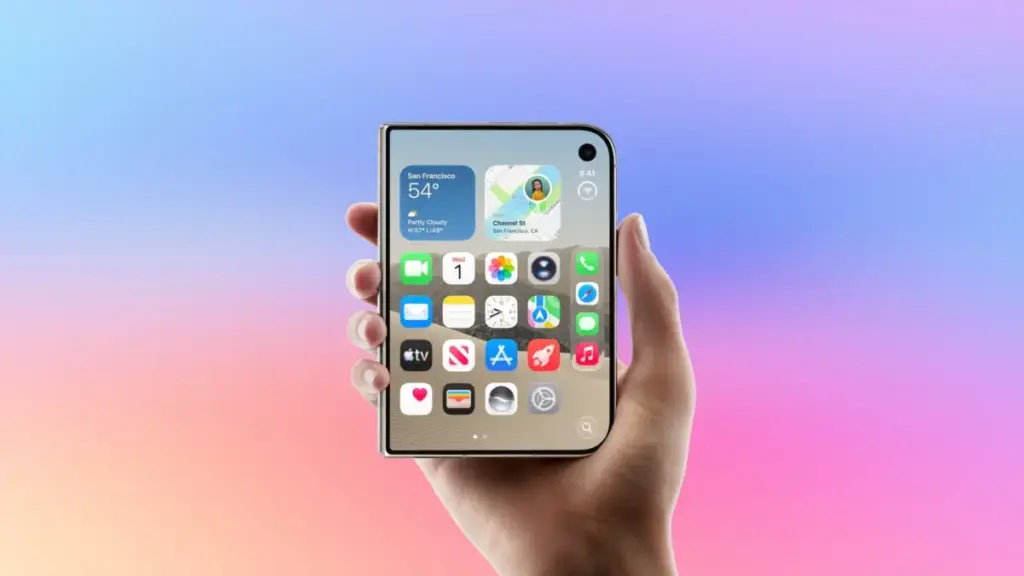
Apple has internally tested an experimental Lock Screen interface designed specifically for the iPhone Duo, which would significantly expand the layout options available to users by allowing widgets to inhabit two distinct areas of the Lock Screen simultaneously. According to technical findings published by the software leaker known as "pdfu," the unreleased layout introduces an additional vertical array of widgets positioned along the right-hand margin of the display. This setup, designated internally as a "Complication Column," operates alongside the traditional bottom row of widgets, creating a denser and more informative glanceable interface on Apple’s dual-screen device.
The leak, shared on the social media platform X by pdfu, reveals that the proposed interface fitment places a vertical pair of circular complications along the right edge of the display. Crucially, this vertical configuration is not designed as a replacement for the existing horizontal widget bar positioned beneath the system clock, but rather as a complementary interface element. If enabled, users would gain access to a dual-zone widget structure, allowing for greater visual customization and immediate access to background data without needing to navigate away from the Lock Screen.
From a spatial and structural standpoint, the "Complication Column" is positioned strategically within the iPhone Duo’s display geometry. The additional widget zone sits directly above the customizable quick-action shortcuts typically reserved for the flashlight and camera controls at the bottom corners of the interface. Rather than crowding these core navigation targets, the layout makes efficient use of the intervening vertical margin space along the right edge. System-level status indicators, including cellular and Wi-Fi network strength icons, remain positioned above the top of the new column, preserving standard status bar readability while capitalizing on otherwise unused screen real estate.
Technical analysis of the underlying operating system code indicates that this multi-zone widget interface is currently inactive for end users. According to details uncovered by pdfu, the functionality is gated behind an internal system toggle labeled within the code as "SpringBoard/Ionic." The feature made its initial appearance in early builds of iOS 27.1. SpringBoard, which serves as the core system shell managing the home screen, lock screen, and application lifecycle across Apple’s mobile platforms, holds the dormant logic required to render the vertical widget column. However, no further code modifications, refinements, or updates targeting the "Ionic" setting have been detected in subsequent operating system iterations.
The static nature of the code leaves the ultimate fate of the "Complication Column" uncertain. In Apple’s software development pipeline, internal toggles within SpringBoard often serve as testbeds for exploratory UI concepts. Engineers frequently embed experimental interface designs into early developer or internal system builds to evaluate usability, battery consumption, and visual balance on pre-release hardware. In many instances, such features remain hidden indefinitely, are salvaged for future major iOS updates, or are scrapped entirely if internal metrics and ergonomic testing fail to meet Apple’s design standards. It remains unclear whether Apple is actively continuing work on the feature or if the vertical complication array was merely a temporary design exercise.
 macOS & Apple IT Support
Amazon Launches Early Prime Day Sales Across Apple’s Latest Lineup, Cutting Prices on MacBooks, iPads, AirPods, and Apple Watches
Amazon has officially kicked off an extensive wave of early discounts ahead...
 macOS & Apple IT Support
Apple Details Workaround for Apple Watch Daylight Saving Time Display Glitch
Apple has officially published a support document addressing a software issue that...
 macOS & Apple IT Support
Apple Surveys Early iPhone Duo Owners on Display Size, Crease Visibility, and Under-Display Camera as Post-Launch Feedback Begins
Apple has officially begun issuing detailed email surveys to early purchasers of...