For over a decade, Samsung has maintained its position at the forefront of the smartphone industry, not just through hardware innovation but through the iterative refinement of its software ecosystem. The transition from the early days of TouchWiz to the modern sophistication of One UI has been a journey of streamlining complexity. With the arrival of One UI 9, the company is signaling a significant shift in its philosophy: moving away from a traditional mobile interface toward an intelligent, proactive assistant. For long-time enthusiasts and professional users alike, the update offers a compelling look at how artificial intelligence can be woven into the fabric of everyday tasks.
The latest update is more than a simple visual refresh; it represents the deep integration of Galaxy AI into the core functions of the device. For users who have grown accustomed to the high performance of Samsung’s hardware, One UI 9 provides a suite of features designed to reclaim time and reduce the cognitive load of multitasking. From automated video tracking to contextual shortcuts that anticipate a user’s next move, the software seeks to solve the minor but persistent frictions of mobile use.
Intelligent Videography: Keeping the Action in Frame
One of the most notable hurdles for mobile photographers and parents alike is the difficulty of capturing high-quality video during dynamic events. Whether it is a child’s school performance, a wedding dance floor, or a sporting event, the challenge of manual tracking often results in shaky footage or missed moments. Samsung’s response to this universal problem is "My FanCam," a feature that leverages Galaxy AI to transform the way users record live action.

Traditionally, capturing a specific person in a crowded or fast-moving environment required constant manual zooming and repositioning of the phone. This often meant the person filming was so focused on the screen that they missed the actual experience. My FanCam automates this process by allowing the user to select a specific subject within the frame. Once the subject is identified, the AI takes over, automatically adjusting the crop and framing to keep that individual centered and clear.
The utility of this feature extends beyond just parental pride at school functions. It democratizes high-quality videography for users who may not have a steady hand or the technical intuition for camera angles. By navigating to the Gallery, selecting a video, and engaging the Galaxy AI icon, users can apply this tracking after the fact or use similar logic during live recording. It effectively turns the smartphone into an intelligent camera operator, ensuring that the most important parts of a memory are never lost to poor framing.
Eliminating App Friction with Contextual Intelligence
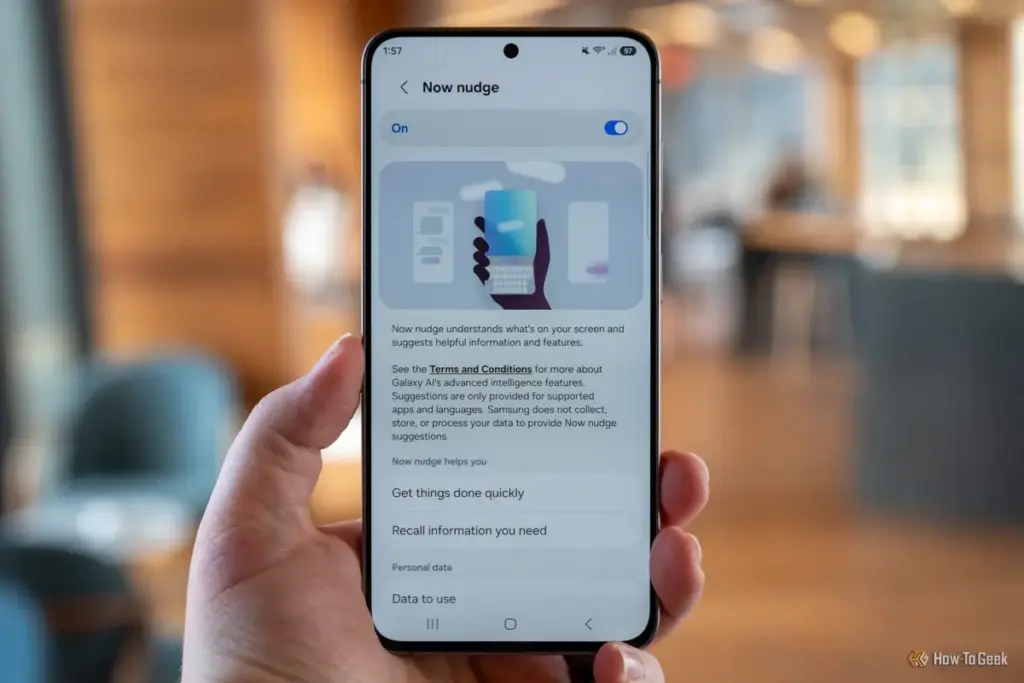
In the modern mobile landscape, "app fatigue" is a genuine concern. The constant switching between messaging platforms, calendars, and note-taking apps creates a fragmented user experience. Samsung addresses this in One UI 9 with "Now Nudge," a feature designed to bridge the gap between different applications through contextual awareness.
Consider the common scenario of coordinating a dinner plan. Typically, a user receives a message on an app like WhatsApp, exits the chat, opens their calendar to check availability, memorizes the free slot, returns to the chat, and types the reply. Now Nudge eliminates several of these steps by recognizing the intent of the conversation. If a friend mentions a date or time, the system can proactively suggest a Calendar shortcut or a relevant task reminder directly within the current view.
 Tech Tutorials & How-To Guides
Bridging the Digital Divide: How Legacy Kindle Hardware Reclaims Modern Social Features Through Open-Source Innovation
In the rapidly evolving landscape of consumer electronics, the lifespan of a...
 Tech Tutorials & How-To Guides
Protecting Your Power: The Critical Importance of Proper Winter Storage for Ryobi Tool Batteries
As the autumn leaves finish falling and the first signs of frost...
 Tech Tutorials & How-To Guides
Beyond the Workshop: How Ryobi is Leveraging its 18V Ecosystem to Redefine Outdoor Maintenance
In the modern landscape of home improvement, the cordless power tool has...