
Microsoft has announced a sweeping overhaul of its Copilot platform, signaling a fundamental shift in how artificial intelligence is integrated into the modern workplace. The tech giant is moving beyond the concept of a simple AI assistant to a more comprehensive ecosystem designed to scale AI across entire organizations. By introducing a new suite of capabilities—including a centralized Home interface, a dedicated solution-building environment called Code, and a proactive agentic system known as Autopilot—Microsoft aims to embed AI directly into the "flow of human ambition."
The announcement marks a significant milestone in the evolution of generative AI for enterprise use. Jared Spataro, who leads Microsoft’s AI at Work efforts, emphasized that the new Copilot is designed to connect the tools people rely on daily with a next-generation set of capabilities. This evolution is intended to help users not just draft text or summarize meetings, but to build, customize, and scale AI-driven workflows that can operate independently of constant human prompting.
A New Experience for Every Mode of Work
Central to this reimagining is the introduction of a new "Home" experience within the Copilot app. For many users, the primary challenge of the AI era has been the fragmentation of work across various meetings, chats, documents, and emails. Home is designed to serve as a grounding point where users can get their bearings and pick up work exactly where they left off.
The Home interface brings together two distinct modes of operation: Chat and Cowork. Chat remains the familiar, conversational interface optimized for instant queries, lookups, and quick drafts. Cowork, however, represents a more advanced tier of delegation. Instead of a back-and-forth conversation, users define a complex task—such as creating an RFP response, a launch kit, or a financial close package—and the system runs the process end-to-end to return a completed result. Microsoft indicated that in the near future, the system will automatically route requests to the most appropriate mode—Chat, Cowork, or Code—based on the nature of the task.
Further bridging the gap between AI and productivity is the integration of "Office in Copilot." This feature brings the full functionality of Word, Excel, and PowerPoint directly into the Copilot experience. The goal is to eliminate the friction of switching between applications, which often leads to broken formatting or version control issues. From within the Copilot interface, users can now ask the system to draft briefs or model budgets that result in real, editable Office documents. These documents are live and synchronized, meaning that edits made within Copilot appear instantly for teammates working in the traditional Office desktop or web apps.

The individual Office applications are also receiving targeted upgrades. PowerPoint can now automatically maintain brand consistency while fine-tuning slides, and Excel has been enhanced with a "change tracking" feature that explains exactly what edits were made by the AI. Additionally, new "Skills" are being introduced across Microsoft 365, allowing organizations to bring specialized expertise—such as legal or financial workflows—directly into the apps people use every day.
Democratizing Solution Building Through Code
Perhaps one of the most ambitious aspects of the update is the introduction of "Code," a feature designed to move solution-building out of the exclusive domain of professional developers. Microsoft posits that the traditional unit of knowledge work—the file—is being joined by a fourth category: small, purpose-built digital solutions.
Powered by the same underlying technology as GitHub Copilot, the Code feature allows users to describe an app, tracker, or automation in natural language. Copilot then determines the best approach and builds the solution, ranging from persistent desktop widgets to cloud-hosted internal apps. These tools are hosted securely within a company’s own tenant and are grounded in the specific context of the user’s work through Microsoft IQ.
To support this new era of "citizen development," the company is introducing the Microsoft Copilot Managed Runtime. This hosting infrastructure ensures that the code generated by Copilot runs safely within the organization’s Microsoft 365 environment. While it is designed to be easy for non-technical users to share and connect to live data, it remains fully governed by IT departments. This same foundation will eventually support third-party and professional developers, creating a unified environment for AI-driven applications.
The Rise of the Digital Teammate: Autopilot
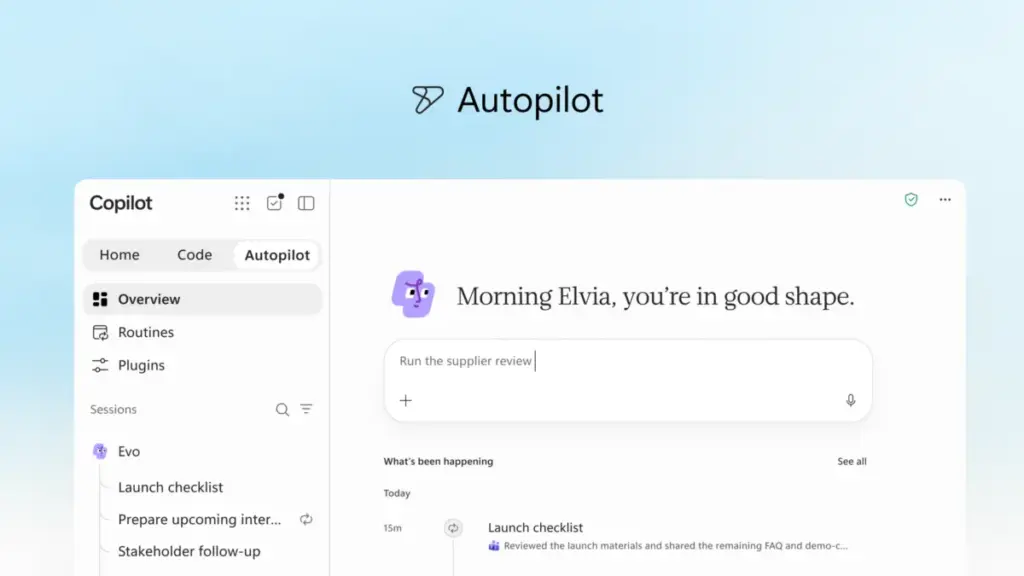
Moving into the realm of "agentic" AI, Microsoft has introduced Autopilot. Formerly known by the internal codename "Scout," Autopilot is described as a persistent, proactive digital teammate. Unlike standard AI assistants that wait for a user prompt, Autopilot is designed to work in the background, even when the user is offline.
By assigning Autopilot a name, a role, and a specific goal, users can delegate recurring or long-running processes. For example, an Autopilot agent could be tasked with managing a full supplier review process. It would independently build a schedule, handle preparation, follow up on threads in Teams or Outlook, and reach out to stakeholders for updates.

Because Autopilot is cloud-hosted and possesses its own identity and memory within the organization’s tenant, it functions more like a human colleague than a software tool. It can be @mentioned in chats or channels, and it operates under the same permissions, audit, and governance structures as any other employee. This allows it to understand the nuances of how an organization operates, ensuring that its proactive actions remain within established boundaries.
Expanding Business Context and Data Grounding
For AI to be effective in a business setting, it must be grounded in the specific data and workflows of that business. Microsoft is addressing this through Microsoft IQ, a unified intelligence platform that connects Copilot to the organization’s knowledge base.
A major expansion of this context comes via Fabric IQ, which integrates over 20 million semantic models from Power BI into Copilot. This ensures that when a user asks a question or delegates a task, the AI is drawing from trusted, real-time data. Furthermore, Copilot is now grounded in data from Dynamics 365 and the Power Platform. This means a salesperson drafting a proposal can have the AI automatically incorporate deal history or support tickets without having to manually look up information in a separate CRM system.
To facilitate external connections, Microsoft is launching a new plugin registry. This unified catalog will house Microsoft-built, partner-built, and custom plugins, allowing IT departments to centrally approve and manage the tools that extend Copilot’s capabilities. Developers can publish a plugin once and have it work across all supported Copilot experiences, simplifying the process of scaling trusted AI capabilities.
Managing the Economics of AI: FinOps for AI
As AI usage scales, managing costs has become a primary concern for enterprise leaders. Microsoft is addressing this by bifurcating its pricing and management models to reflect different types of AI work.
For "everyday AI"—such as summaries and quick drafts—the company offers a fixed-cost User Subscription License (USL). At the heart of this model is "Auto," a routing system that weighs accuracy, speed, and cost for each request, sending the task to the most efficient model for the job.

For "agentic work," which requires more advanced models and longer-running processes, Microsoft is utilizing Usage-Based Billing (UBB). This model applies to capabilities like Cowork, Code, and Autopilot, as well as frontier models like Astra and Fable. This approach is intended to give organizations full control over their spend, allowing them to match the cost of the AI to the specific value it generates.
To help organizations navigate these complexities, Microsoft is introducing "FinOps for AI." This suite of capabilities includes cost management tools within Agent 365, allowing admins to set spending policies, manage API access, and route credit requests. Business leaders can also access insights to determine which AI tasks are generating the highest ROI. On the user side, employees will be able to view their credit usage and remaining balances directly within Copilot, fostering a culture of responsible AI consumption within organizational guardrails.
A Sneak Peek at Future Innovations
Microsoft concluded its announcement by offering a glimpse into upcoming features currently in development. One of the most anticipated is "Today," a personalized command center that will appear in the Copilot Home experience. Today is designed to act as a proactive assistant that surfaces missed meetings, urgent tasks, and pending follow-ups, often preparing drafts or schedule changes before the user even asks.
Additionally, the company is testing a new "@Copilot" capability in Microsoft Teams. This feature allows the AI to join a channel or group chat with the shared context and permissions of the entire team. It can explain the history of a product decision or prepare cross-functional reviews that identify dependencies and owners across different departments.
These new features are currently rolling out through the Microsoft Frontier program, with broader availability expected in the coming weeks and months. As the company prepares for its annual Microsoft Ignite conference in November, it is clear that the "new Copilot" is intended to be the foundation for a fundamental reimagining of organizational productivity.
 Productivity Software & Office Suites
Microsoft Reimagines Copilot as a Central Hub for Autonomous AI and Agentic Work
Microsoft has announced a significant evolution of its AI strategy, unveiling what...
 Productivity Software & Office Suites
Microsoft Announces Microsoft 365 G7 and Agent 365 to Accelerate AI Adoption and Governance Across U.S. Government Agencies
In an era where the public sector faces the dual challenge of...
 Productivity Software & Office Suites
Microsoft to Headline ESPC 2026 in Amsterdam as the European Tech Community Pivots Toward an Agentic AI Future
As the global landscape of work undergoes its most significant transformation since...







