As the holiday season approaches, indie software developer Simon Støvring has officially released the major 2026 update for Festivitas, his popular seasonal customization app designed to bring festive visual cheer to Apple’s desktop and mobile operating systems. First introduced two years ago as a playful tool to string decorative holiday lights across the Mac’s Dock and menu bar, Festivitas has grown into a versatile visual utility spanning macOS, iOS, and iPadOS. The latest release introduces a significant expansion of personalization options, headlined by the ability to import custom bulb designs, improved dynamic snowfall that interacts directly with open application windows, and native transparent widgets for iPhone and iPad users.
Since its initial debut, Festivitas has occupied a unique niche within the Apple utility ecosystem. Rather than offering purely functional desktop utilities, Støvring created the application to inject a sense of warmth and holiday ambiance into daily computer use. Over the past two years, the software has evolved from a straightforward novelty light strip into a highly customizable visual engine. The 2026 release builds directly upon that foundation, refining the app’s rendering capabilities, expanding its aesthetic flexibility, and tightening its integration with native platform features like Apple Shortcuts and Home Screen widgets.
The headline feature of the 2026 update is the introduction of fully custom light bulb shapes on macOS. For the first time, users are no longer limited to pre-packaged light templates; instead, Festivitas now allows individuals to upload their own images to generate bespoke bulb strings across their screens. The app processes imported artwork and converts it directly into illuminated light strands that line the display boundaries. Simple PNG files featuring transparent backgrounds deliver the cleanest aesthetic outcomes, making it easy to turn logos, simple graphics, or custom vector shapes into glowing holiday displays. For more intricate or multi-colored graphics, the software retains the original image colors, allowing detailed illustrations to illuminate the desktop without losing their original visual identity.
Beyond custom image importing, Festivitas 2026 provides an expansive suite of granular adjustments within its Settings menu, giving users broad control over how holiday lighting appears on their displays. Digital decorators can tailor light bulb geometry, color palettes, scale, opacity, and vertical drop height to match their preferred desktop aesthetic. The app also allows fine-tuning of the virtual wiring supporting the light strands, including adjustable cable thickness to ensure the strings blend naturally into dark or light wallpaper themes.
To complement the static visual tweaks, the light strings feature dynamic animation patterns that bring the desktop to life. Users can select from multiple movement and lighting sequences, including soft pulsing glow effects, rapid twinkling, classic sequential chasing lights, and rhythmic wave motions. These animations can be customized to run continuously, offering a subtle, ambient background backdrop while working or browsing.
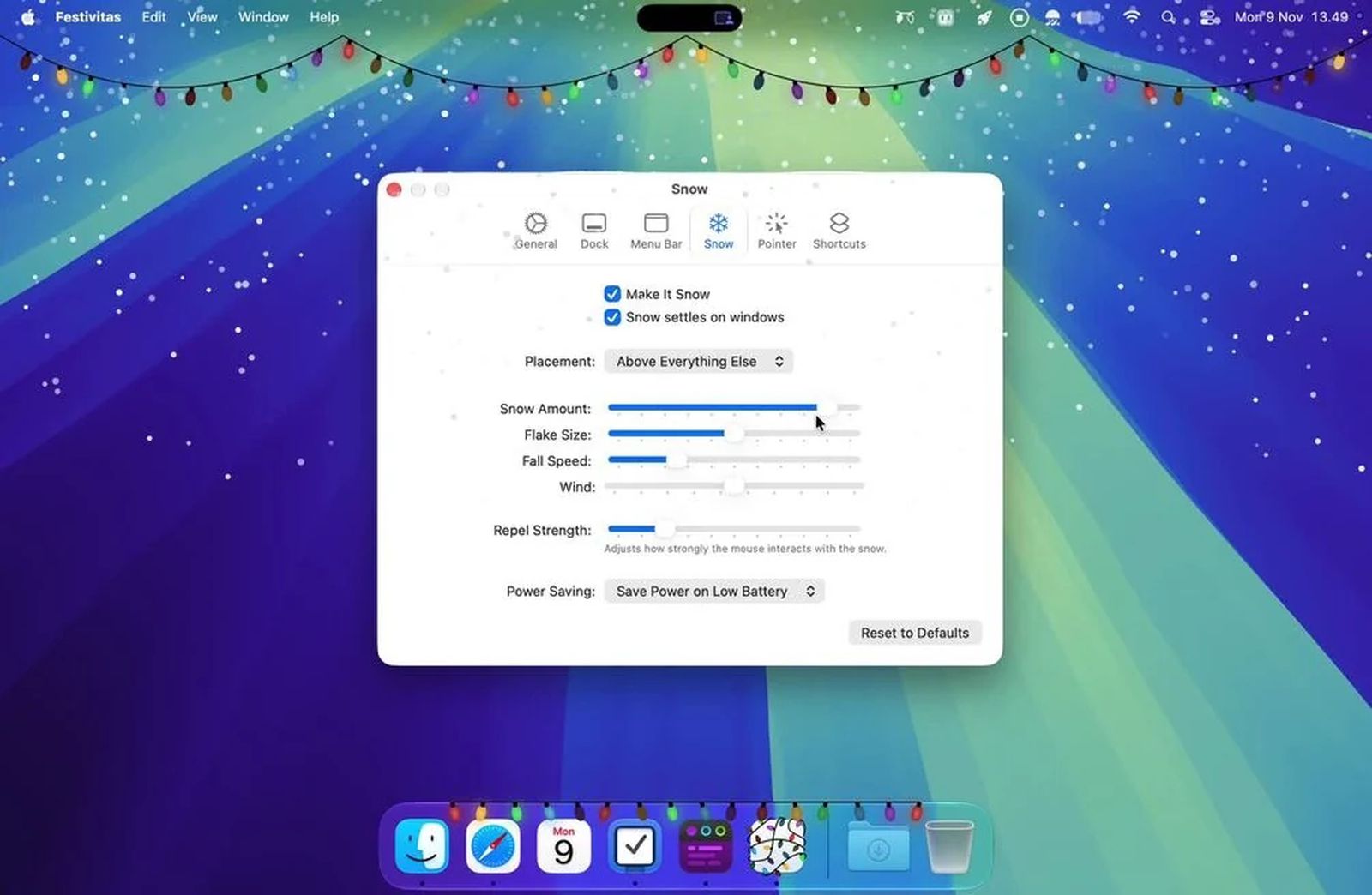
Alongside the lighting upgrades, the 2026 update significantly enhances the application’s dynamic snow rendering engine. While previous versions allowed virtual snowflakes to float down the screen, the updated release introduces interactive window collision mechanics. Snowflakes falling across the display now physically accumulate on top of open application windows, creating delicate drifts along title bars and active frame edges. This visual effect turns open windows into physical obstacles within the screen environment, enhancing the depth and realism of the seasonal atmosphere.
Users retain full control over the environmental parameters governing the virtual winter weather. The settings panel enables precise adjustment of the snowfall rate, ambient flake density, and individual snowflake size, allowing users to toggle between a gentle, sparse flurry and a dense desktop snowfall. For those who prefer a less intrusive experience during focus-intensive tasks, Festivitas allows environmental snow and light strands to be displayed either layered above active app windows or constrained strictly to the underlying desktop wallpaper layer. Regardless of the chosen rendering depth, light strands designated for the Mac’s Dock remain clearly visible, framing pinned app icons with glowing seasonal accents.
The visual enhancements of Festivitas 2026 extend beyond lighting and weather to encompass interactive cursor effects. The app includes an expanded suite of pointer decorations that trace user mouse movements across the display. Users can choose from a wide assortment of festive trails, including shimmering sparkles, floating air bubbles, drifting autumn leaves, celebratory confetti, miniature Christmas trees, and traditional holiday wreaths. These pointer decorations follow cursor trajectories in real time, adding a touch of playful feedback to ordinary desktop navigation.
Deep integration with Apple’s native Shortcuts framework is another core pillar of the 2026 release, allowing users to automate their holiday desktop setup based on real-world conditions or user routines. Through configured Shortcuts, Festivitas can automatically trigger background music playback alongside lighting activation, turning the computer into an automated holiday media hub. Even more impressive is the app’s ability to tie its atmospheric effects directly to external weather data. Using Shortcuts, Festivitas can monitor local weather forecasts and automatically initiate its desktop snow engine—or escalate the effect into a full desktop snowstorm—whenever real-world snow is predicted in the user’s immediate area.
While Festivitas originated as a Mac-centric desktop customizer, the developer has maintained functional parity across Apple’s mobile platforms. The companion app for iPhone and iPad receives the major 2026 feature additions as well, bringing custom bulb image importing and interactive falling snow to mobile displays. Crucially, the updated iOS and iPadOS version introduces fully transparent animated widgets for the Home Screen. Unlike earlier third-party widget implementations that required users to capture screenshots of their blank Home Screen wallpapers to simulate transparency, Festivitas achieves native, fully transparent widget backgrounds seamlessly, delivering clean holiday animations directly among application icons without any extra workaround steps.
The technical operation of Festivitas on macOS touches upon broader discussions surrounding system security and user permissions. To render overlays above active system components, manipulate Dock presentation, and calculate window boundaries for snow accumulation, Festivitas relies on specific accessibility access permissions within macOS. In light of Apple’s planned security updates and permission changes coming in macOS 27.3, developer Simon Støvring shared insights into how these evolving system protocols impact utility applications like Festivitas.
Støvring explained that under the current macOS permission architecture, Festivitas is forced to request far more broad system access than its feature set actually requires. Because Apple’s existing permission toggles lack sufficiently granular access controls for overlay-driven visual software, developers must ask for wide-reaching accessibility privileges simply to draw graphics near system borders or detect app window coordinates. Støvring noted that he would strongly prefer to request a much narrower, less intrusive permission set if Apple provided more refined API options specifically tailored to non-invasive desktop enhancements.
To provide clarity for privacy-conscious users, the developer delineated how permissions correspond to specific features within the app. Core visual features—including top-level menu bar lights, ambient falling snow, and interactive pointer decorations—operate completely standardly without requiring the elevated System & App Protection Override permission. However, more invasive visual elements that interact directly with OS-managed boundaries—specifically displaying light strings across the Mac Dock and enabling snowflakes to land and pile up on active application window edges—do require elevated system override access to function properly.
Distribution and pricing for Festivitas remain user-friendly across all supported platforms. For macOS, Festivitas is available directly through the official Festivitas website using a customer-chosen fair pricing model that starts at 4.39 euros. This flexible pricing structure allows users to support the ongoing development of the app according to their personal valuation. For mobile users, the iPhone and iPad application can be downloaded for free from the Apple App Store, with optional customer-selected fair pricing tiers available between $3.99 and $9.99. In line with Støvring’s past release policies, the 2026 update is provided completely free of charge for existing users across both Mac and iOS platforms.
 macOS & Apple IT Support
Apple to Reopen Renovated Carlsbad Retail Store at The Forum Following Year-Long Transformation
Apple has announced that its retail store located at The Forum in...
 macOS & Apple IT Support
Amazon Trims Base AirPods 5 Price Ahead of Official Launch Alongside Broader Autumn Apple Hardware Discounts
As Apple prepares to officially launch its latest generation of personal audio...
 macOS & Apple IT Support
Apple Shell Company Filings Point to ‘HomeView’ and ‘homeOS’ Ahead of October ‘Welcome Home’ Launch
As Apple prepares for an upcoming hardware launch event, recent trademark discoveries...