
Apple has officially released iOS 27.2, delivering a significant mid-cycle software update that brings feature parity across its smartphone hardware lineup. The update serves a crucial operational role by uniting the newly released iPhone Duo with all other supported iPhone models on the same version of iOS. As the first major point release since the debut of the iOS 27 operating system, iOS 27.2 introduces substantial artificial intelligence enhancements, deep system integration for media applications, expanded accessibility features, and crucial regulatory compliance adjustments.
The public deployment follows an extensive testing phase that concluded with a release candidate build issued to developers earlier in October. In addition to functional feature additions and visual redesigns across core native apps, iOS 27.2 delivers a massive overhaul to system security, fixing more than 160 documented vulnerabilities.
Siri AI Improvements and Expanded Language Support
The central focus of iOS 27.2 is a series of meaningful upgrades to Siri’s underlying artificial intelligence engine. Designed to offer a more conversational and contextually aware assistant experience, Siri can now recall information from past interactions. Users can ask the virtual assistant to retrieve previously discussed details—such as a specific restaurant recommendation, an address mentioned in a previous query, or advice shared during a prior session—without needing to repeat contextual setup details.
In addition to conversation memory, Siri AI draws on a broader range of device data sources to supply richer responses. Apple has upgraded how the assistant indexes and parses web context, yielding noticeably better search results from a user’s Safari browsing history and saved Reading List items.
To give users refined control over which applications feed information into Siri and native system search, Apple overhauled its app permission framework. A newly redesigned Excluded Apps menu replaces the previous App Access interface. While the prior system forced users to manage data-sharing permissions individually on an app-by-app basis, the updated interface provides a streamlined hub where users can quickly toggle which applications Siri, system-wide Search, and contextual suggestions can read.
For enhanced usability when reading generated responses, iOS 27.2 adds granular text selection within the Siri interface. Instead of being forced to copy an entire generated response block, users can now highlight and copy specific snippets or individual sentences directly from a Siri response window.
These advanced conversational Siri AI capabilities remain tied to high-performance processing hardware, requiring an iPhone 15 Pro, iPhone 15 Pro Max, or any model from later iPhone generations.
Alongside the intelligence enhancements, Apple extended Siri AI support to several new international languages, including French, Japanese, Korean, Portuguese, and Spanish. However, Apple confirmed that Siri AI features remain unavailable to users located in mainland China and the European Union due to ongoing regulatory and legal compliance considerations.
Contextual Messaging in Messages
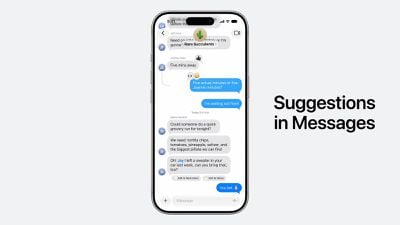
The Messages app receives a prominent workflow upgrade with the official launch of smart suggestions. Although contextual suggestions were initially tested during the early iOS 27 beta cycle, Apple removed the feature prior to the initial public release in September to refine its accuracy and performance.
With iOS 27.2, contextual suggestions are fully integrated into active conversation threads. The feature scans chat content locally on the device to present interactive, tappable shortcuts directly inside the conversation view. For example, if a contact sends a shipping tracking number or discusses an upcoming dinner gathering, Messages will generate an immediate shortcut allowing the user to track the package with a single tap or create a structured event entry in the Calendar app.
Users retain full granular control over which system services generate these inline shortcuts. Within the Messages settings menu, users can toggle suggestions on or off for specific application categories, including Calendar, Reminders, Notes, Maps, as well as dedicated shortcuts for tracking flights and parcel packages.
Apple Music Visual Rebrand
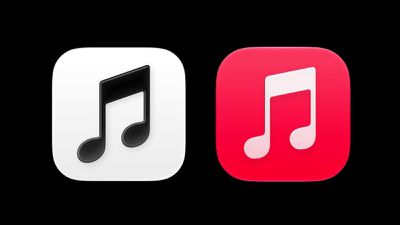
Coinciding with Apple’s broader corporate brand refresh for its streaming music service, iOS 27.2 officially updates the visual identity of the Apple Music app. The long-standing red application icon has been retired in favor of a sleek, monochromatic black-and-white icon design.
This design transformation extends inside the application itself. Apple stripped away the traditional red accent highlights across the app’s navigation bars, tab bars, and playback controls. The entire user interface now adopts a neutral color palette that complements system-wide dark and light display modes while aligning with the service’s updated global branding.
Photos App Refinements and SynthID Verification
The Photos app receives several practical utility updates aimed at album management and media authenticity. Within Shared Albums, users now have the ability to edit photo captions and post comments after they have been published, correcting a long-standing limitation of the shared photo platform.
To help manage growing media libraries, Apple added automated duplicate photo detection tools designed to identify and consolidate redundant shots. Additionally, the app now issues timely reminder notifications before shared media albums expire, providing participants with an advance window to download and safeguard important photos and videos before the collection closes.
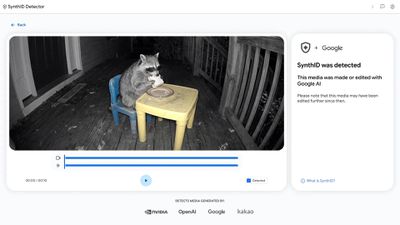
A major technical addition in iOS 27.2 is the integration of digital provenance marking powered by Google’s SynthID technology. Image Playground generations and specific photo edits performed using generative artificial intelligence tools—such as the Extend tool, the Reframe tool, and substantial object removals using the Clean Up feature—now automatically embed imperceptible SynthID digital watermarks directly into the image file metadata.
These embedded watermarks provide verifiable proof of artificial intelligence manipulation. Users and content platforms can verify whether an image contains SynthID artificial intelligence labeling by uploading the file to Google’s publicly available SynthID Detector website.
Overhauled Podcasts Experience
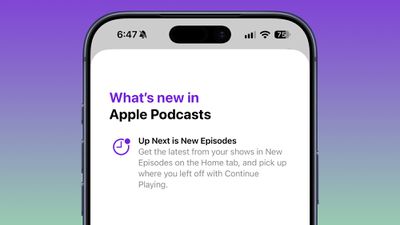
Apple simplified the main interface of the native Podcasts application to streamline playback management. On the Home tab, the traditional "Up Next" queue section has been completely replaced by two dedicated, distinct categories: "New Episodes" and "Continue Playing."
This structural separation separates unplayed content from partially listened episodes, allowing listeners to jump directly back into ongoing shows without mixing them up with newly published releases from subscribed feeds.
Expanded Social Features in Games
The dedicated Games app receives enhanced social capabilities through an updated Friends tab. The platform now provides richer context surrounding friend suggestions, explaining mutual connections or common gameplay interests that prompted the recommendation.
Furthermore, individual player profile pages now feature an activity section displaying recently played titles, making it easier for friends to discover new games and compare recent gaming activity across their network.
Enhanced Parental Controls and Profiles in Apple TV
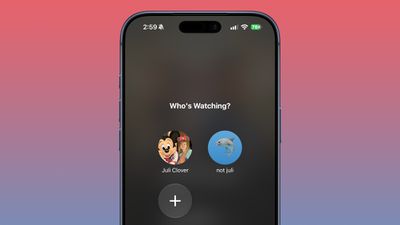
Multi-user management within the Apple TV application has been streamlined for mobile devices. Users can now build and manage individual Apple TV profiles directly inside the account settings menu on an iPhone or iPad, eliminating the need to set up profiles exclusively through an Apple TV streaming box.
Creating a new profile requires minimal information, asking only for a display name, profile rating preferences, and an indicator specifying whether the profile belongs to a child.
When a child profile is established, the Apple TV app automatically applies a default content restriction set to a PG rating across all streaming catalogs. Parents looking for tighter or more relaxed control can customize age ratings individually for television series and movies, ensuring that recommended and accessible content aligns precisely with a child’s age group.
Smart Call Context in Phone and Enhanced FaceTime Capabilities
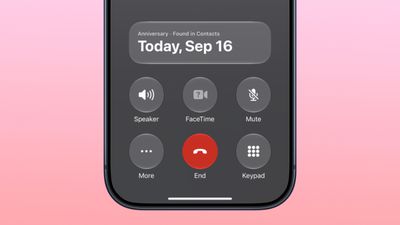
The native Phone application introduces a helpful feature known as Call Context. Designed to prevent forgotten milestones, Call Context scans stored card data in the Contacts app. When an outgoing call is placed to a contact whose anniversary date is recorded in their contact card, the Phone interface displays an on-screen reminder highlighting the occasion during the call setup.
FaceTime also sees meaningful updates, led by the expansion of Dual Capture functionality to group FaceTime calls. Dual Capture allows a caller to stream live video feeds simultaneously from both the front-facing TrueDepth camera and the rear primary camera lenses, displaying a split view to call participants.
On compatible devices running iOS 27.2, flipping the active camera while participating in a group video call automatically triggers Dual Capture mode. Hardware support for Dual Capture includes the iPhone 17, iPhone 17 Pro, iPhone 17 Pro Max, iPhone Air, iPhone 18 Pro, iPhone 18 Pro Max, and the iPhone Duo.
In addition to Dual Capture, FaceTime expands its suite of accessibility options. Call participants can now invite third-party sign language interpreters or external live captioning services directly into an active FaceTime call, improving communication accessibility for deaf and hard-of-hearing users.
Custom Automations in Shortcuts
The Shortcuts automation framework gains several powerful new triggers, actions, and management enhancements tailored for power users and specific hardware form factors.
To support Apple’s dual-screen foldable hardware, Shortcuts introduces a dedicated trigger condition that executes automations specifically "when my iPhone is opened or closed." This enables users to configure distinct system behaviors, sound profiles, or app launches based on the physical state of the iPhone Duo display.
For fitness enthusiasts, the Workout automation logic has been updated with full operational support for the native Fitness app. Additionally, the general App automation trigger can now pass the specific name of an application that was closed as an input variable for downstream scripting actions.
Window management and interface builders in Shortcuts also see refinements. Developers and automation creators can configure complex spatial window layouts using new "Show Actions" and "Show Describe a Shortcut" menu parameters. Organization inside the app has also been simplified, as shortcut titles and visual icons can now be edited directly within the main library grid without opening the full workflow editor.
Targeted iPhone Duo Features
Beyond shared software updates, iOS 27.2 delivers hardware-tailored capabilities designed specifically to maximize the dual-screen form factor of the iPhone Duo.
The update introduces native input support for the Apple Pencil (USB-C), expanding precision drawing, note-taking, and navigation capabilities across the device’s dual displays.
To improve video presentation during remote meetings and personal video calls, iOS 27.2 introduces Edge Light for the iPhone Duo. This feature uses the perimeter of the dual display panels to emit a soft, adjustable fill light, illuminating the user’s face during FaceTime or third-party video calls in low-light environments.
Multiview Sports Streaming on iPhone
Apple has expanded one of its most popular living-room features to handheld displays by bringing Multiview support in the Apple TV app to the iPhone.
With iOS 27.2, sports fans can stream up to four live athletic events simultaneously on a single iPhone screen. Users can tap individual stream tiles to switch the primary audio track between matches or enlarge a specific game to full screen.
Multiview compatibility is available for live sporting events included as part of an active Apple TV subscription service or add-on channel. Supported coverage includes Major League Soccer (MLS) Season Pass matches, U.S. broadcasts of Formula 1 (F1) races, and Major League Baseball (MLB) Friday Night Baseball doubleheaders.
Clock App Tweaks, European Regulatory Compliance, and Security Overview
Rounding out the user-facing refinements in iOS 27.2 is a subtle typographic adjustment in the native Clock app. The AM and PM time indicators within the main alarm list have been reduced in font size, creating a cleaner visual alignment alongside set alarm times.
From a regulatory standpoint, iOS 27.2 adapts Apple’s App Tracking Transparency (ATT) framework to meet European privacy mandates. For users located in the European Union, the update implements an expanded consent prompt paired with a mandatory annual re-prompting cycle. This modified transparency prompt is explicitly enforced for users in France, Germany, Italy, Poland, and Romania to comply with regional data protection standards.
Notably missing from this update is the redesigned Health app interface that was briefly evaluated during early iOS 27.2 developer beta testing. Apple opted to hold back the overhauled Health experience for further refinement, with plans to release it in a subsequent software update later in the year.
Finally, iOS 27.2 includes essential security patches addressing more than 160 documented security vulnerabilities across kernel components, web engines, and system frameworks. Although Apple reported that none of the vulnerabilities were actively exploited in the wild prior to release, security experts strongly advise all users on compatible devices to install the update promptly to maintain optimal system protection.
 macOS & Apple IT Support
Apple Seeds iOS 27.3 Beta 2: Face Unlock for iPhone Duo, Siri AI Web Awareness, Tiered Usage Limits, and System Refinements
Apple has officially seeded the second beta of iOS 27.3 to developers...
 macOS & Apple IT Support
Apple’s First Touchscreen OLED MacBook Pro, Upgraded OLED iPad Mini, and M6 Macs Arrive as Global Rollout Begins
The next generation of Apple personal computing hardware has officially reached the...
 macOS & Apple IT Support
Apple Retail Staff Advised to Warn Walk-In Customers Against Launch-Day Visits as iPhone Duo Supply Shortages Deepen
Apple retail employees have been instructed to proactively warn customers against visiting...







