
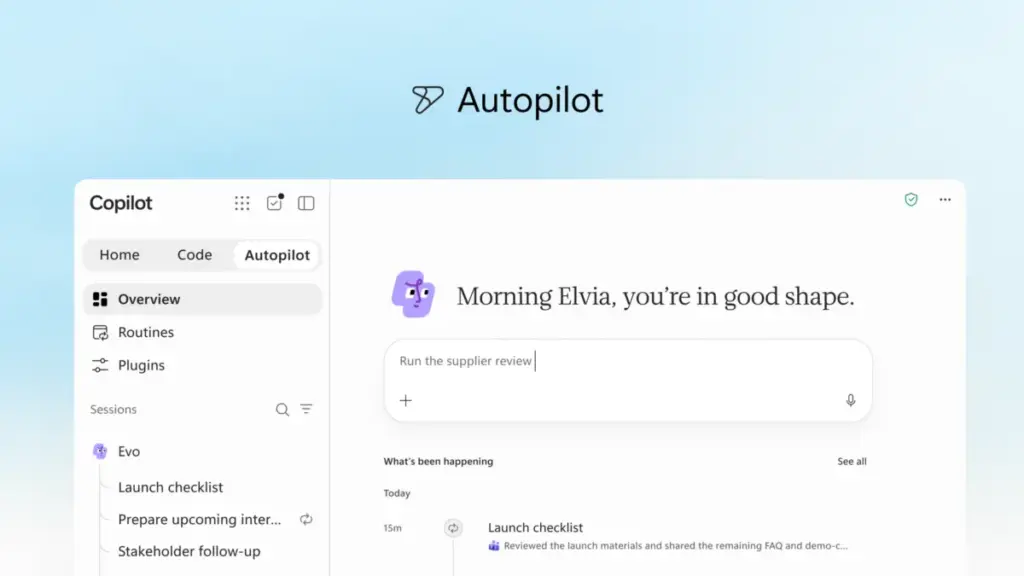
In a significant pivot toward the next era of enterprise productivity, Microsoft has announced a comprehensive reimagining of its Copilot ecosystem. The tech giant is introducing a suite of new capabilities designed to transition the platform from a reactive assistant into a proactive partner capable of managing complex, end-to-end workflows. This evolution, centered on a new "Home" interface and the introduction of "Autopilot" and "Code" features, aims to integrate artificial intelligence more deeply into the flow of human ambition and organizational scaling.
The core of this update is the "new Copilot," an experience intended to unify the fragmented tools that modern professionals rely on daily. By connecting traditional productivity applications with next-generation agentic capabilities, Microsoft seeks to enable a work environment where AI doesn’t just respond to prompts but anticipates needs and executes tasks independently.
A Unified Hub for the Modern Workflow
At the center of this transformation is "Home," a new starting point within the Copilot app that serves as a command center for the digital workday. Home is designed to solve the friction of modern work, which often requires employees to bounce between meetings, chats, documents, and emails. By bringing "Chat" and "Cowork" together in one place, Home allows users to maintain their bearings and keep projects moving forward without losing context.
The distinction between Chat and Cowork is fundamental to Microsoft’s new vision. Chat remains the conversational interface for instant interactions—quick questions, data lookups, or drafting brief responses. Cowork, however, represents a shift toward delegation. In this mode, a user defines a complex task, such as responding to a Request for Proposal (RFP), creating a product launch kit, or preparing a financial close package. Copilot then runs the task from start to finish, returning a completed result for the user to iterate upon. Microsoft has indicated that soon, the system will even remove the need for users to manually choose a mode; Copilot will automatically route requests to Chat, Cowork, or Code based on the nature of the task.
Furthering this integration is "Office in Copilot," which embeds the full functionality of Word, Excel, and PowerPoint directly into the Copilot experience. This update addresses a common pain point: the loss of formatting and context when moving drafts between an AI interface and a traditional document editor. Now, users can draft briefs or model budgets within Copilot, and the system creates live, editable files that are synchronized across the team. Changes made by colleagues or the AI itself are reflected in real-time, ensuring that progress is never siloed.

Microsoft has also refined the specific AI skills within these apps. PowerPoint can now automatically keep presentations on-brand while allowing for fine-tuned slide adjustments. Excel has been updated to provide better transparency, showing users exactly what Copilot changed in a spreadsheet and why, while also recommending the most effective visualizations for complex data sets.
Democratizing Solution Building with "Code"
Perhaps one of the most ambitious additions to the platform is "Code," a feature that moves software and solution building beyond the exclusive domain of professional developers. Microsoft argues that while documents and spreadsheets have long been the primary units of knowledge work, small, purpose-built solutions—such as trackers, dashboards, and automations—are becoming just as essential.
 Productivity Software & Office Suites
Microsoft Unveils Strategic Roadmap for Enterprise AI, Emphasizing Agentic Workflows and Hybrid Pricing Models
In an era defined by a relentless cycle of artificial intelligence breakthroughs...
 Productivity Software & Office Suites
Microsoft Reimagines the Future of Productivity with a New Generation of Copilot and Autonomous Agents
Microsoft has announced a significant evolution of its artificial intelligence strategy, unveiling...
 Productivity Software & Office Suites
Microsoft Announces General Availability of Work IQ APIs, Ushering in the Era of Agentic Software
REDMOND, Wash. — In a move that signals a fundamental transformation in...







