

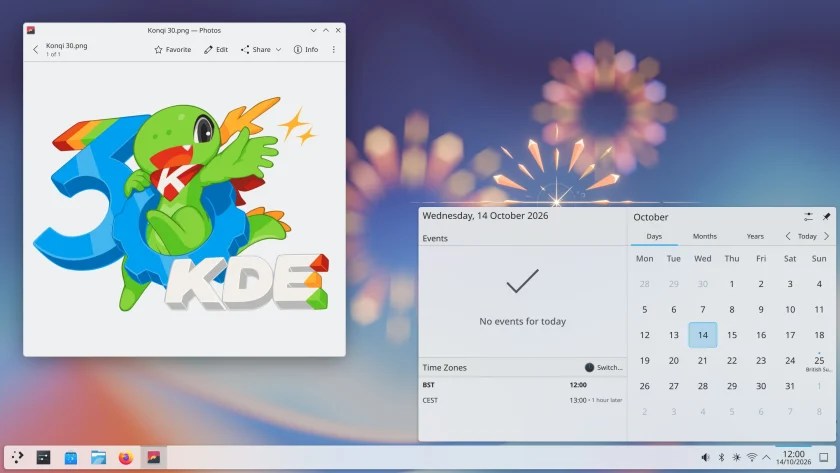
The KDE community has officially released KDE Plasma 6.8, marking a historic milestone as the open-source desktop environment celebrates the 30th anniversary of its founding. Over the three decades since its inception, KDE has evolved from an ambitious effort to create a consistent, user-friendly graphical environment for Unix-like systems into one of the pillars of the modern free software ecosystem. The arrival of Plasma 6.8 represents both a celebration of that longevity and a decisive step forward in the project’s technical modernization, combining expanded system tooling, refined visual consistency, performance optimizations, and a definitive pivot toward modern display architectures.
The new release touches almost every layer of the Plasma desktop stack. Rather than focusing solely on incremental bug fixes or minor aesthetic adjustments, Plasma 6.8 delivers meaningful additions to system maintenance, multimedia capture, visual integration for third-party software, accessibility, and low-level resource management.
Expanding Desktop Tooling: Kup and Spectacle
Among the most visible additions in KDE Plasma 6.8 is the integration of Kup, a dedicated backup tool designed to simplify automated data protection. While Linux users have traditionally relied on a disparate collection of command-line scripts, manual file transfers, or standalone third-party software, Kup is now provided as part of the Plasma environment to streamline routine backups directly to external storage media. By integrating backup functionality cleanly into the desktop workflow, the system allows users to configure automated schedules and safeguard personal files without navigating complex administrative setups.
Plasma’s default screenshot and screen capture utility, Spectacle, has also received significant functional upgrades. In recent iterations, Spectacle transitioned from a straightforward static image capture utility into a modern screen-recording interface. In Plasma 6.8, its recording capabilities expand further: the tool can now capture system audio alongside microphone input simultaneously with video recording. This enhancement turns Spectacle into a comprehensive, out-of-the-box solution for creating instructional walkthroughs, technical troubleshooting captures, video demonstrations, and collaborative presentations without requiring users to install advanced external broadcasting suites.
Visual Integration and Broader Accessibility
Visual consistency across diverse application ecosystems has long presented challenges for Linux desktop environments, particularly when handling third-party software built on custom graphical toolkits. In Plasma 6.8, the desktop client for Valve’s Steam platform receives improved window decorations, rendering native drop shadows and rounded corners. This adjustment allows the Steam interface to blend seamlessly alongside native KDE and standard Wayland client windows, reducing visual friction and maintaining the aesthetic cohesion of the overall desktop workspace.
Usability improvements in Plasma 6.8 also focus heavily on inclusive design. The update introduces a dedicated "click dwell" accessibility feature, which allows users to trigger a mouse click simply by hovering the pointer over a user interface element for a designated period. This feature is particularly valuable for individuals with motor disabilities, repetitive strain injuries, or those using alternative pointing hardware, such as head trackers or eye-gaze systems, enabling full desktop navigation without requiring physical button presses.

Cultural and linguistic accessibility has been broadened as well. The Digital Clock applet now supports the Hindu Bikram Sambat calendar, catering to users who rely on this historical solar-lunar calendar system alongside or in place of the standard Gregorian format. Additionally, Plasma’s built-in on-screen virtual keyboard has expanded its localization capabilities with added support for Amharic, widening desktop accessibility for Ge’ez script users.
Graphics, Performance, and Process Management
Under the hood, KDE Plasma 6.8 introduces substantial refinements to graphics pipeline handling, power efficiency, and hardware resource allocation. For systems running NVIDIA graphics hardware, Plasma now enables triple-buffering by default. This change aims to eliminate frame drops, minimize visual stutter, and ensure consistent frame pacing throughout desktop animations, window movements, and compositing operations, resolving historic performance disparities on proprietary graphics drivers.
Color management and display rendering have also been polished. The desktop’s High Dynamic Range (HDR) implementation now integrates effectively with International Color Consortium (ICC) color profiles. This allows creative professionals, photographers, and video editors to work within calibrated color workflows while still leveraging modern high-dynamic-range display hardware, bridging an essential gap for production environments on the Linux desktop.
General system responsiveness receives a noticeable boost as well. The underlying Plasma Shell architecture has been optimized to start up more rapidly while consuming less system memory, improvements that remain noticeable even on hardware setups running an extensive array of desktop widgets and plasmoids.
For enthusiasts, developers, and power users seeking precise control over hardware resources, Plasma 6.8 introduces processor management capabilities directly inside the KDE System Monitor application. Users can now assign specific applications or individual processes to designated CPU cores through a built-in CPU affinity selector. By right-clicking any running process within System Monitor and opening the "select affinity" option, users are presented with a checklist of available logical cores, allowing them to uncheck any cores they wish to restrict from that task. This level of granular control is particularly beneficial for isolating background workloads, running resource-intensive compilation tasks, or managing software across modern processors featuring hybrid performance and efficiency core architectures.
X11 Desktop Sessions Dropped
The most significant architectural shift in Plasma 6.8 is the removal of support for running the core desktop environment on legacy X11/Xorg sessions. Following a similar transition path adopted by the GNOME project, the KDE developers have removed the native X11 session option, establishing Wayland as the exclusive display server architecture for the Plasma desktop workspace.
This transition reflects the broader evolution of the Linux display stack. Maintaining dual code paths for both X11 and Wayland within the KWin compositor and desktop shell has required substantial engineering resources, often forcing developers to work around the fundamental security and architectural limitations inherent to the decades-old X11 protocol. By deprecating the X11 desktop session, the KDE project can direct its development efforts entirely toward optimizing Wayland performance, improving modern security boundaries, and advancing display standards such as HDR, variable refresh rates, and fractional scaling.
Despite the removal of the X11 session itself, the KDE community has emphasized that backward compatibility for software remains intact. Legacy applications that have not yet been ported to native Wayland will continue to function seamlessly on the desktop through the XWayland compatibility layer. Furthermore, newer versions of KDE applications will continue to operate normally when executed inside other desktop environments that still provide native X11 sessions.
Comprehensive technical documentation covering the architectural changes, API updates, and smaller improvements across the stack has been made available via the official KDE Community Wiki.
Distribution Availability and Deployment Schedules
The rollout of KDE Plasma 6.8 will follow standard distribution release pipelines over the coming weeks. Users running rolling-release Linux distributions—such as Arch Linux, openSUSE Tumbleweed, and similar distributions—can expect the updated packages to appear in their software repositories in the coming days once initial packaging and validation conclude.
For users of KDE neon, the project’s official Ubuntu-based distribution providing rapid access to the latest KDE software releases, Plasma 6.8 will be delivered as an update in the coming weeks following standard quality assurance testing.
Conversely, users of Kubuntu, the official Ubuntu flavor featuring the KDE desktop, will not see Plasma 6.8 in the Kubuntu 26.10 release. Due to strict package freeze schedules and release timing constraints ahead of the distribution’s final images, Kubuntu 26.10 instead ships with the latest point release from the preceding KDE Plasma 6.7 series. Users on scheduled release distributions will typically encounter Plasma 6.8 in subsequent release cycles or via dedicated backport archives where supported.
 Linux & Open Source Solutions
Hylki Brings Modern Rust Engineering and Deep Customization to the GNOME Desktop
For years, the Linux desktop has maintained a complicated relationship with the...
 Linux & Open Source Solutions
Ubuntu 26.10 Introduces Top-Screen Layout Picker to Streamline Window Tiling
Ubuntu 26.10 is introducing a new way for users to organize their...
 Linux & Open Source Solutions
NexPhone Multi-OS Smartphone Delayed to March 2027 as Hardware Challenges and Price Adjustments Emerge
The NexPhone, an ambitious multi-operating system smartphone designed to bridge the divide...







